Brand: SILVER CREST
Category: Electronics
Document Type: Manual
Language: EN
Brand: SILVER CREST
Category: Electronics
Document Type: Manual
Language: EN
Uploaded: Nov. 21, 2025, 6:36 p.m.
This product comes with a 3-year warranty against material or production faults.
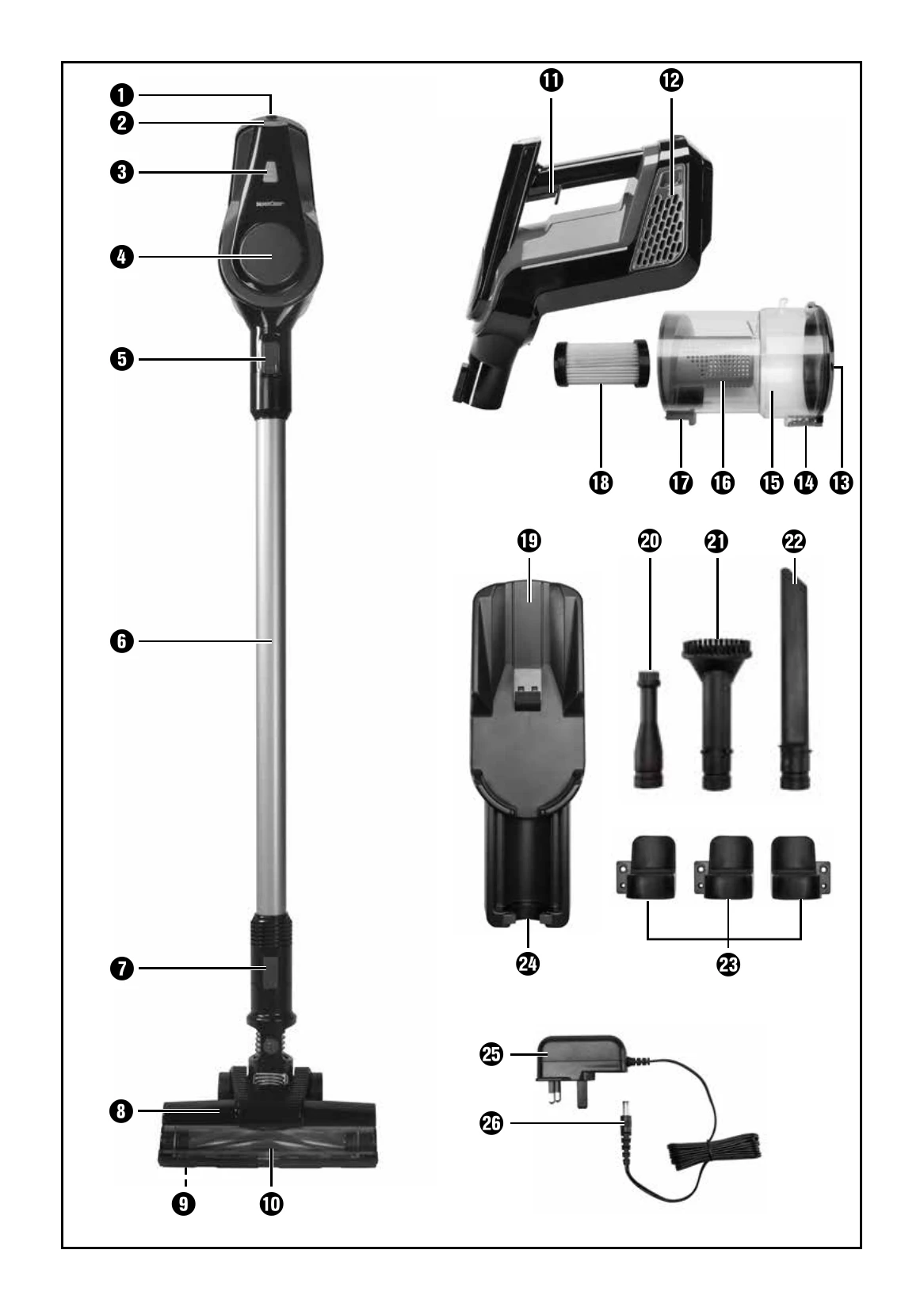
Switching On/Off: Press and hold the On/Off switch (1) to start the appliance. The indicator light (3) will illuminate. Release the switch to stop.
ECO Mode: Press the ECO mode button (2) to activate energy-saving and quieter operation. The button will light up. Press again to deactivate.
Attaching Accessories: Push the desired attachment into the suction opening on the hand element (4) or the suction pipe (6) until it clicks into place. Note specific fitting directions for certain attachments.
Emptying the Dirt Container: Detach the dirt container (15) by pressing the "MOVE" release button (7). Hold over a bin and press the "PUSH" release button (14) to open the lid. Empty and close the lid until it clicks.
Cleaning the HEPA Filter: Pull out the HEPA filter (18) with the filter holder (16). Remove the HEPA filter and tap out both parts. Rinse if necessary and ensure they are completely dry before reassembly.
Cleaning the Floor Brush: To simplify, remove the floor nozzle (8). Push the release switch (9) under the floor nozzle to remove the floor brush (10). Clean any blockages, hairs, or dirt.
| Problem | Cause | The solution |
|---|---|---|
| The appliance is not working. | The battery is empty. | Charge the appliance. |
| The appliance is defective. | Contact the Customer Service department. | |
| The suction is weak. | The battery is almost flat. | Charge the appliance. |
| The suction opening is blocked. | Remove the blockage. | |
| Dust is escaping from the appliance. | The filters 12/18 are too dirty. | Clean the filters 12/18. |
| The dirt container 15 is not fitted properly. | Check whether the dirt container is correctly fitted or the lid 13 is correctly closed. |