Brand: SILVER CREST
Category: Electronics
Document Type: Manual
Language: EN
Brand: SILVER CREST
Category: Electronics
Document Type: Manual
Language: EN
Uploaded: Nov. 21, 2025, 6:27 p.m.
Manual Publish Date: 2016-02
A 3-year warranty covers material and manufacturing defects, excluding transport damage and misuse.
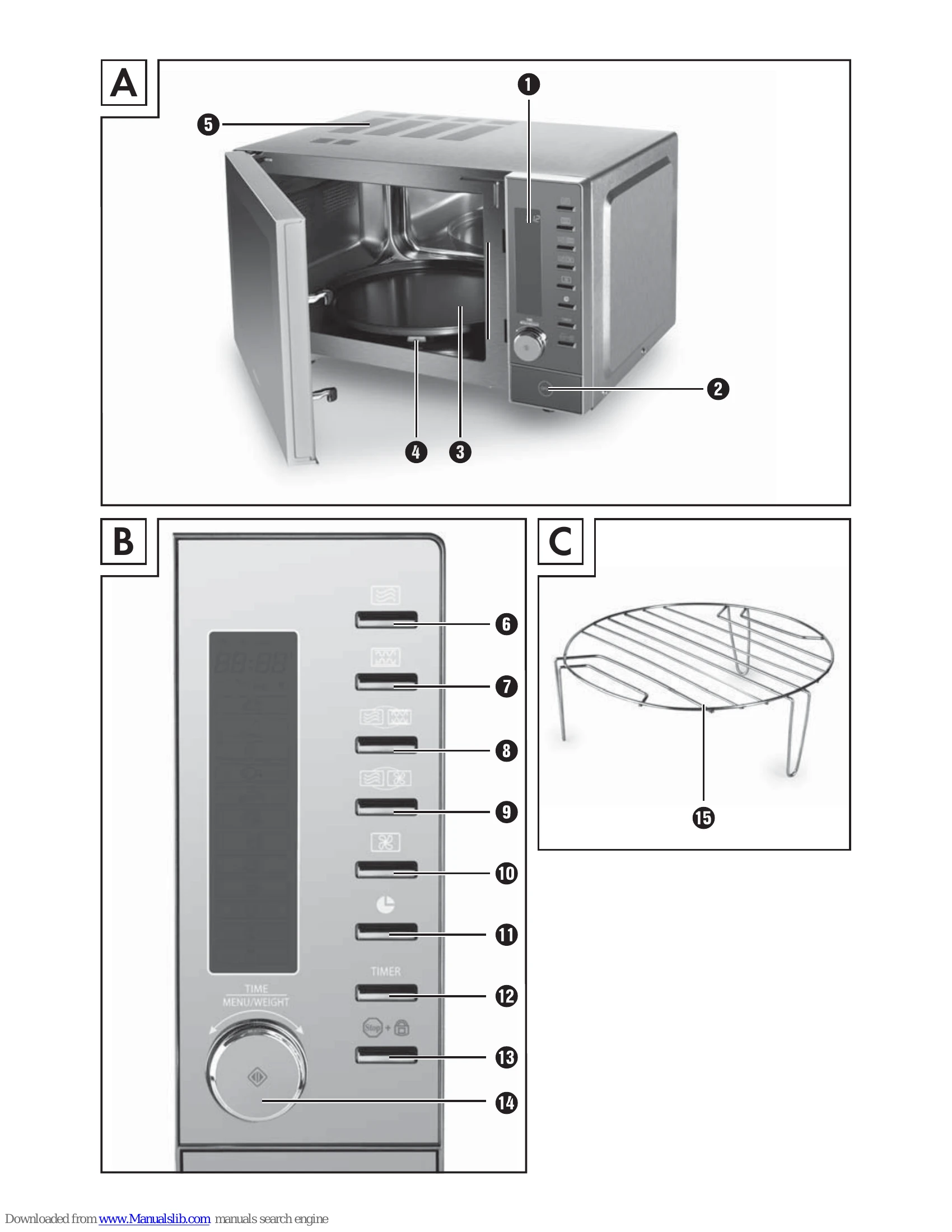
Figure A: Appliance features include screen (1), door release (2), turntable (3), rollers (4), and ventilation slits (5).
Figure B: Control panel features include Microwave (6), Grill (7), Combination Microwave-Grill (8), Combination Microwave-Air Fry (9), Air Fry (10), Clock (11), Kitchen Timer (12), Stop/Child Lock (13), and Selection/Start button (14).
Figure C: Includes the grill stand (15).
| PROBLEM | POSSIBLE CAUSE | POSSIBLE SOLUTIONS |
|---|---|---|
| There is nothing on the display 1. | The plug is not inserted into a mains power socket. The mains power socket is defective. The display 1 is defective. |
Check the plug. Try another mains power socket. Contact Customer Service. |
| The appliance does not respond to pressing the buttons. | The child safety lock is activated. | Deactivate the child safety lock (see section "Operation"). |
| The appliance does not start the cooking/heating process. | The door is not properly closed. | Close the door properly. |
| The turntable 3 makes a loud noise when turning. | The turntable 3 is not correctly positioned on the axle. The small rollers 4 and/or the floor of the cooking area are unclean. |
Insert the turntable 3 correctly into the cooking area. Clean the rollers 4 and the floor of the cooking area. |
| "E01" appears on the display 1 and you hear beeps. | The microwave has overheated. | Terminate the current programme immediately. Remove the plug from the mains power socket, open the microwave door and allow the appliance to cool down. |
| "E02" appears on the display 1 and you hear beeps. | There is a sensor error. There is an error during the heating up of the appliance. |
Stop the programme and let the appliance cool down. Then restart the microwave. If the error occurs again, contact Customer Support. Stop the programme and let the appliance cool down. Then restart the microwave. If the error occurs again, contact Customer Support. |
| "E03" appears on the display 1 and you hear beeps. | The microwave has switched into fault protection due to a short circuit or open-circuit voltage. | Stop the programme and remove the power plug. If possible, eliminate the problem, e.g. metals in the cooking area, which can lead to the above problem when using the microwave function. Otherwise, please contact our Customer Support. |
| The light inside the microwave is not working. | The light bulb is possibly defective. | Contact the Customer Service department. |