Manual for SMWC 700 D1

Manual for SMWC 700 D1

Brand: SILVER CREST

Category: Electronics

Document Type: Manual

Language: EN
Uploaded: Nov. 21, 2025, 6:53 p.m.

Manual Publish Date: 2024-05-01

Warranty Information

This product comes with a 3-year manufacturer's warranty covering material and manufacturing defects.

Standby Mode:

The microwave enters standby mode when connected to the mains supply. It automatically switches to standby if no controls are pressed for a prolonged period.

Setting the Time:

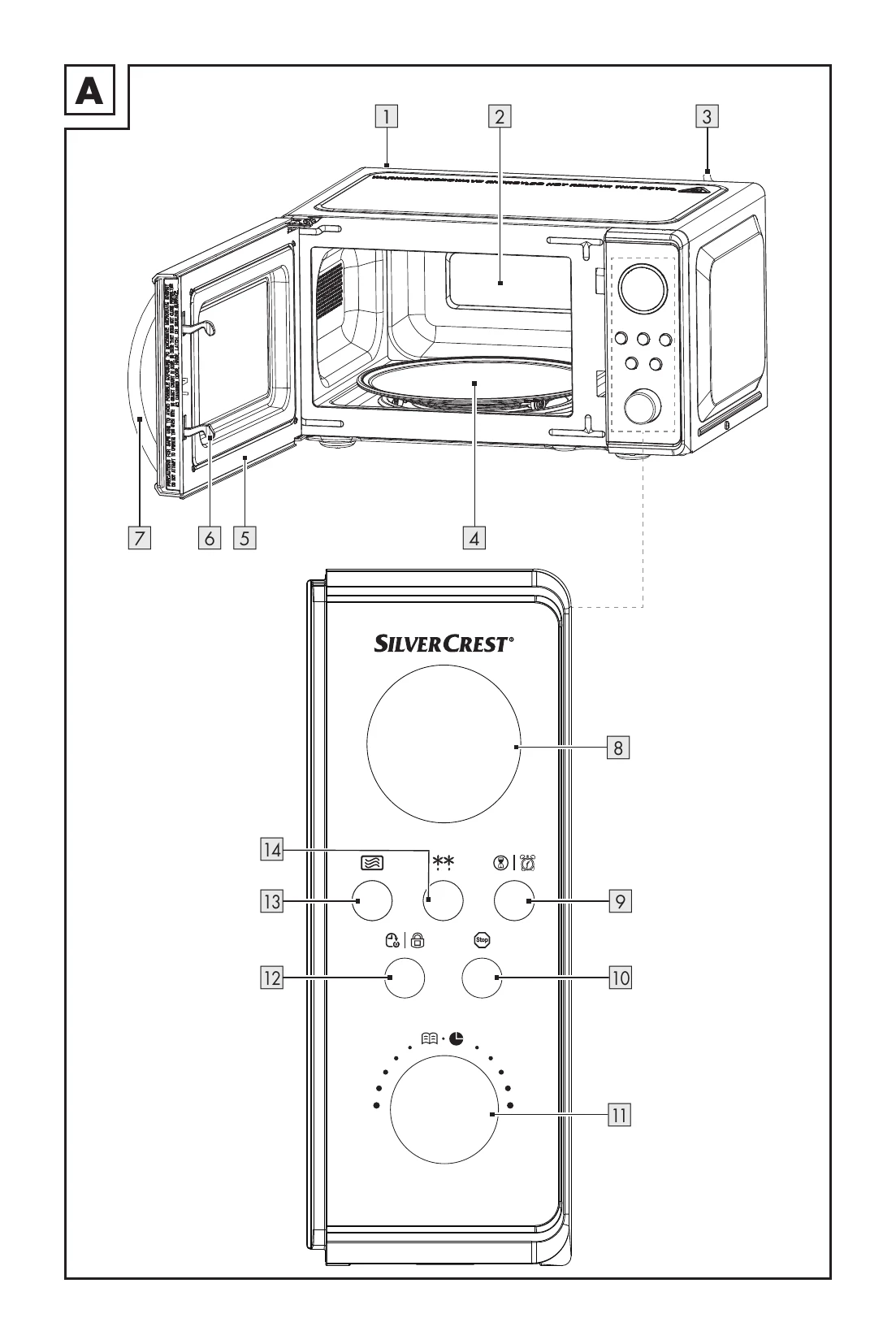
Connect the mains plug. Press and hold the "Time/Clock" button (9) to select 12-hour or 24-hour mode. Use the rotary knob (11) to set the hours and minutes, confirming each with the "Time/Clock" button (9).

Setting the Timer:

Press the "Time/Clock" button (9) to activate the timer. Use the rotary knob (11) to set the desired time (from less than 5 minutes to 95 minutes) and press the rotary knob (11) to confirm. The timer runs in the background.

Cancelling/Stopping:

Press the "Stop" button (10) to cancel input or stop the cooking process. Pressing it again switches to standby mode.

Child Lock:

Activate by pressing and holding the "Preset time/Child safety" button (12). A lock symbol appears. Deactivate by pressing and holding the same button until the symbol disappears.

Cooking Food:

Select power level by pressing the "Microwave" button (13) repeatedly (100% to 0%). Set cooking time using the rotary knob (11). Press the rotary knob (11) to start.

Quick Start:

Quick start 1: Turn the rotary knob (11) to set time and press to start (700W). Quick start 2: Press the "Microwave" button (13) to start cooking for 30 seconds at 700W. Press repeatedly for longer times (up to 10 minutes).

Defrosting:

Use the "Defrost" button (14). Choose between defrosting by time or by weight. Follow on-screen prompts.

Preset Time Function:

Set a cooking program and then press the "Preset time/Child safety" button (12) to set a delayed start time. Enter the desired start time using the rotary knob (11).

Automatic Menu:

Turn the rotary knob (11) to access the automatic menu. Select the food type (e.g., A-1 Heating up, A-2 Vegetables) and its weight using the rotary knob (11). The microwave automatically sets the cooking time and power.

Troubleshooting and error codes

Problem Possible Cause Possible Solution
Display 8 shows nothing. The mains plug 3 is not inserted into a mains power socket. Check the mains plug 3.
The mains power socket is defective. Try another mains power socket.
The display 8 is defective. Contact the customer service department.
The product does not respond to pressing the buttons. The child safety lock is activated. Deactivate the child safety lock (see "Operation").
The product does not start cooking. The door 5 is not properly closed. Close the door 5.
The turntable 4 makes a loud noise when turning. The turntable 4 is not correctly positioned on the turntable holder 4. Position the turntable 4 correctly on the turntable holder 4.
The rollers 4 and/or the floor of the cooking chamber 2 are unclean. Clean the rollers 4 and the floor of the cooking chamber 2.
The light inside the product is not working. The luminary is defective. Contact the customer service department (see "Service").
Privacy Policy