Manual for SPBH 3000 B2

Manual for SPBH 3000 B2

Brand: SILVER CREST

Category: Electronics

Document Type: Manual

Language: EN
Uploaded: Nov. 21, 2025, 6:31 p.m.

Warranty Information

This appliance has a 3-year warranty from the date of purchase.

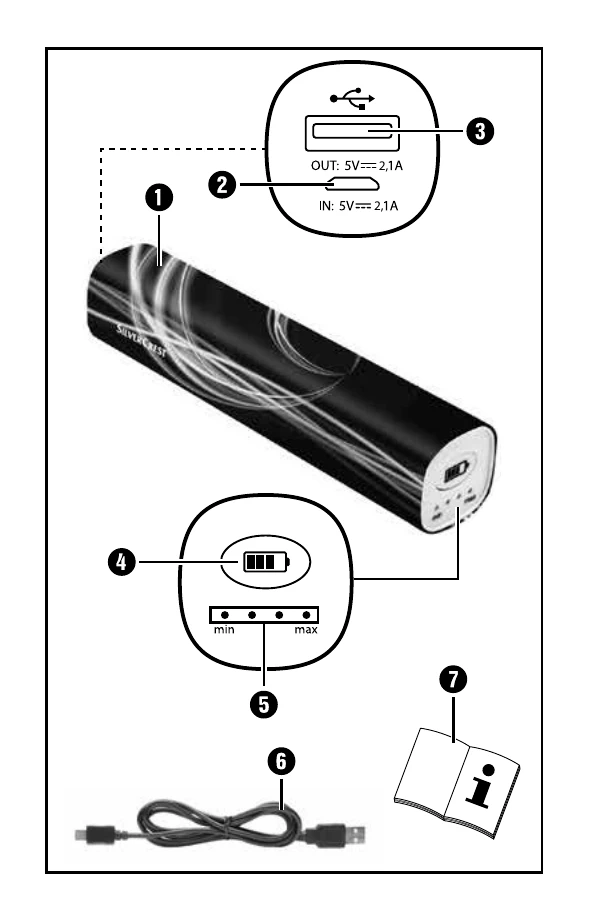
  • Charging the Power Bank: Before first use, fully charge the integrated battery. Use a USB mains adapter (5V, min 2.1A) and the supplied cable. Do not charge and use the power bank simultaneously.
  • Checking Charge Level: Press the ON button briefly to view charge level via LEDs for approx. 20 seconds.
  • Charging Mobile Devices: Connect the microUSB end of the charging cable to your device and the USB end to the power bank. Charging starts automatically. If not, press the ON button.
  • Ending Charging: Disconnect the charging cable from both devices. LEDs will turn off after about 20 seconds.

Troubleshooting and error codes

Problem Possible Cause and Solution
The Power Bank does not charge Connection may be faulty. Check the connection.
A connected device will not charge
  • The integrated battery is empty. Charge the battery.
  • No connection to the device. Check the connection.
  • Press the ON button 4 to start the charging process.
  • The charging current of the connected device is too low (< 30 mA) or too high (> 2,1 A).
  • The internal overcurrent protection may have been triggered. Disconnect the attached device and connect the microUSB charging port 2 to a power source for a short while.
Privacy Policy