Brand: SILVER CREST
Category: Electronics
Document Type: Manual
Language: EN
Brand: SILVER CREST
Category: Electronics
Document Type: Manual
Language: EN
Uploaded: Nov. 21, 2025, 6:54 p.m.
Manual Publish Date: 2020-07-01
The product comes with a 3-year warranty from the date of purchase.
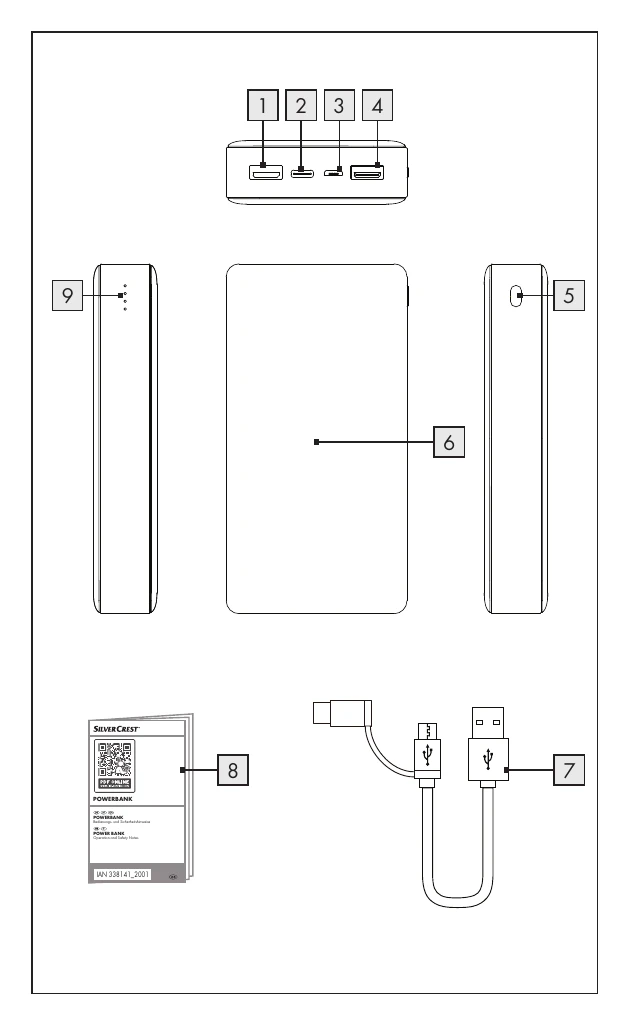
To charge the power bank, use a power adapter with a 5 V output voltage and at least 3 A output current. Connect the USB-C end of the cable to the power bank's USB-C input and the USB-A end to a power source. The LED indicator shows the charge level. To charge mobile devices, connect them to one of the power bank's USB outputs using the provided cable or the device's original charging cable. The charging process starts automatically. If not, press the on/off button.
| Problem | Cause | Solution |
|---|---|---|
| The power bank is not charging. | Connection is faulty. | Check the connection. Ensure a 5V, 3A power supply is used. |
| A connected device is not charging. | The battery is empty. | Charge the battery. |
| No connection to the device. | The device is not connected. | Ensure it is connected. Press the ON/OFF button to start charging. |
| The current draw of the connected devices might be too low. | Check the connected device's manual for its current draw. The minimum output current of the power bank is approx. 60 mA. | |
| The power bank does not react to a button press or when a device is connected, even though the battery is charged. | The current draw of the connected devices is too high. The internal overcurrent protection has been triggered. | Reduce the number of connected devices and press the ON/OFF button. |