Brand: SILVER CREST
Category: Electronics
Document Type: Manual
Language: EN
Brand: SILVER CREST
Category: Electronics
Document Type: Manual
Language: EN
Uploaded: Nov. 21, 2025, 6:59 p.m.
Warranty claims can be made within 3 years of purchase for material or manufacturing defects.
Charging the Product: Fully charge the product before first use. The charging time is approximately 3-5 hours. The charging process is indicated on the display. Connect the charging dock to the mains and place the robot on it, aligning the charging contacts. Alternatively, the mains adapter can be connected directly to the robot's charging port.
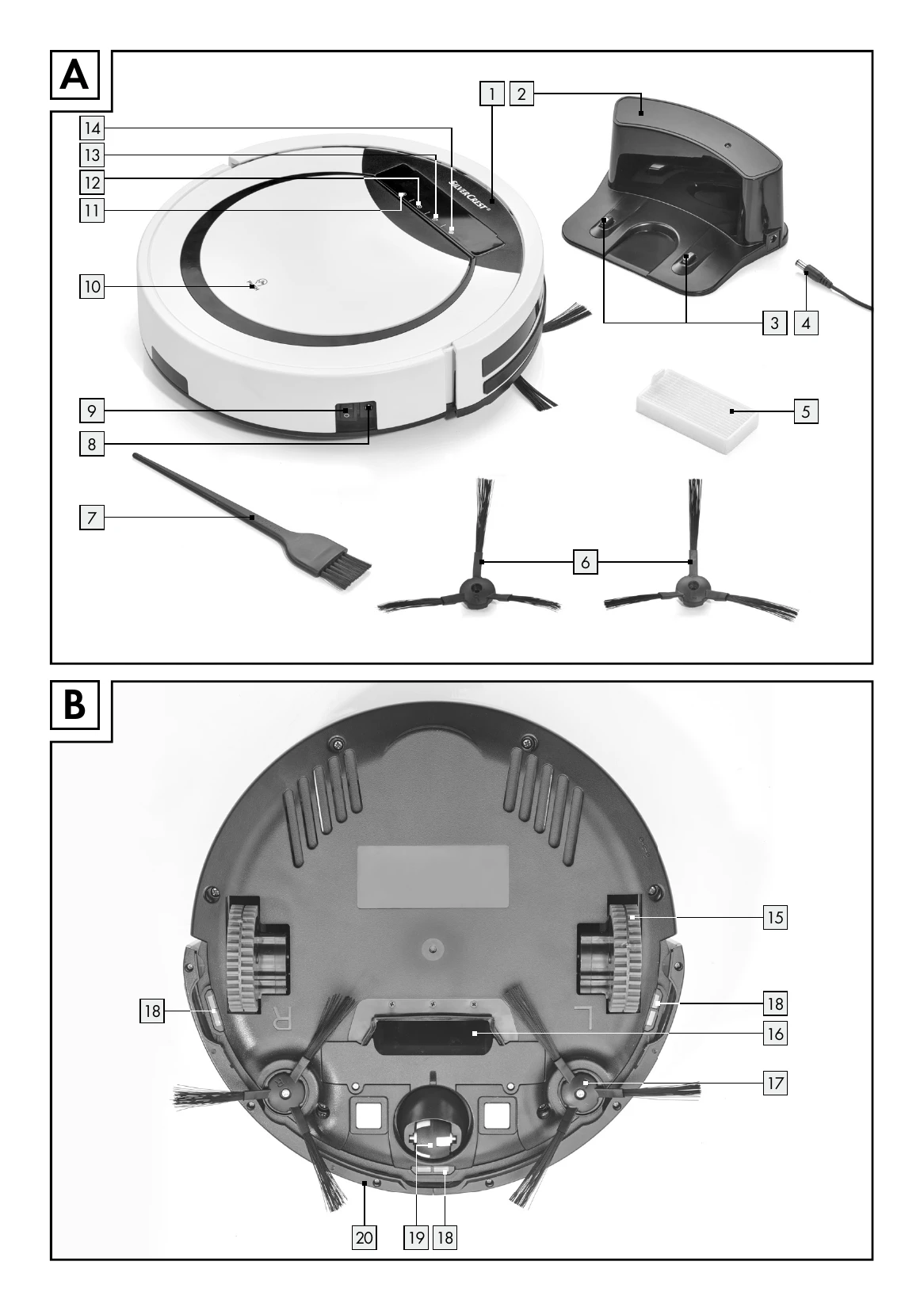
Switching On/Off: Use the power switch on the side of the product. 'I' means ON, '0' means OFF. The display will light up when successfully switched on.
Operation: Due to the complexity of home environments, the product may miss some areas. For better cleaning results, it is recommended to use the product daily. Prepare the area by removing obstacles like cables and toys. Fold carpet edges under. Ensure furniture is tidily arranged. Test in areas with stairs to check fall detection.
Cleaning Modes: Features Auto, Spot, Corner, and MAX modes. Auto mode cleans until the battery is low. Spot mode focuses on high-dirt areas. Corner mode cleans along edges. MAX mode increases suction power.
Time-Delayed Cleaning: Set a cleaning schedule for the product to start automatically.
Cleaning and Storage: Switch off the product before cleaning. Do not wash the product with water. Wipe with a damp cloth only. Disconnect from power if not used for a long time.
| Problem | Possible Cause | Troubleshooting |
|---|---|---|
| No Function. | Battery not fully charged. | Charge the battery fully. |
| Power switch 9 on "O". | Set the power switch 9 to "I". | |
| Battery contacts dirty. | Clean the charging pins 3 and battery contacts on the product. | |
| Poor Suction Power. | Suction opening 16 is blocked. | Check the suction opening 16. |
| Dust container 21 is full or filters 5, 23 are blocked. | Refer to the "Cleaning and Storage" chapter. | |
| Error Code E01 | Left side wheel not rotating. | Check the left side wheel and clean if necessary. |
| Error Code E02 | Right side wheel not rotating. | Check the right side wheel and clean if necessary. |
| Error Code E04 | Product was lifted. | Place the product back on the floor. |
| Error Code E05 | Anti-fall sensor 18 failed. | Clean the anti-fall sensor 18 as described in the "Cleaning and Storage" chapter. |
| Error Code E06 | Anti-collision sensor 20 failed. | Check if the anti-collision sensor 20 is dirty and clean if necessary. |
| Error Code E10 | Power switch 9 on "O". | Set the power switch 9 to "I". |