Brand: SILVER CREST
Category: Electronics
Document Type: Manual
Language: EN
Brand: SILVER CREST
Category: Electronics
Document Type: Manual
Language: EN
Uploaded: Nov. 21, 2025, 6:25 p.m.
The product has a 3-year warranty against material or manufacturing defects.
| Problem | Possible Cause | Solution |
|---|---|---|
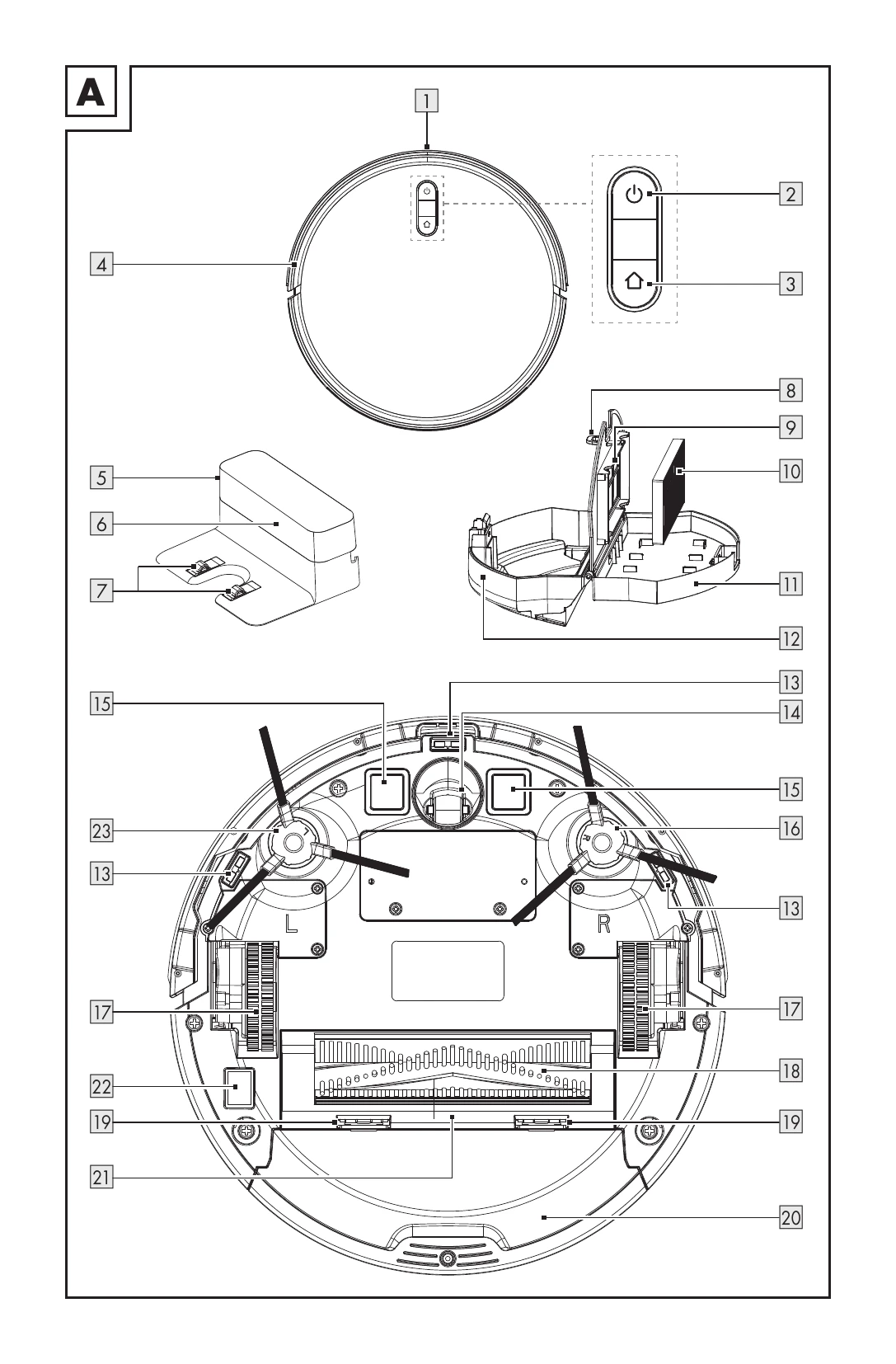
| Product repeatedly bumps into objects. | Bumper (4) is pressed in and cannot spring back. | Tap the bumper (4) 10-20 times to loosen dirt or release the bumper. |
| Product's runtime is too short. | The battery is not fully charged. | Charge the battery again. |
| Indicator lights on buttons 2 and 3 do not flash white with a pulsing effect during charging. | The DC plug of the mains adapter (45) is not properly connected to the charging dock (5). | Connect the DC plug of the mains adapter (45) properly to the charging dock (5). |
| The suction power is decreasing. | The HEPA filter (10) is dirty or damp. | Clean the HEPA filter (10) or replace it with a new one. |
| Dirt leaks from the dust collector (20). | The dust collector (20) is overfilled. | Empty the dust collector (20). |