Brand: SILVER CREST
Category: Electronics
Document Type: Manual
Language: EN
Brand: SILVER CREST
Category: Electronics
Document Type: Manual
Language: EN
Uploaded: Nov. 21, 2025, 6:53 p.m.
Manual Publish Date: 2021-09
This device comes with a 3-year warranty from the date of purchase.
Receiver Power: Plug into a mains power outlet; no batteries required.
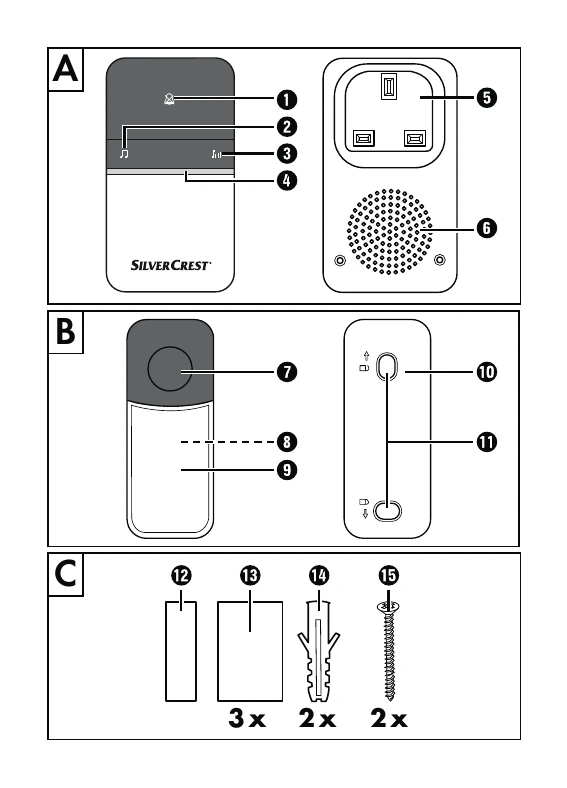
Signal Type: Select acoustical and optical signal (ringer sounds, LED flashes white) or optical signal only (LED flashes green/blue). Use button 1.
Ringer Tone: Select from 16 tones by repeatedly pressing button 2. Stop when the desired tone is heard.
Volume: Adjust ringer volume by continuously pressing button 3 (quiet to very loud).
Synchronization: To add transmitters, press and hold button 1 on receiver for 3 seconds. Then press ringer button 7 on the transmitter. Receiver LED 4 will flash blue twice.
Transmitter Mounting: Use provided screws 15 and wall plugs 14, or double-sided tape 12. Ensure no utilities are present before drilling. Mount wall bracket 10, then attach transmitter.
Nameplate: Write on plate 13, insert into recess, and replace cover 9.
| Problem | Possible cause | Solution |
|---|---|---|
| No ring when pressing the ringer button | Power socket for receiver is not working. | Check the power socket. |
| No ring when pressing the ringer button | Transmitter is not synchronized with the receiver. | Synchronize the transmitter with the receiver (see "Synchronising with additional transmitters" section). |
| No ring when pressing the ringer button | Signal type is set to optical only. | Use the signal type selection button 1 to select the acoustic and optical signal. |