Brand: SilverCrest
Category: Audio
Document Type: Manual
Language: EN
Brand: SilverCrest
Category: Audio
Document Type: Manual
Language: EN
Uploaded: Nov. 21, 2025, 7:18 p.m.
Manual Publish Date: 2009-10-01
Offers a 3-year warranty against material and manufacturing defects.
Turning On/Off:
\nAdjusting Volume:
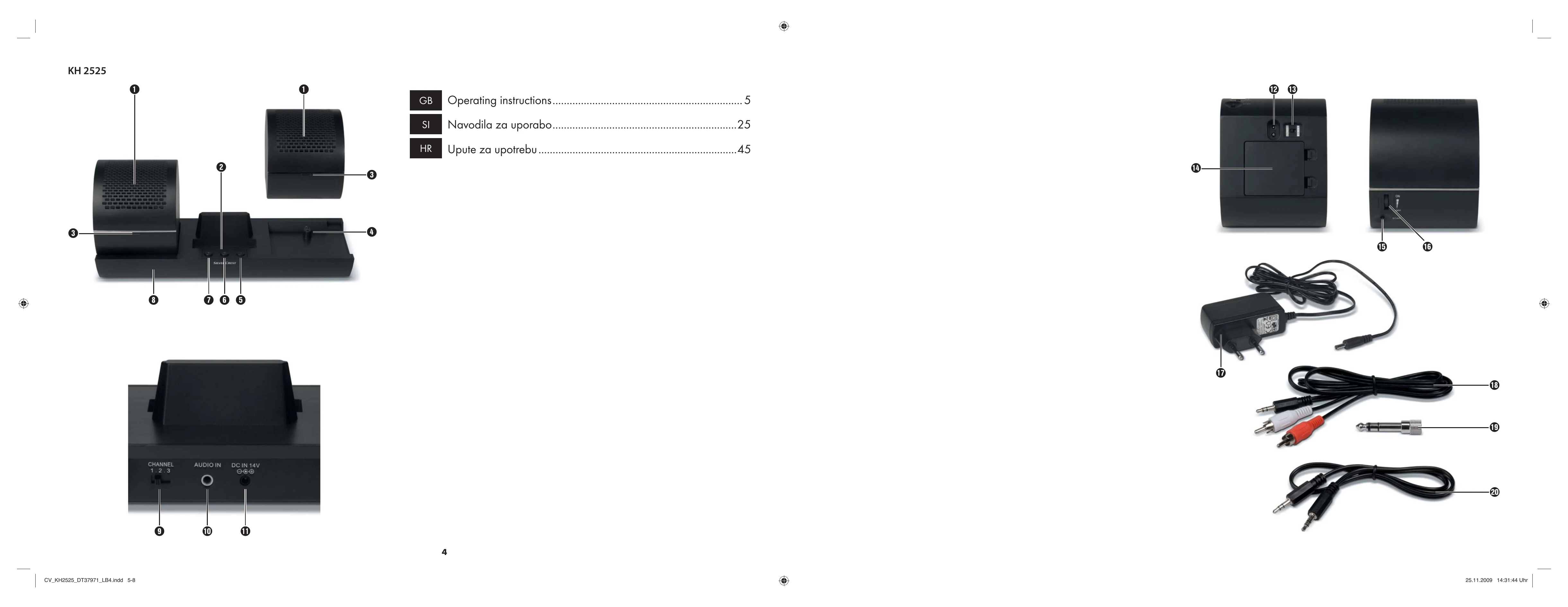
\nSetting Channel: Use the channel selection switch (9) on the transmission unit to select the best channel for quality audio.
\nAdjusting Frequency: Press the SCAN button (15) on the speaker to start and stop frequency scanning.
\n| Defect | Possible cause | Solution |
|---|---|---|
| Rechargeable battery pack will not charge | The power adapter is not connected. | Connect the power adapter correctly. |
| The switch is not in the position Charge. | Shift the switch to the position Charge. | |
| The rechargeable batteries are not inserted properly and/or the rechargeable battery pack is not connected. | Insert the rechargeable batteries correctly and/or connect the rechargeable battery pack. | |
| The speaker is not correctly placed on the transmission unit. | Place the speaker correctly. | |
| The transmission unit is not switched on. | Switch the transmission unit on. | |
| No sound | The power adapter is not connected. | Connect the power adapter correctly. |
| The wall socket is not supplying power. | Check the house fuse. | |
| The speakers are switched off. | Switch the speaker on. | |
| The rechargeable battery packs in the speakers are not charged. | Charge the rechargeable battery packs. | |
| The volume is set too low. | Set the volume to a suitable level. | |
| The transmission unit is not connected to an audio device. | Connect the transmission unit correctly. |