Manual for SCAZ 5.00 B2

Manual for SCAZ 5.00 B2

Brand: SilverCrest

Category: Electronics

Document Type: Manual

Language: EN
Uploaded: Nov. 21, 2025, 6:45 p.m.

Warranty Information

The device comes with a 3-year warranty from the date of purchase for material or manufacturing faults.

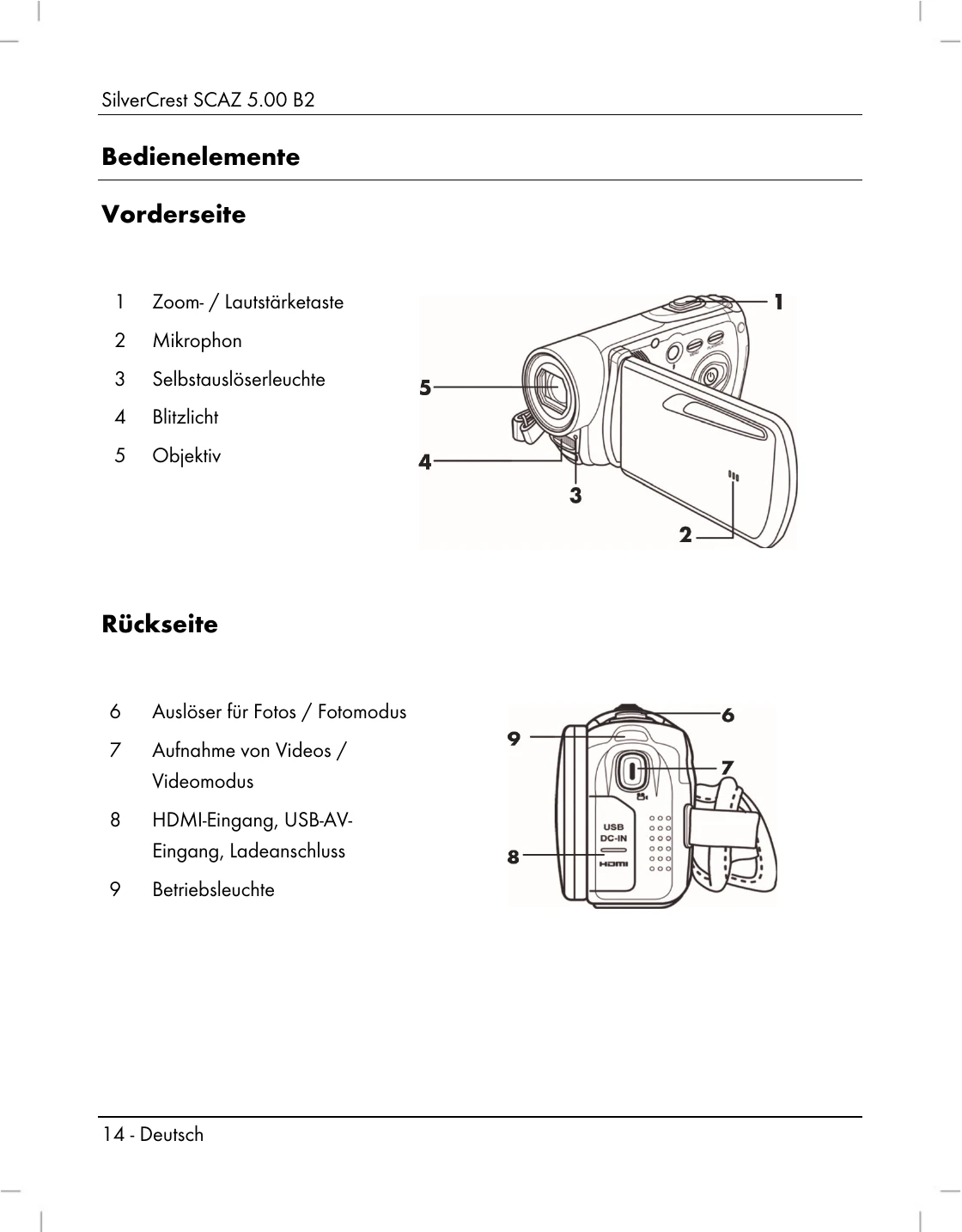
  • Switching the camcorder on and off: Press the On/Off button (13) to switch the camcorder on. The power light (9) goes green. Press the On/Off button (13) to switch the camcorder off. The power light (9) then goes out. When you open the display, the camcorder switches itself on automatically. When you close the cover, it switches itself back off again.
  • Overview of function buttons: Buttons are labelled with descriptions and functions (e.g., On/Off button (13), Menu button (11), Flash/Night Mode (10), Playback button (12), Movie recording/Movie mode (7), Picture (photo) shutter/Photo mode button (6), Zoom/Volume adjustment button (1)).
  • Touch-sensitive display: The device display is touch-sensitive. Use your finger to tap the display icons to configure the camcorder.
  • Setting the menu language: Open display, open main menu, tap 'Language' icon, select desired language, close main menu.
  • Setting the date and time: Open display, open main menu, tap 'Date/Time' icon, select value to change, use up/down icons to edit, tap Enter icon to save, close main menu.
  • Recording movies: Open and rotate display, press Movie recording button (7) to start (power light flashes green/red), use zoom/volume button (1) to zoom, press Movie recording button (7) to stop (power light green). Icons on display show current settings.
  • Taking pictures: Open and rotate display, press Picture shutter button (6) to enter Photo mode, use sharpness icon (27) to switch modes, use zoom/volume button (1) to zoom, press Picture shutter button (6) to take photo (power light red while saving). Use Photo menu to adjust settings like exposure compensation or white balance.

Troubleshooting and error codes

Problem Possible Cause Solution
Device does not turn on. Battery is not charged or not inserted correctly. Charge the battery or re-insert it correctly.
No image displayed. The lens cap is on. Remove the lens cap.
Cannot record video or take photos. Memory card is full or not inserted. Write-protection is enabled. Insert a memory card or format it. Disable write-protection.
Poor image quality. Lens is dirty. Low light conditions. Clean the lens. Adjust settings (e.g., Night mode, Exposure compensation).
Device overheats. Operating in extreme temperatures. Avoid extreme temperatures.
Privacy Policy