Brand: SilverCrest
Category: Kitchen Appliances
Document Type: Manual
Language: EN
Brand: SilverCrest
Category: Kitchen Appliances
Document Type: Manual
Language: EN
Uploaded: Nov. 21, 2025, 9:18 p.m.
This product comes with a 3-year warranty from the date of purchase.
| Problem | Possible Cause | Possible Solutions |
|---|---|---|
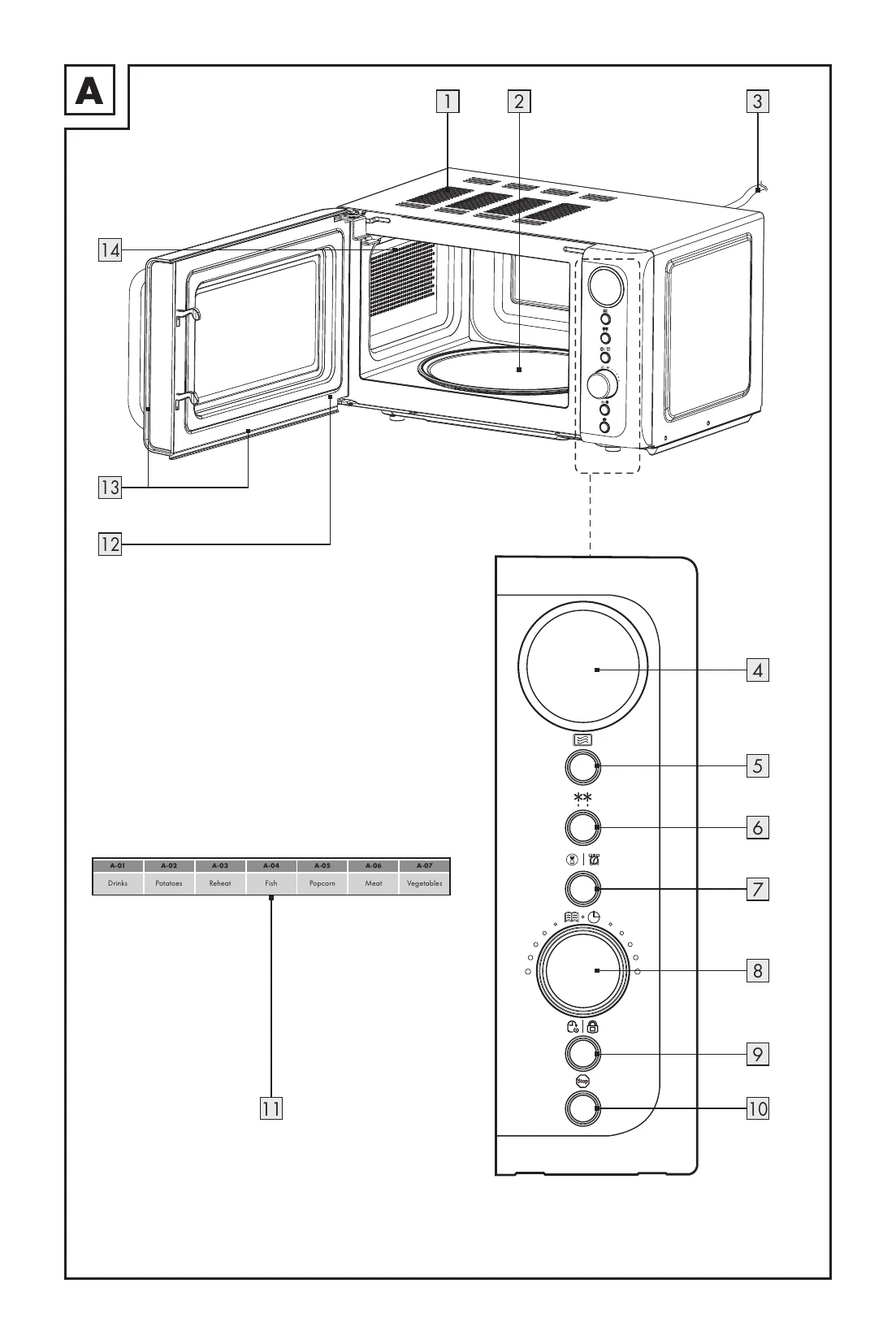
| Display (4) shows nothing. | Mains plug (3) is not plugged into the mains socket. | Check the mains plug (3). |
| Mains socket is faulty. | Try another mains socket. | |
| Display (4) is faulty. | Contact customer service. | |
| Product does not respond to button presses. | Child lock is activated. | Deactivate the child lock (see "Operation"). |
| Product does not start cooking. | Door (13) is not closed properly. | Close the door (13). |
| Turntable (2) makes loud noises during rotation. | Turntable (2) is not correctly placed on the retainer (2). | Place the turntable (2) correctly in the cooking compartment (14). |
| Turntable ring (2) and/or the bottom of the cooking compartment (14) is dirty. | Clean the turntable ring (2) and the bottom of the cooking compartment (14). | |
| The interior light of the product does not function. | The bulb is likely burnt out. | Contact customer service. |