Manual for TM-610

Manual for TM-610

Brand: SINOTIMER

Category: Time Switch

Document Type: Manual

Language: EN
Uploaded: Nov. 21, 2025, 7:41 p.m.

Warranty Information

Power reserve of 3 years.

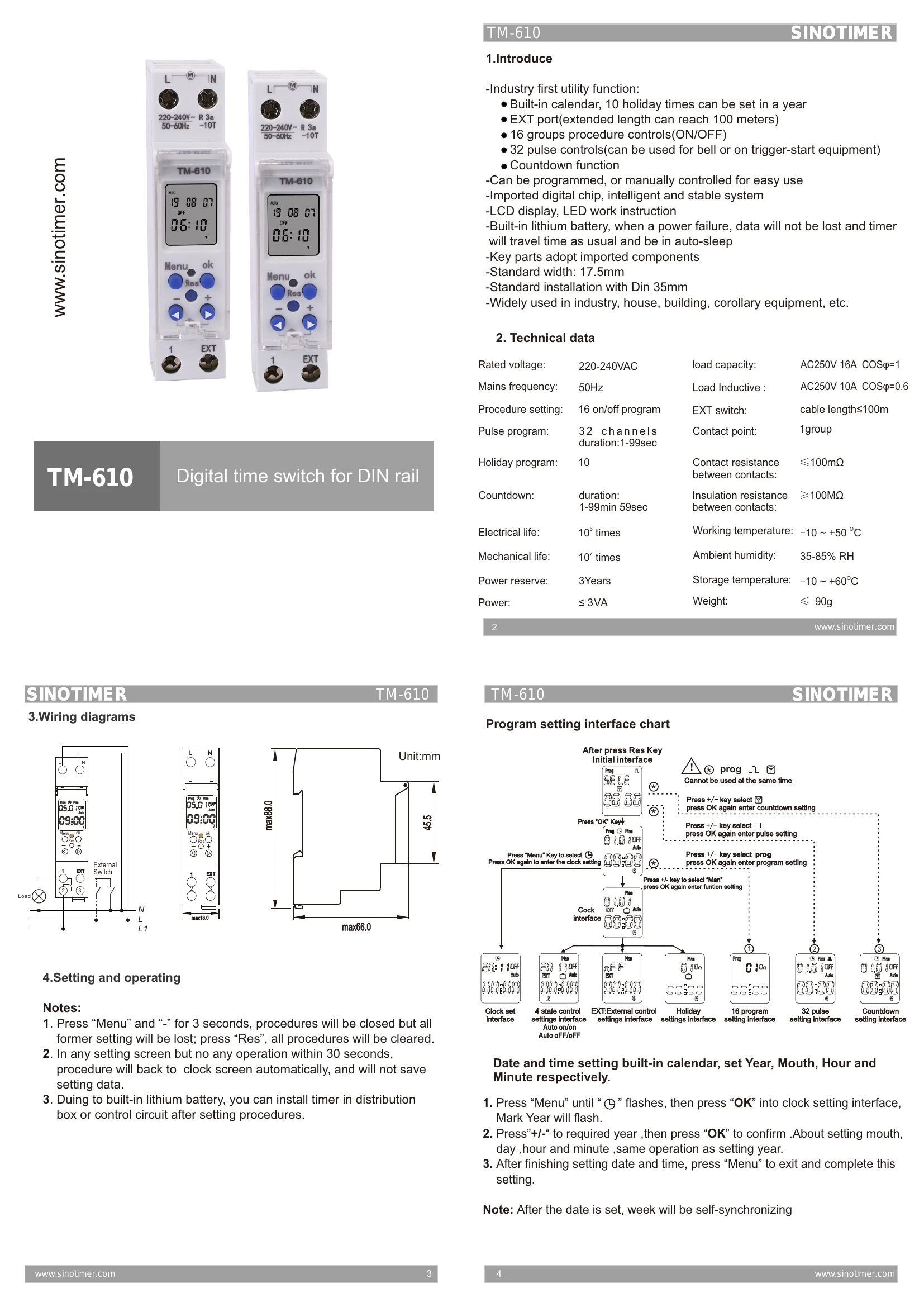
  • Introduction: Industry-first utility functions including built-in calendar with 10 holiday times, EXT port, 16 ON/OFF procedures, 32 pulse controls, and countdown.
  • Programming: Can be programmed manually or via external devices. Features a digital chip for stability and an LCD display with LED indicators.
  • Battery Backup: Built-in lithium battery ensures data retention and continued operation during power failures.
  • Installation: Standard width (17.5mm) and DIN 35mm rail mounting.
  • Technical Data: Rated voltage 220-240VAC, 50Hz frequency, AC250V 16A load capacity, and ambient temperature -10 to +50 °C.
  • Operation: Users can set programs, pulses, countdowns, and holiday settings. The device also supports manual control and external switch input (EXT).
  • Setting Interface: Intuitive interface for setting clock, programs, pulses, countdowns, holidays, and manual functions.
  • Notes: Resetting clears all procedures. Settings are auto-saved within 30 seconds of inactivity.

Troubleshooting and error codes

Error Solution
No display on LCD 1. Check power supply; 2. Press "+ " and "-" for 3s to resume.
Timer does not turn ON/OFF as scheduled 1. Check if the correct program is set; 2. Check if the time is set correctly; 3. Check if the timer is in "AUTO" mode.
External switch control not working 1. Check if "EXT" function is enabled; 2. Check the wiring of the external switch.
Holiday program not working 1. Check if holiday dates are set correctly; 2. Ensure the timer is in "AUTO" mode.
Privacy Policy