Manual for CDP-CX400/CX450

Manual for CDP-CX400/CX450

Brand: SONY

Category: Audio

Document Type: Manual

Language: EN
Uploaded: Nov. 21, 2025, 6:29 p.m.

Manual Publish Date: 2001-10-01

Checking Method:

  1. Turn ON the power, set the disc on the disc table with the side labeled as "test disc" as the right side, close the front cover, and chuck the disc.
  2. The following will be displayed on the fluorescent indicator tube. (The display switches each time the TIME/TEXT button is pressed.) Display: CD TEXT TEST DISC (Album Title)
  3. Press the button and play back the disc.
  4. The following will be displayed on the fluorescent indicator tube. (If nothing is displayed, press the TIME/TEXT button.) Display: 1kHz/0 dB/ L&R
  5. Rotate and ▷▷I knob to switch the track. The text data of each track will be displayed.

Service Mode Operation:

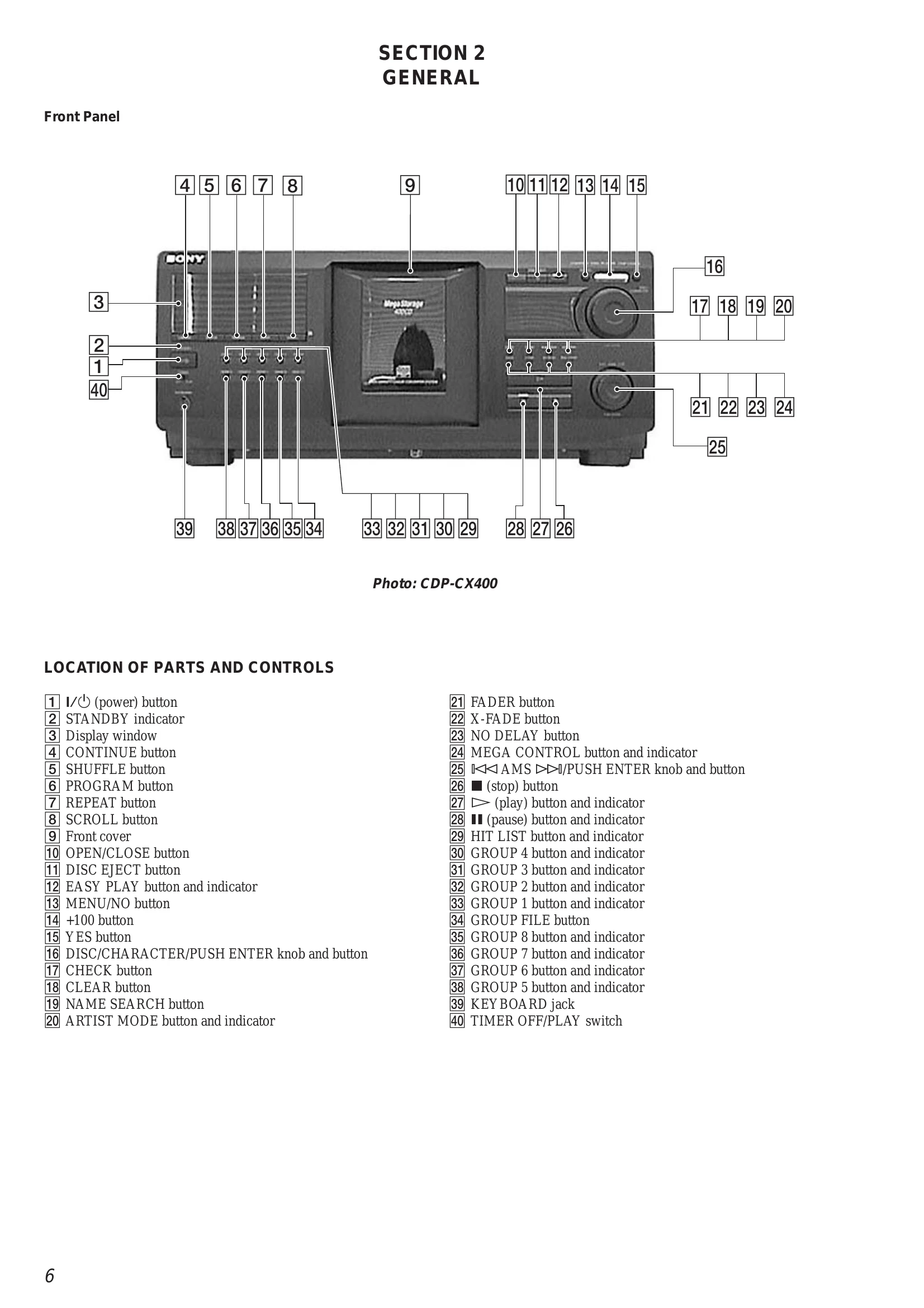
  • Turn on the power and press GROUP FILE, MEGA CONTROL and I/ buttons.
  • Rotate the DISC/CHARACTER dial to enter any of the following modes.
  • To exit the mode, press / button to enter the standby state.

Aging Mode Procedure:

  1. Turn on the power and press the GROUP FILE, MEGA CONTROL and I/ buttons.
  2. Rotate DISC/CHARACTER dial, select "Normal Aging" and press the dial to start the aging mode.
  3. When the disc set mode is set, the ➤ and LEDs blink. Rotate the DISC/CHARACTER dial. Insert the discs into the designated slits.
  4. Set self-protection function during errors using the REPEAT button.
  5. Press the button. The LED blinks, aging starts.
  6. To end aging, press the / button to enter the standby mode.

Troubleshooting and error codes

Error code Name Contents
#Err 01 DISC sensor check 1 No disc in the specified slit
#Err 02 DISC sensor check 2 Disc in other slits
#Err 03 Table operation check 1 Table motor current over
#Err 04 Table operation check 2 No table sensor input
#Err 05 Loading operation check 1 Load in timeover
#Err 06 Loading operation check 2 Load out timeover
#Err 08 Table is not stopped within the specified time.
#Err 09 Stopped while both T.SENS 1 and 2 are "LOW".
#Err *1 BU related check 1 Access timeover
#Err *2 BU related check 2 During high speed playback, COUNT timeout
#Err *3 BU related check 3 Q data read error
#Err *4 BU related check 4 BU operation (from focus search to until signal can be read) timeover
#Err *5 BU related check 5 GFS monitor error
#Err *6 BU related check 6 Focus cannot be imposed by focus search
Privacy Policy