Brand: SONY
Category: Audio
Document Type: Manual
Language: EN
Brand: SONY
Category: Audio
Document Type: Manual
Language: EN
Uploaded: Nov. 21, 2025, 9:13 p.m.
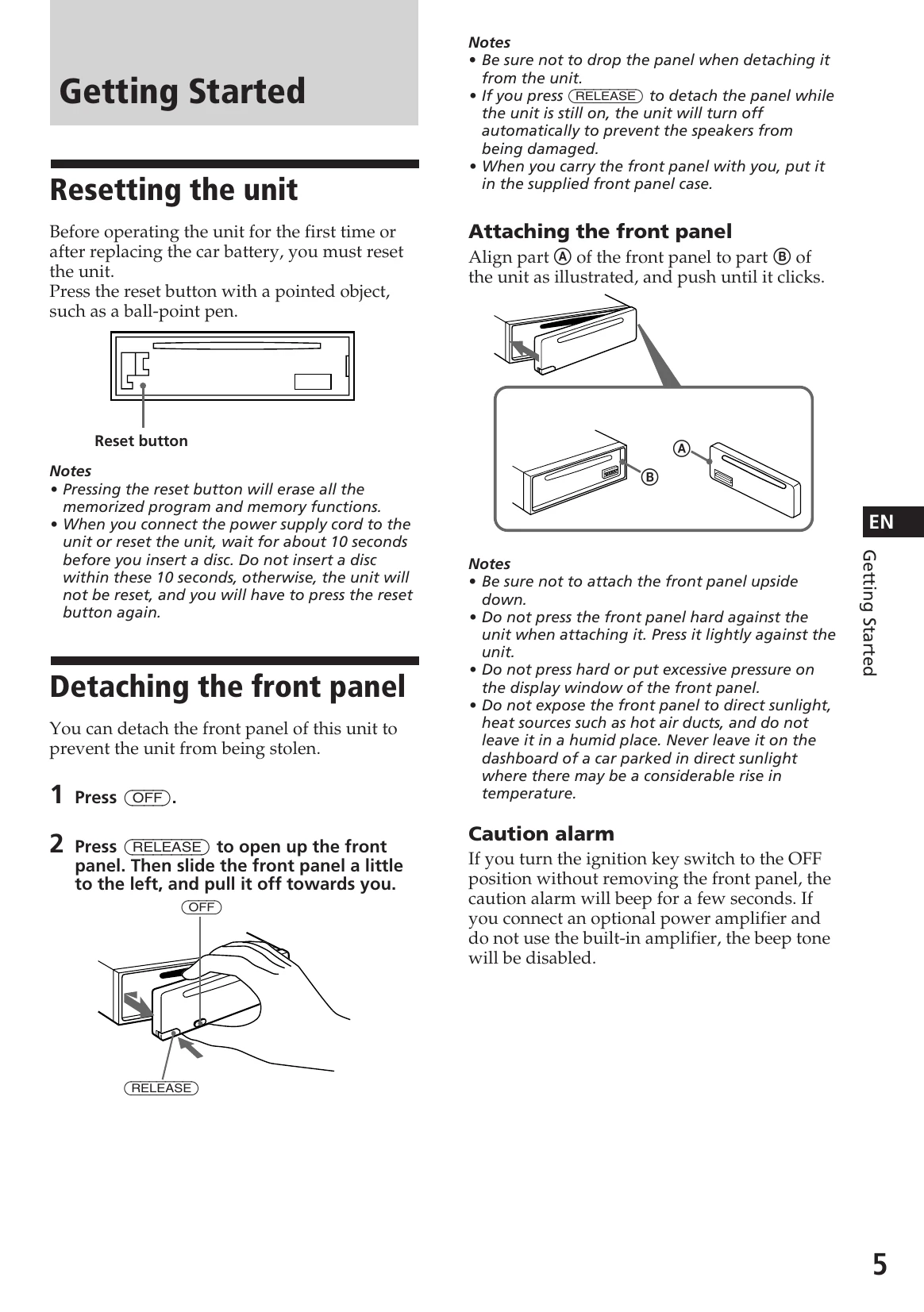
Resetting the Unit: Before first use or after battery replacement, press the reset button with a pointed object. This erases memory functions. Wait 10 seconds before inserting a disc.
Detaching the Front Panel: Press OFF, then RELEASE to detach the front panel to prevent theft. Store it in the provided case.
Attaching the Front Panel: Align the panel and push until it clicks. Do not press hard.
Press OFF or DSPL, then DSPL for two seconds. Use SOURCE to set hours and SOUND to set minutes. Press DSPL to activate.
Listening to a CD: Insert the CD labelled side up. Playback starts automatically. Press SOURCE to select CD if needed.
Locating Tracks: Use SEEK/AMS to find tracks. Push momentarily to skip, push and hold to search within a track.
Playback Modes: Press REPEAT for repeat play and SHUF for shuffle play.
Memorizing Stations (BTM): Press SOURCE to select TUNER, MODE to select band, then BTM/SENS for two seconds to automatically store strongest stations.
Memorizing Desired Stations: Tune to a station, then press and hold a number button (1-6) for two seconds.
Receiving Stations: Select TUNER, choose band, then press the number button.
Rotary Commander: Use buttons and rotating controls for source selection, tuning, and volume adjustment.
Sound Adjustment: Use SOUND to select Bass, Treble, Balance, or Fader. Use the dial to adjust. D.bass boosts bass sound.
Beep Tone: Press and hold ⑥ while pressing SOUND to attenuate beep tone.
| Problem | Cause/Solution |
|---|---|
| General | |
| No sound. | • Rotate the dial in a clockwise direction to adjust the volume. • Set the fader control to the center position for two-speaker systems. |
| The contents of the memory have been erased. | • The power cord or battery has been disconnected. • The reset button has been pressed. → Store the settings again into the memory. |
| Indications do not appear in the display. | Remove the front panel and clean the connectors. See “Cleaning the connectors” (page 12) for details. |
| No beep tone. | • An optional power amplifier is connected and you are not using the built-in amplifier. • The beep tone is attenuated (page 10). |
| CD playback | |
| CD cannot be loaded. | • Another CD is already loaded. • The CD was forcibly inserted upside down. |
| Play does not begin. | Dusty disc. |
| CD is automatically ejected. | The ambient temperature is more than 50°C (122°F). |
| CD will not eject. | Press the ⏏ button for two seconds. |
| The operation buttons do not function. | Press the reset button. |
| The sound skips due to vibration. | • The unit is installed at an angle of more than 60°. • The unit is not installed in a sturdy part of the car. |
| Radio reception | |
| Preset tuning is not possible. | • Store the correct frequency. • The broadcast signal is too weak. |
| Automatic tuning is not possible. | The broadcast signal is too weak. → Use manual tuning. |
| The "ST" indication flashes. | • Tune in the frequency correctly. • The broadcast signal is too weak. → Set to the MONO mode (page 8). |