Brand: SONY
Category: Audio
Document Type: Manual
Language: EN
Brand: SONY
Category: Audio
Document Type: Manual
Language: EN
Uploaded: Nov. 21, 2025, 6:50 p.m.
No warranty information is available in the provided manual excerpt.
Click the buttons located at the upper right of the pages of this manual to jump to "Table of Contents" or ""Index."
The buttons on the Adobe Reader window enable you to select how pages are displayed.
Pages are displayed as a continuous roll of pages, fitting the page width inside the window. When you scroll, the previous or next pages scroll up or down continuously.
Pages are displayed one at a time, fitting the page into the window. When you scroll, the display changes to a previous or succeeding page.
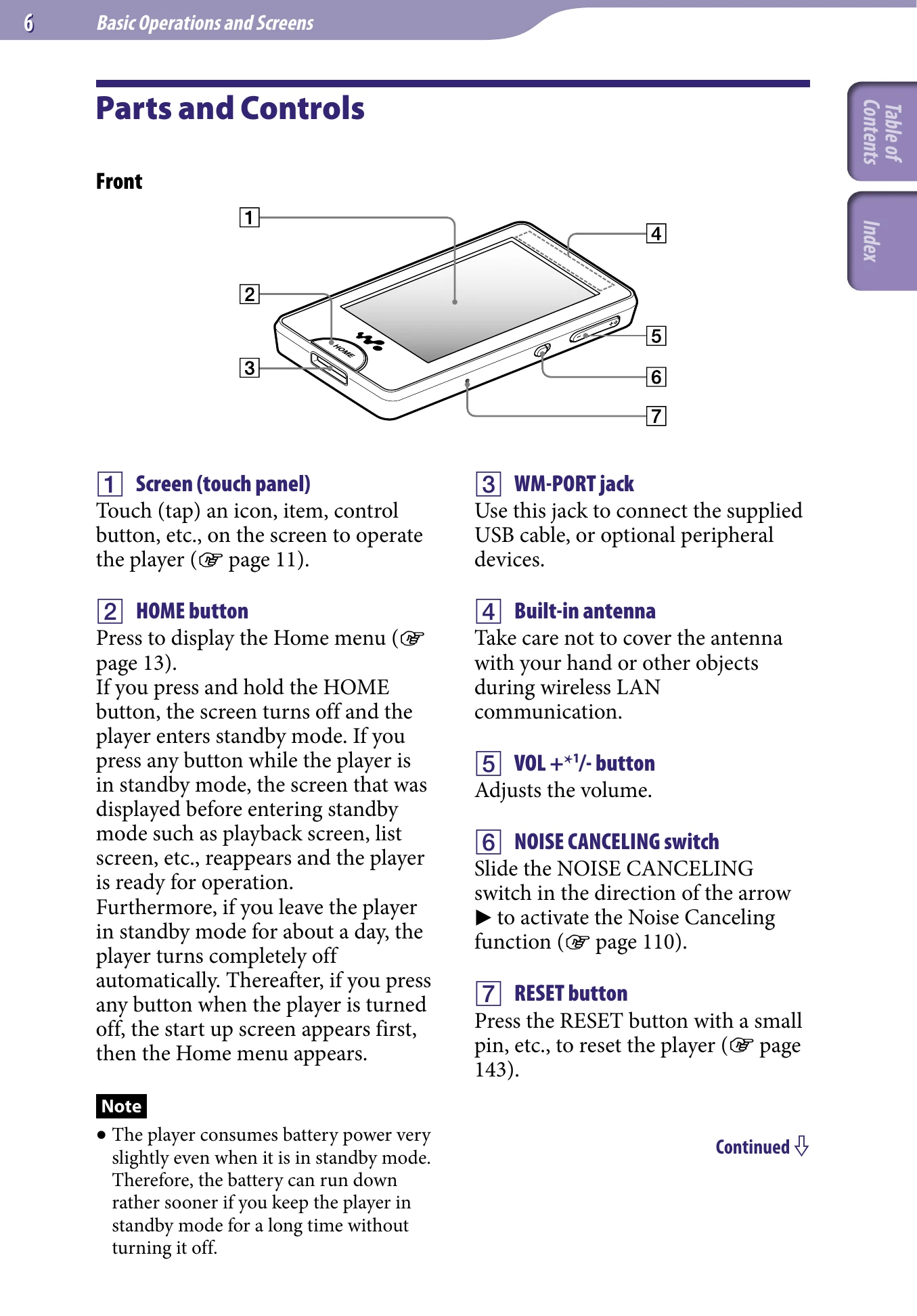
Touch (tap) an icon, item, control button, etc., on the screen to operate the player (page 11).
Press to display the Home menu (page 13).
If you press and hold the HOME button, the screen turns off and the player enters standby mode.
Use this jack to connect the supplied USB cable, or optional peripheral devices.
Take care not to cover the antenna with your hand or other objects during wireless LAN communication.
Adjusts the volume.
Slide the NOISE CANCELING switch in the direction of the arrow to activate the Noise Canceling function (page 110).
Press the RESET button with a small pin, etc., to reset the player (page 143).
Press to find the beginning of a song or video, or to fast-forward/rewind.
Connects the headphones (page 8).
Press the button to start playback of a song or video. During playback, press the button to pause.
Use the HOLD switch to disable the buttons and touch panel to avoid unintentional actions.
If the earbuds do not fit your ears correctly, low bass sound may not be heard and the Noise Canceling function (page 110) may not work effectively. To enjoy better sound quality, change the size of the earbuds or adjust the earbud position to fit your ears snugly.
| Troubleshooting | Page |
|---|---|
| Messages | 160 |