Manual for CCD-CR1

Manual for CCD-CR1

Brand: SONY

Category: Camcorder

Document Type: Manual

Language: EN

Uploaded: Aug. 10, 2025, 12:18 a.m.
Getting Started:

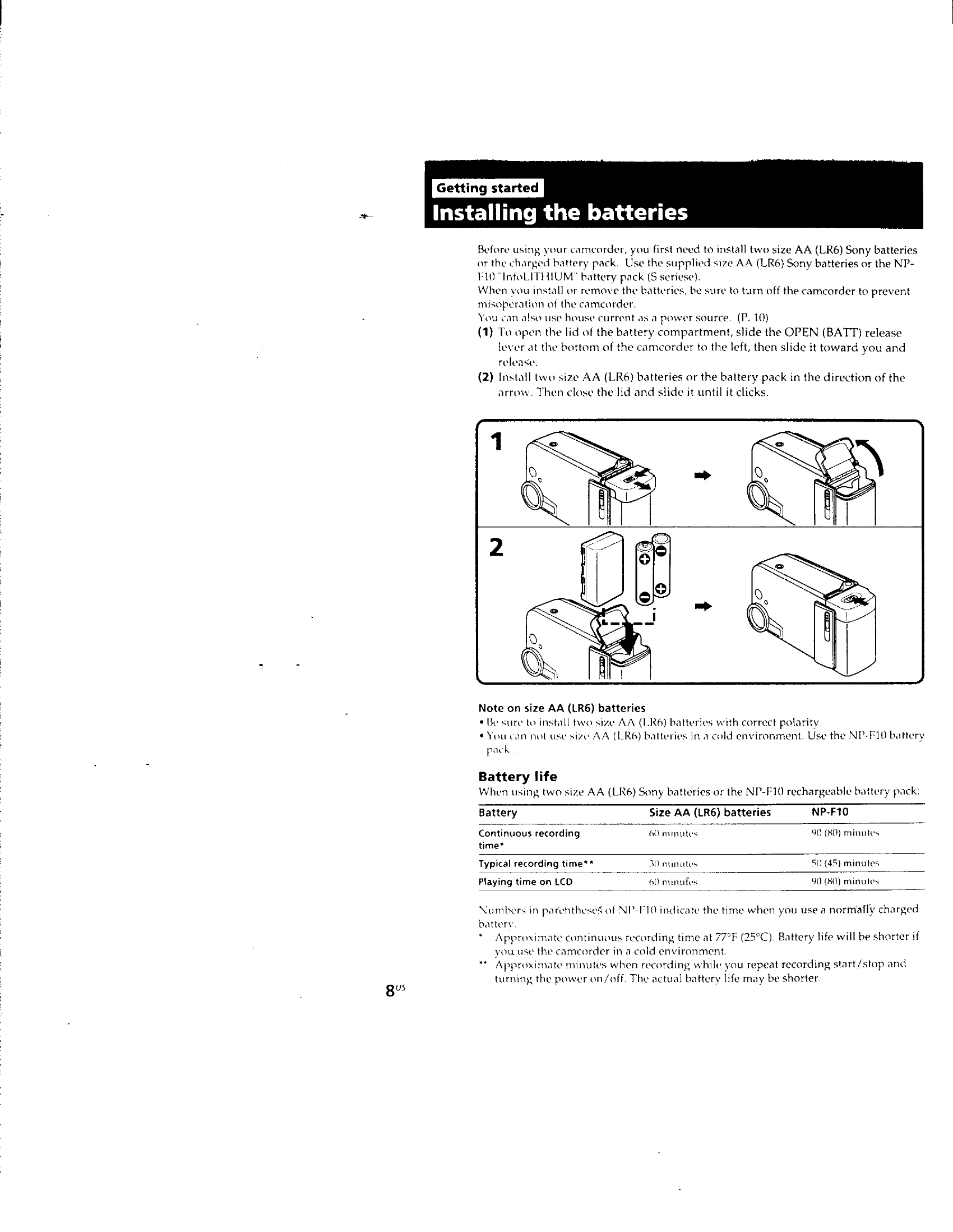
  • Install batteries (AA or NP-F10) or connect to house current.
  • Charge battery pack if necessary.

Shooting:

  • Select recording mode (5SEC, ANTI GROUND SHOOTING).
  • Press START/STOP to begin and end recording.
  • Use PHOTO button for still pictures.
  • Adjust LCD panel for comfortable viewing.
  • Use BACK LIGHT function for backlit subjects.
  • Utilize zoom and macro functions for varied shots.
  • Monitor shot with mirror mode if needed.

Playback:

  • Press playback buttons (REW, PLAY, FF, PAUSE).
  • Use PHOTO SCAN to search for still pictures.
  • Connect to TV/VCR for larger screen viewing.

Editing:

  • Connect camcorder to VCR with A/V cable.
  • Follow steps to record scenes onto another tape.

Additional Information:

  • Reset date and time as needed.
  • Tips for battery usage and care.
  • Troubleshooting common issues.
Privacy Policy