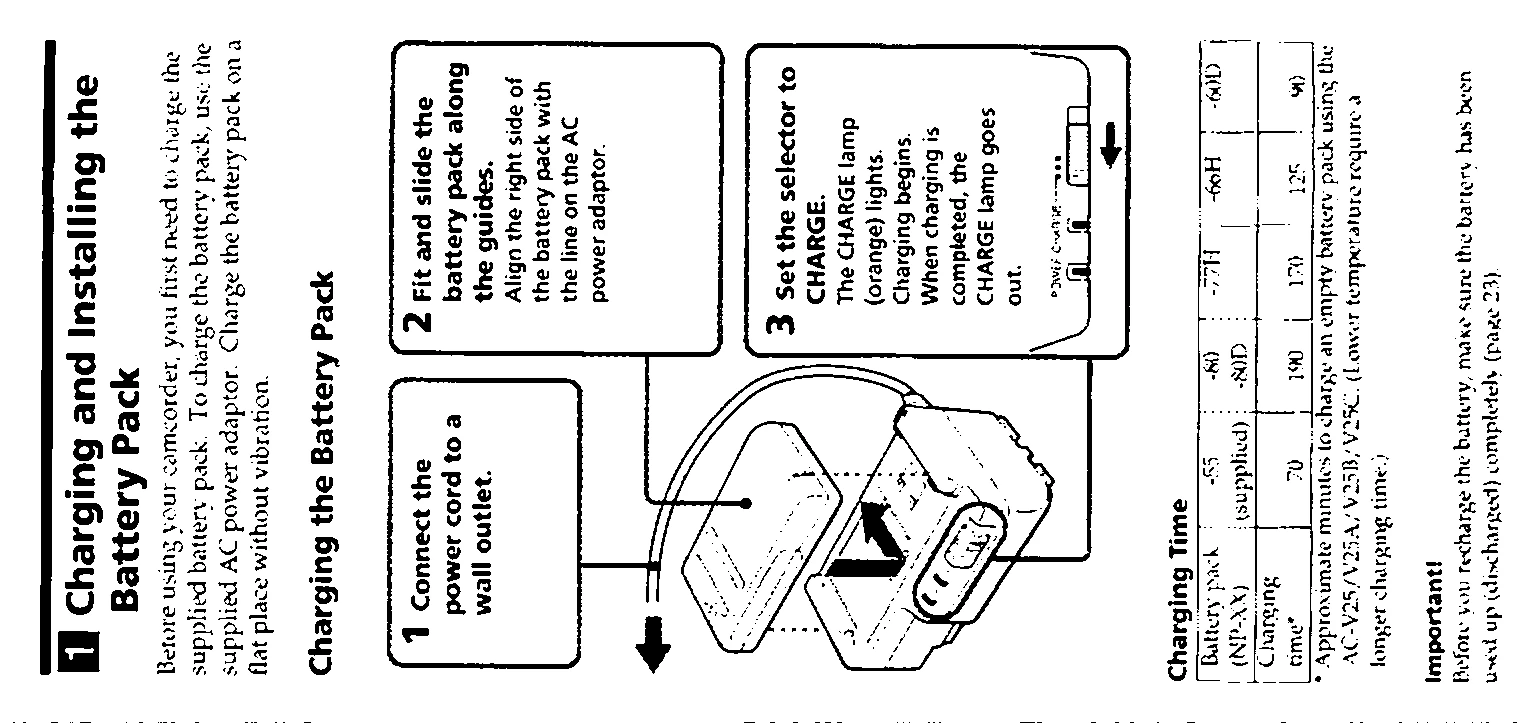
Charging and Installing the Battery Pack: Connect the AC power cord to a wall outlet. Fit and slide the battery pack along the guides on the AC power adaptor. Set the selector to CHARGE. The CHARGE lamp (orange) lights, indicating charging has begun. Charging is complete when the lamp goes out. To install the battery pack, remove it from the wall outlet, lift the viewfinder, and fit and slide the battery pack along the guides.
Inserting a Cassette: Open the cassette holder by pressing the EJECT knob. Insert a cassette with the window facing out. Close the cassette holder by pressing the "PUSH" mark.
Adjusting the Viewfinder Lens: Turn the POWER switch to CAMERA. Turn STANDBY up. Adjust the viewfinder lens adjustment ring/lever until the image is in sharp focus. For models with a color viewfinder, adjust brightness by turning the screw on the viewfinder.
Camera Recording:
Remove the lens cap and attach it to the grip strap.
Turn on the power by setting the POWER switch to CAMERA.
Place your eye against the finder.
Press START/STOP to begin recording. Press it again to stop.