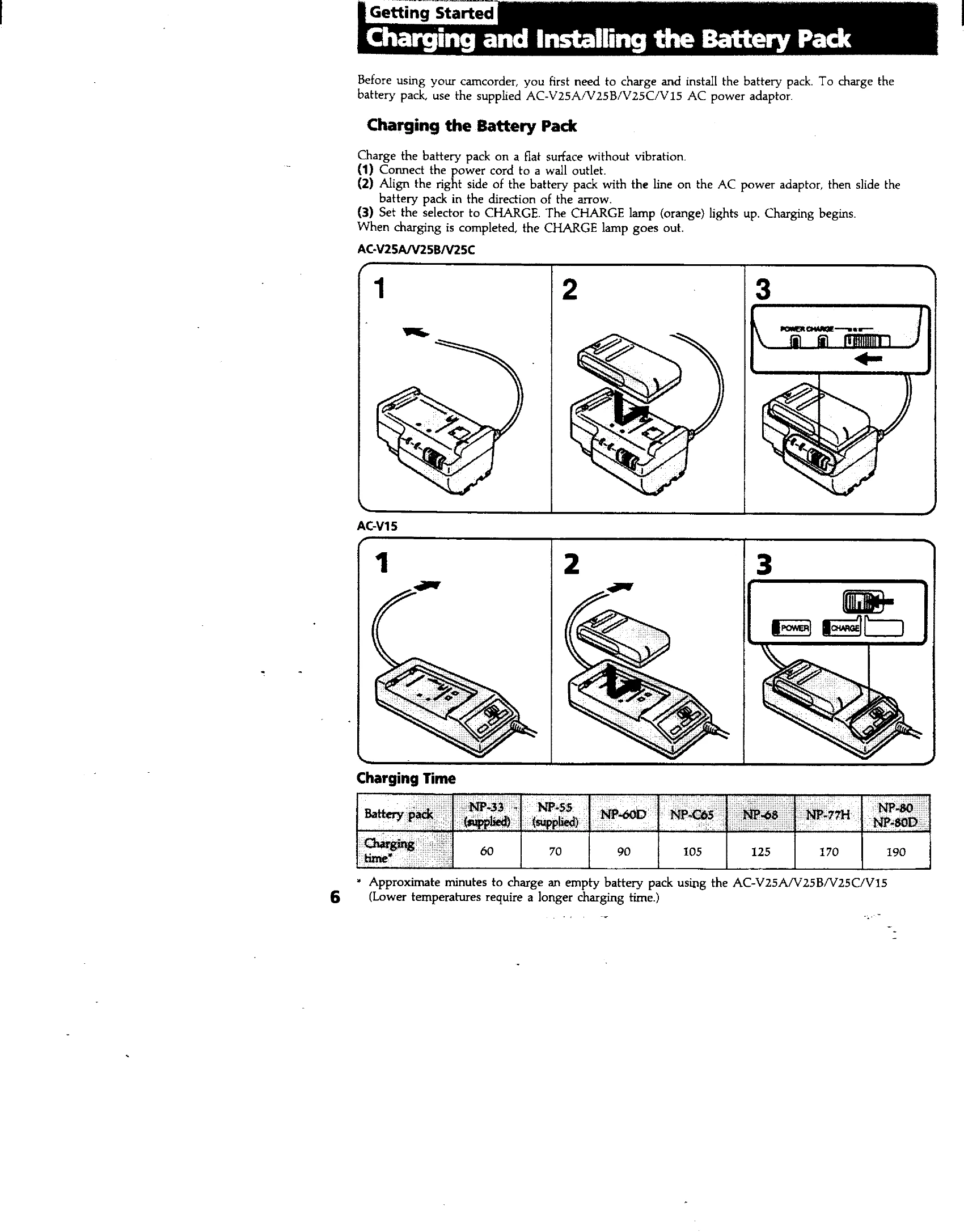
Charge & Install Battery: Connect AC adapter, slide battery into place, set selector to CHARGE.
Insert Cassette: Lift lid, press EJECT, insert cassette with window facing out, close compartment.
Adjust Viewfinder: Set POWER to CAMERA, turn STANDBY up, adjust viewfinder lens for clear indicators.
Basic Operations
Camera Recording: Set POWER to CAMERA, turn STANDBY up, press START/STOP to record. Press START/STOP to pause. Turn STANDBY down and POWER to OFF to finish.
Zoom: Use the "T" side for telephoto (closer) and "W" side for wide-angle (farther). Press zoom button firmly for high-speed zoom, softly for slow zoom.
Playback: Set POWER to PLAYER, insert tape, press PLAY. Use transport buttons to control playback.
Advanced Operations
Alternative Power: Use AC adapter for house current, battery pack for outdoors, or car battery adapter.
Date/Time Recording: Press DATE or TIME buttons to display them on the recording.