Manual for CCD-TR100/TR600

Manual for CCD-TR100/TR600

Brand: SONY

Category: Camcorder

Document Type: Manual

Language: EN

Uploaded: Aug. 10, 2025, 12:16 a.m.

Manual Publish Date: 1995-01-01
Getting Started

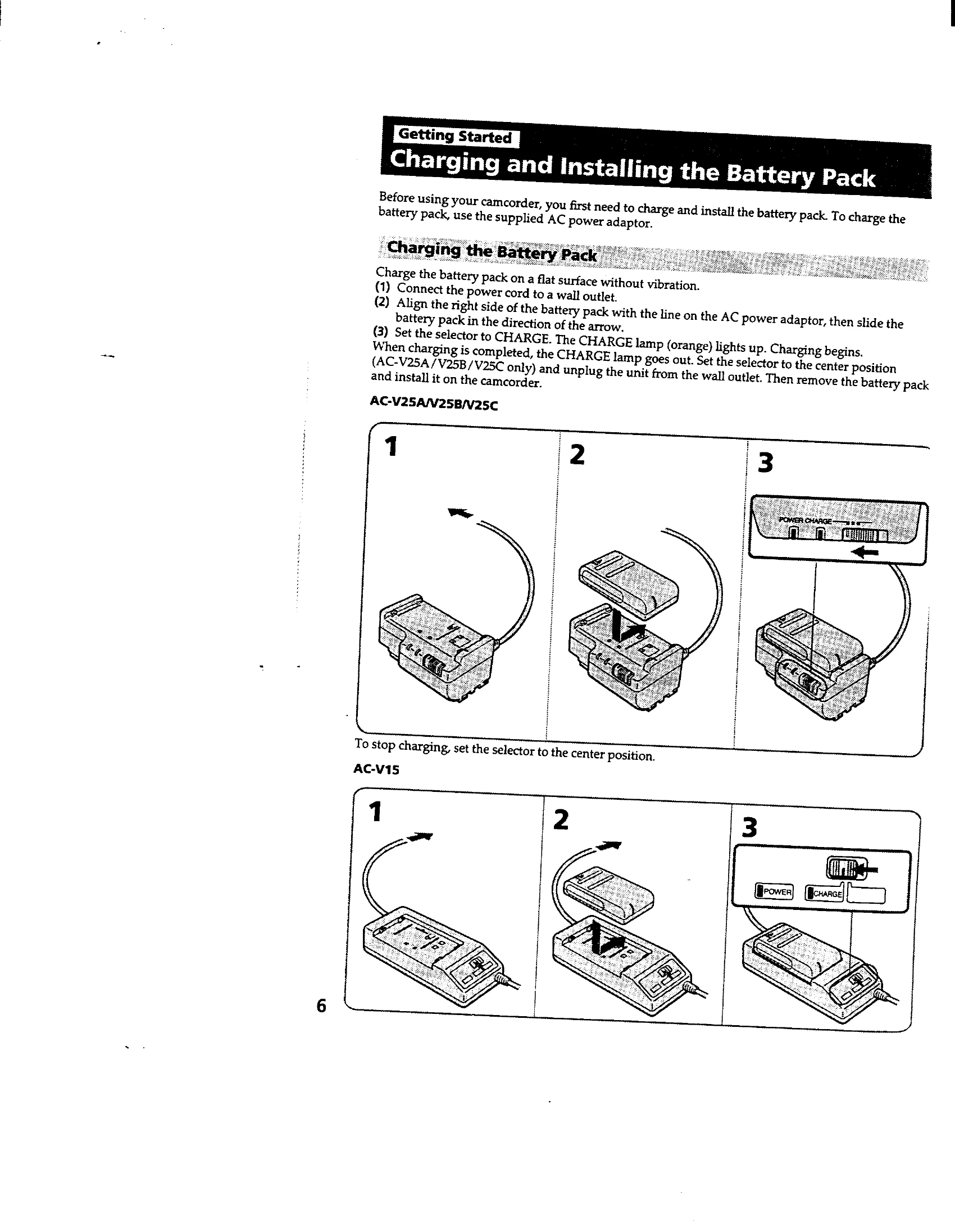
Charging and Installing the Battery Pack

  • Charge the battery pack using the AC power adaptor.
  • Align and slide the battery pack into the camcorder.

Inserting a Cassette

  • Slide the release knob and lift the lid.
  • Press EJECT to open the cassette compartment.
  • Insert the cassette with the window facing out.
  • Close the compartment and the lid.

Basic Operations

Camera Recording

  • Turn the POWER switch to CAMERA and STANDBY up.
  • Press START/STOP to begin recording.
  • Press START/STOP again to stop momentarily or finish recording.

Playback

  • Turn the POWER switch to VTR.
  • Insert the recorded tape.
  • Press PLAY to begin playback.
Privacy Policy