Brand: SONY
Category: Camcorder
Document Type: Manual
Language: EN
Brand: SONY
Category: Camcorder
Document Type: Manual
Language: EN
Uploaded: Aug. 10, 2025, 12:24 a.m.
Before operating, charge and insert the NP-500 battery pack. Connect the AC power adaptor to a wall outlet and the battery pack. The orange CHARGE lamp indicates charging. Three lamps indicate a full charge. Insert the charged battery into the camcorder. You can also set the date and time using the lithium battery for clock and world clock functions.
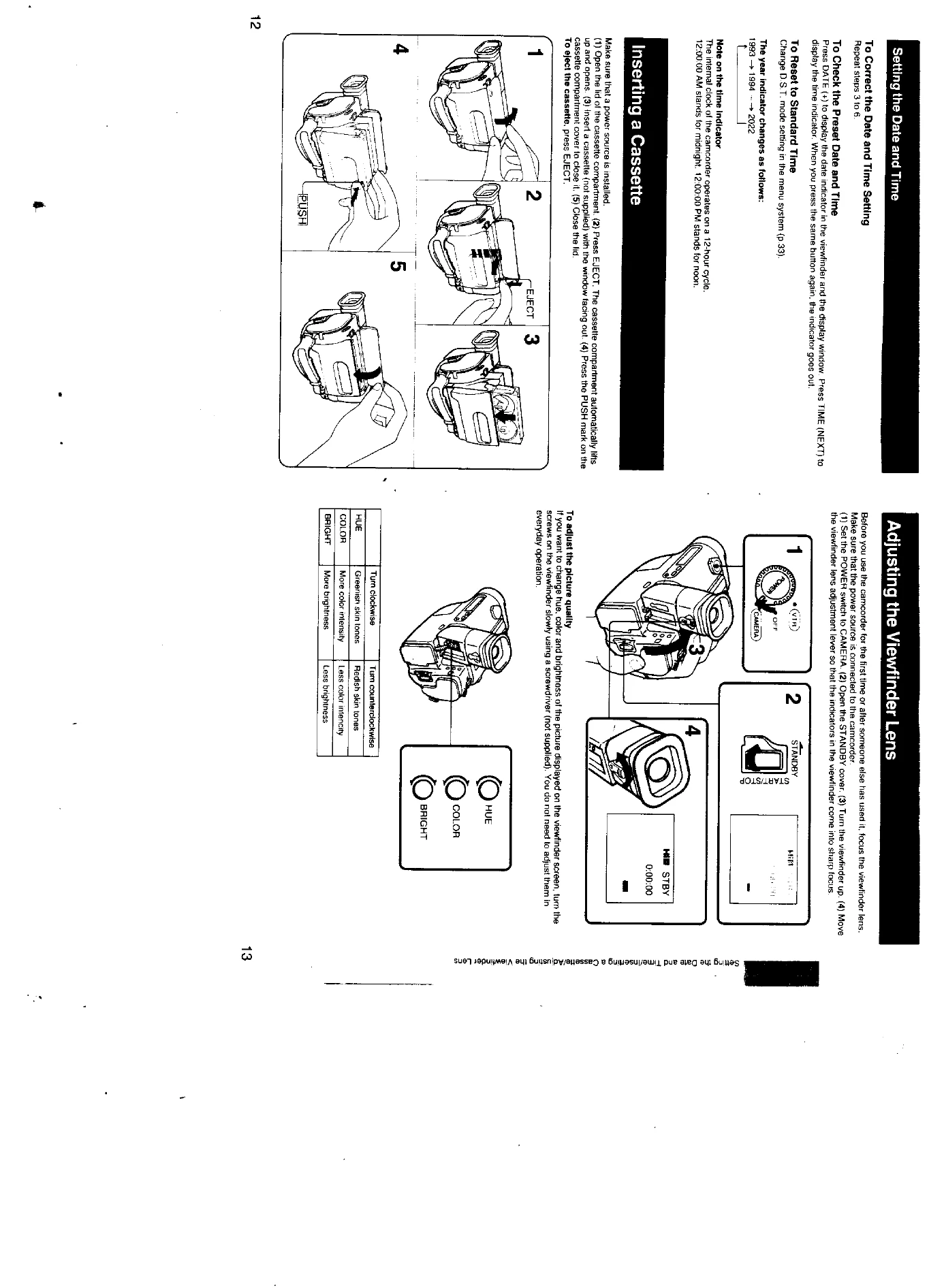
Insert a cassette. Adjust the viewfinder lens for a clear picture. For better shooting, hold the camcorder firmly with the grip strap, keep your elbow against your side, and place your eye firmly against the viewfinder eyecup. Use the instant stand or a tripod for stability. To record, set the power switch to CAMERA, open the STANDBY cover, and press START/STOP. The 'REC' indicator will appear. To stop recording momentarily, press START/STOP again. To finish recording, close the STANDBY cover and set the power switch to OFF.
| Symptom | Cause | Corrective Actions | Page |
|---|---|---|---|
| Video Camera Recorder | |||
| The power does not go on. | The battery is not inserted. | Insert the battery. | 7 |
| The battery is dead. | Use a charged battery. | 6, 24 | |
| The AC power adaptor is not connected to a wall outlet. | Connect the adaptor to a wall outlet. | 26 | |
| The power goes off. | While being operated in CAMERA mode, the camcorder has been in the pause mode for more than 5 minutes. | Close the STANDBY cover at once and open it again. | 15 |
| The battery is dead. | Use a charged battery. | 6, 24 | |
| The battery pack is quickly discharged. | The battery pack has not been charged fully. | Charge the battery pack again. | 6, 24 |
| The battery pack is completely dead, and cannot be recharged. | Use another battery pack. | 6, 24 | |
| START/STOP does not operate. | The tape is stuck to the drum. | Eject the tape. | 12 |
| The tape has run out. | Rewind the tape or use a new one. | 22 | |
| The POWER switch is set to VTR. | Set it to CAMERA. | 15 | |
| The tape does not move when a tape transport button is pressed. | The battery is exhausted. | Use a charged battery or the AC power adaptor. | 6, 24, 26 |
| The steady shot function does not work. | The STEADY SHOT switch is set to OFF. | Set the STEADY SHOT switch to ON. | 16 |
| The autofocusing function does not work. | The AUTO LOCK cover is opened. | Close the AUTO LOCK cover to set the AUTO LOCK. | 29 |
| Shooting conditions are not suitable for autofocusing operation. | Open the AUTO LOCK cover and press FOCUS to adjust the focus manually. | 30 | |
| No function except for cassette ejection works. | Moisture condensation has occurred. | Remove the cassette and do not use the camcorder for at least an hour. | 41 |
| The lens clatters when you set the POWER switch to OFF and shake the camcorder. | The lithium battery is dead. This is not a malfunction. | (No corrective action needed) | 9 |
| The HOLD switch is working. | Set the switch in the direction opposite to the arrow. | 54 | |
| REMOTE COMMANDER mode is set to "OFF". | Set the mode to "ON" in the menu system. | 33 | |
| Something interrupts the infrared rays. | Take away the obstacle. | (No corrective action needed) | |
| The lithium battery is not inserted with the correct polarity. | Insert the lithium battery with the correct polarity. | 9 | |
| Picture/Sound | |||
| No sound or only a low sound is heard when playing back a tape. | The Stereo tape is played back with the HiFi SOUND mode set to "1" or "2". | Set to "STEREO" in the menu system. | 33 |
| The image on the viewfinder screen is not clear. | The viewfinder lens is not adjusted. | Adjust the viewfinder lens. | 13 |
| The playback picture is not clear. | The video heads may be contaminated. | Clean the heads using the Sony V8-25CLH cleaning cassette. | 42 |
| No picture and no sound is played back when using the Handycam Station. | The RFU adaptors are connected to both of the camcorder and the Handycam Station. | Disconnect the RFU adaptor connected to the camcorder. | (for Canada model) |
| The channel or input for the camcorder is not selected on the TV. | Select correctly. | 19 | |
| The supplied Remote Commander does not work. | DISPLAY on the Remote Commander is not pressed. | Press DISPLAY on the Remote Commander. | 23 |
| A vertical band appears when a subject such as lights or a candle flame is shot against a dark backgound. | The contrast between the subject and background is too high: The camcorder is not malfunctioning. | Change locations. | |
| Others | |||
| The menu is not displayed on the TV. | EDIT mode is set to "ON". | Set EDIT mode to "OFF" in the menu system. | 33 |