Manual for CCD-TR516/TR716

Manual for CCD-TR516/TR716

Brand: SONY

Category: Camcorder

Document Type: Manual

Language: EN

Uploaded: Aug. 10, 2025, 12:21 a.m.

Manual Publish Date: 1998-01-01
Before you begin

  • Using this manual: Understand how to use the manual, including how buttons and settings are displayed (e.g., in capital letters).
  • Checking supplied accessories: Verify that all necessary accessories are included with your camcorder.

Getting started

  • Installing and charging the battery pack: Learn how to attach and charge the removable battery pack.
  • Inserting a cassette: Understand how to insert a Hi8 or standard 8mm video cassette.

Basic operations

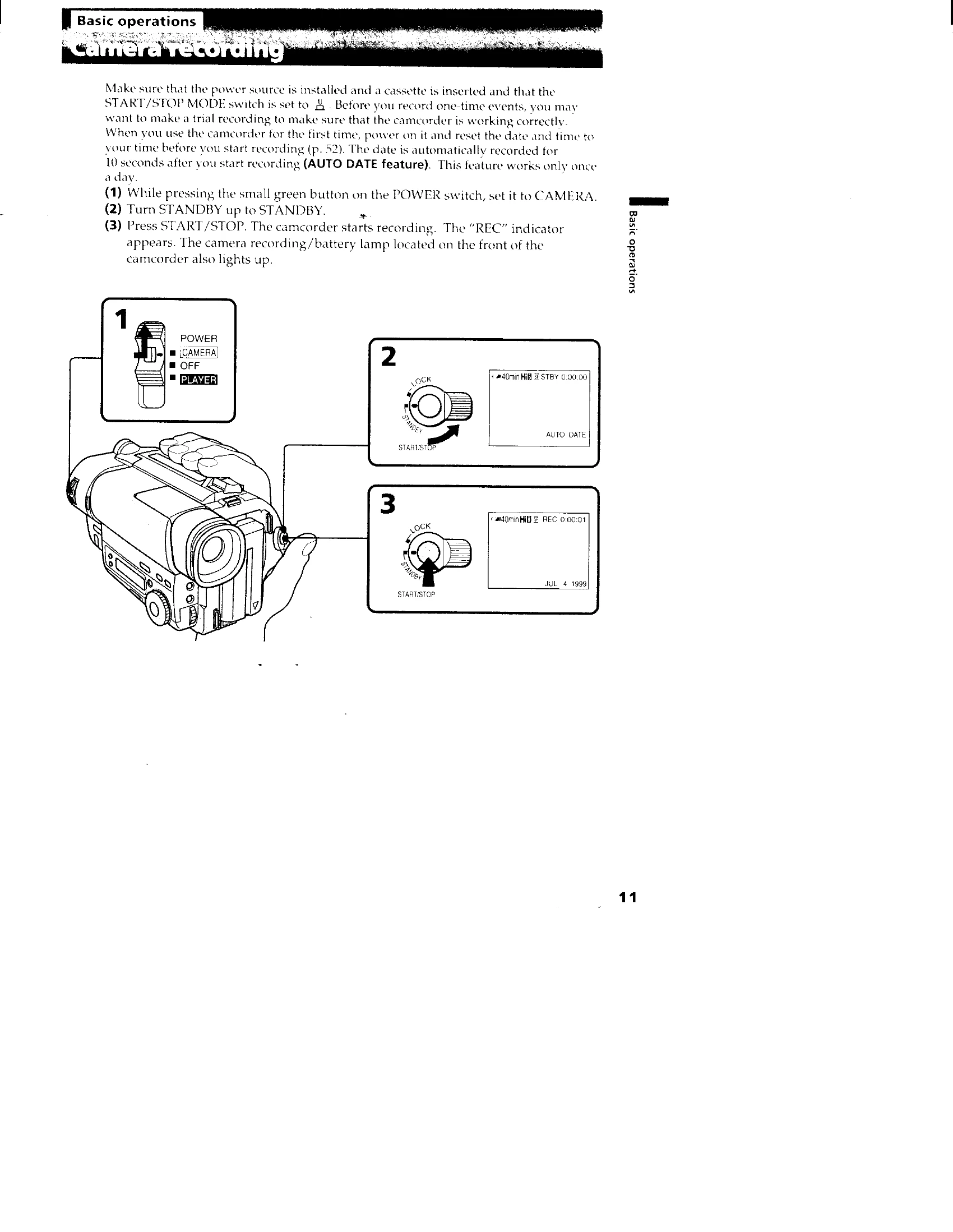
  • Camera recording: Steps to start recording video.
  • Using the zoom feature: How to zoom in and out for framing shots.
  • Selecting the START/STOP mode: Choose from different recording modes like normal, anti-ground shooting, and 5-second recording.
  • Hints for better shooting: Tips for holding the camcorder and composing shots for better results.
  • Checking the recorded picture: How to review recorded footage using EDITSEARCH.
  • Connections for playback: How to connect to a TV or VCR to view recordings.
  • Playing back a tape: Instructions for playback, including using the remote commander and different playback modes.

Advanced operations

  • Using alternative power sources: Options for powering the camcorder besides the battery pack.
  • Using the house current: How to power the camcorder using an AC adapter.
  • Changing the mode settings: Adjusting various settings to customize recording.
  • Shooting with backlighting: How to handle scenes with strong light sources behind the subject.
  • Using the FADER function: Adding fade-in/fade-out effects to recordings.
  • Shooting in the dark (NightShot): Utilizing the NightShot feature for low-light recording.
  • Using the wide mode function: Activating wide-angle recording.
  • Using the PROGRAM AE function: Employing programmed auto-exposure modes.
  • Focusing manually: How to manually adjust focus for precise sharpness.
  • Enjoying picture effect: Using built-in picture effects.
  • Adjusting the exposure: Controlling the brightness of the recording.
  • Superimposing a title: Adding text titles to your recordings.
  • Making your own titles: Instructions for creating custom titles.
  • Recording with the date/time: Options for recording date and time information.
  • Optimizing the recording condition: Tips for best recording quality.
  • Using the built-in light: Activating the camcorder's light for dark scenes.
  • Releasing the STEADYSHOT function: Information specific to the STEADYSHOT feature on the CCD-TR716.
  • Editing onto another tape: Basic editing procedures.

Additional information

  • Charging the lithium battery in the camcorder: How to charge the internal lithium battery.
  • Resetting the date and time: Procedures for setting the correct date and time.
  • Simple setting of clock by time difference: Adjusting the clock for different time zones.
  • Usable cassettes and playback modes: Information on compatible cassettes and playback options.
  • Tips for using the battery pack: Advice for maximizing battery life and usage.
  • Maintenance information and precautions: Care instructions for the camcorder.
  • Using your camcorder abroad: Considerations for using the camcorder in different countries.
  • Trouble check: A guide to solving common problems.
  • Self-diagnosis display: Understanding error codes and their meanings.
  • Specifications: Technical details of the camcorder and accessories.
  • Identifying the parts: Diagrams showing the location of buttons and features.
  • Warning indicators: Explanations of various warning lights and their meanings.
Privacy Policy