Brand: SONY
Category: Camcorder
Document Type: Manual
Language: EN
Brand: SONY
Category: Camcorder
Document Type: Manual
Language: EN
Uploaded: Aug. 10, 2025, 12:21 a.m.
Manual Publish Date: 1996-01-01
null
Getting Started: Charge the battery pack using the supplied AC power adapter. Install the battery pack into the camcorder. Insert a cassette. Turn on the camcorder by sliding the POWER switch to CAMERA.
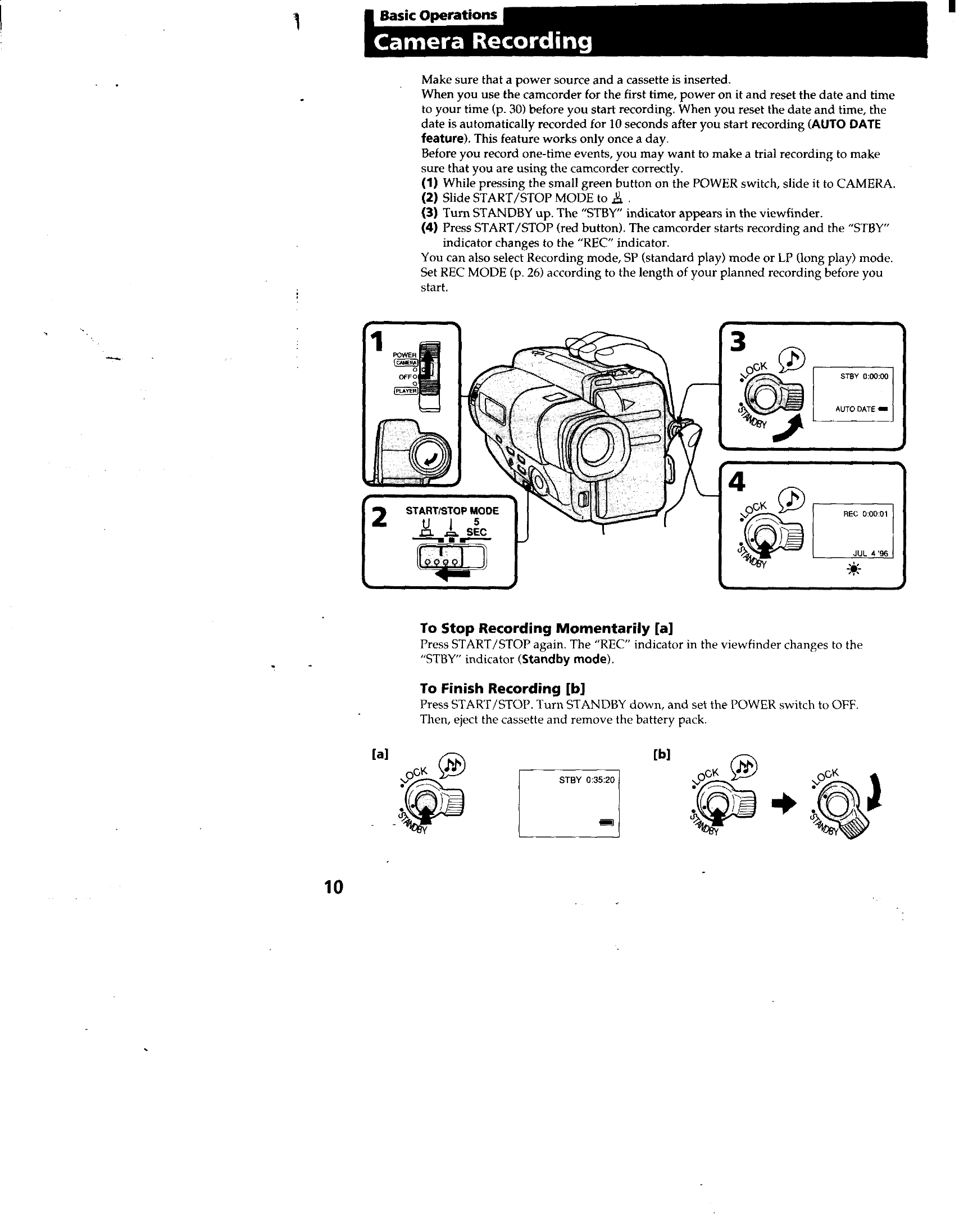
\nCamera Recording: Ensure the date and time are set. Press the small green button to power on, then slide to CAMERA. Set the START/STOP MODE. Turn STANDBY up. Press the START/STOP button to begin recording.
\nPlayback: Slide the POWER switch to PLAYER. Insert the recorded tape. Use the tape transport buttons (STOP, REW, PLAY, FF, PAUSE) to control playback. You can also use the Remote Commander.
\n