Getting Started: Charge and install the battery pack (page 6). Insert a cassette (page 8).
Basic Operations:
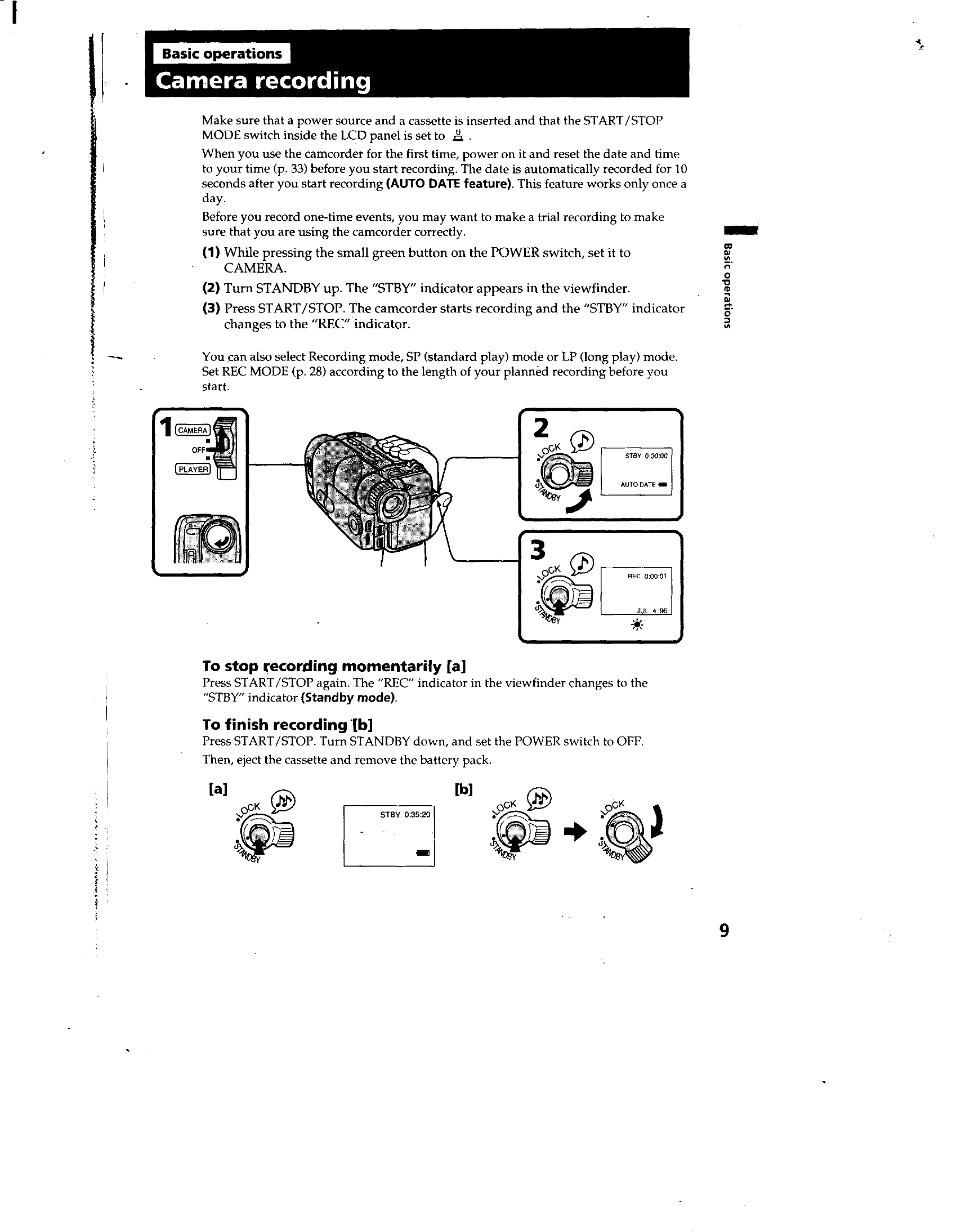
- Camera Recording: Set power to CAMERA, turn STANDBY up, and press START/STOP to record. Press START/STOP again to stop momentarily. Turn STANDBY down and set power to OFF to finish recording (page 9).
- Zooming: Use the power zoom lever (T for telephoto, W for wide-angle) (page 11).
- LCD Screen: Open and angle the LCD panel to record. Close it to save battery life (page 12).
- Handheld Shooting: Hold the camcorder firmly with the grip strap, support with your left hand, and press your eye to the viewfinder (page 13).
- Playback: Set power to PLAYER, insert tape, open LCD, and press PLAY. Use STOP, REW, PLAY, FF, PAUSE buttons (page 16).
- Searching: Use EDITSEARCH to review last scenes or END SEARCH to go to the end of recorded portion (pages 15, 18).
Advanced Operations: Use alternative power sources, record date/time, and utilize features like STEADY SHOT and CINEMA mode (pages 19-22).
Troubleshooting: Check indicators in the viewfinder or on the LCD for common issues (page 55).