Brand: SONY
Category: Camcorder
Document Type: Manual
Language: EN
Brand: SONY
Category: Camcorder
Document Type: Manual
Language: EN
Uploaded: Aug. 10, 2025, 12:24 a.m.
Manual Publish Date: 1996-01-01
None
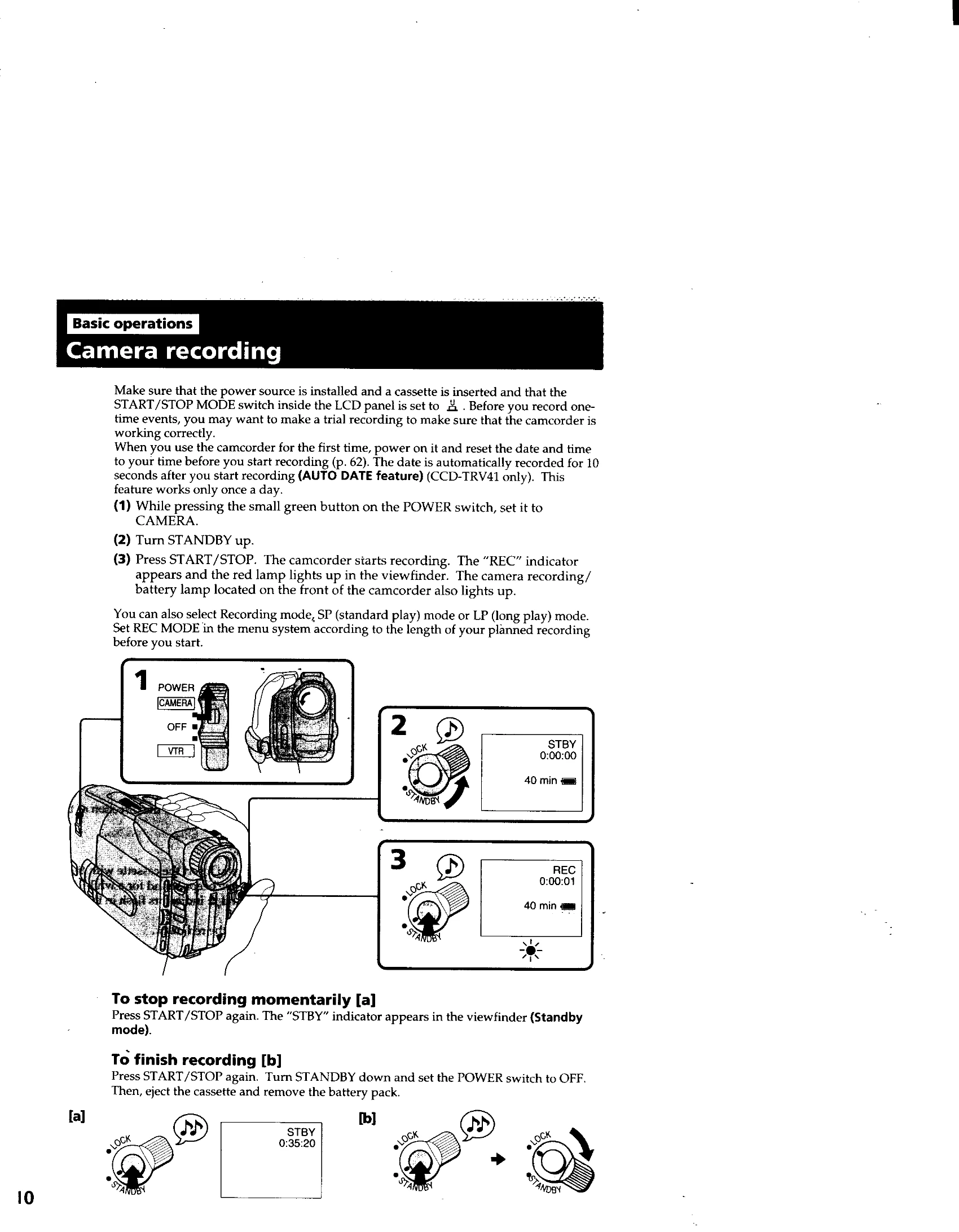
Camera Recording: Set POWER to CAMERA, turn STANDBY up, press START/STOP to record. Stop momentarily with START/STOP (enters Standby). Finish recording by pressing START/STOP, turning STANDBY down, and setting POWER to OFF. Eject cassette and remove battery.
Focusing: Adjust the viewfinder lens by turning the adjustment ring until indicators are sharp. For autofocus, set FOCUS to AUTO. If conditions are unsuitable, use MANUAL focus.
Zooming: Use the power zoom lever for telephoto (T) or wide-angle (W) shots. Digital zoom is available beyond optical zoom but degrades quality. D ZOOM can be turned OFF in the menu.
LCD Screen: Open the LCD panel to view and record. Adjust angle and brightness as needed. Battery life is longer with the LCD closed.
Playback: Set POWER to VTR. Insert cassette. Press PLAY to start. Use video control buttons (STOP, REW, PLAY, FF, PAUSE) and volume control. Can monitor on TV via A/V connection.