Manual for DCR-DVD92

Manual for DCR-DVD92

Brand: SONY

Category: Camcorder

Document Type: Manual

Language: EN

Uploaded: Aug. 10, 2025, 12:23 a.m.
Getting Started:
  • Step 1: Checking supplied items: Ensure all accessories like AC adaptor, cables, cleaning cloth, etc., are present.
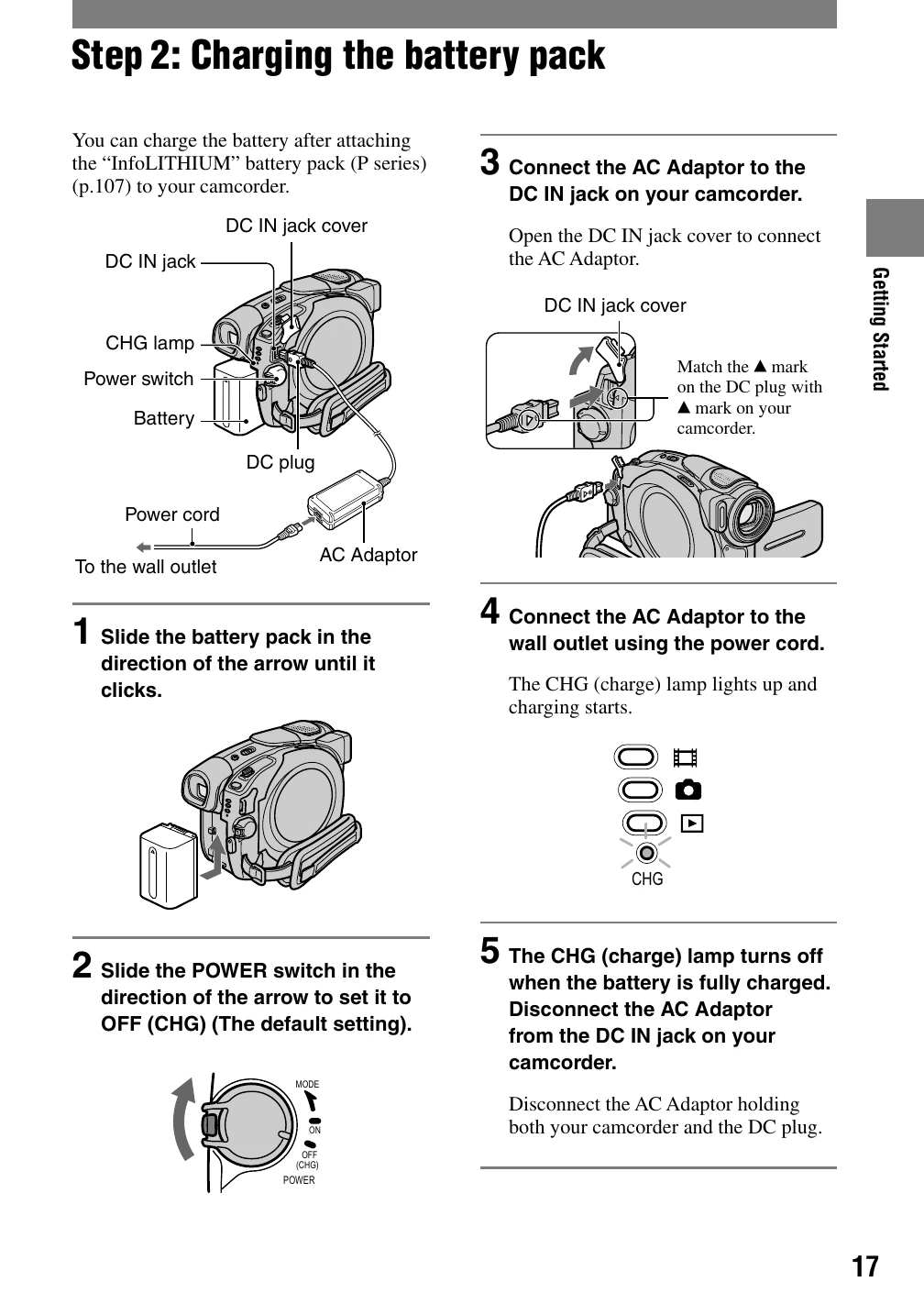
  • Step 2: Charging the battery pack: Connect the AC adapter to the camcorder and wall outlet. The CHG lamp indicates charging status.
  • Step 3: Turning the power on, and holding your camcorder: Slide the power switch to ON. Follow instructions for correct grip and belt usage.
  • Step 4: Adjusting the LCD screen and viewfinder: Open and adjust the LCD screen for optimal viewing. Extend and focus the viewfinder.
  • Step 5: Using the touch panel: Interact with on-screen buttons for playback and settings. Hide screen indicators using DISP/BATT INFO.
Enjoying your DVD Handycam:
  • What you can do: Record on 8cm DVD discs, create a visual index, and use a slide show function.
  • Choosing a disc: Select from DVD-R, DVD-RW, and DVD+RW discs based on intended use (recording once, repeated use, editing).
Recording/Playback:
  • Recording: Use the camcorder to capture movies and still images.
  • Playback: View recorded images on the camcorder or external devices.
Editing and Dubbing:
  • Editing: Edit original data, create playlists using supplied software.
  • Dubbing: Connect to VCR/DVD devices for dubbing or recording from TV.
Using a Computer:
  • Transfer data, install software, and view guides.
Troubleshooting:
  • Consult the troubleshooting section for common issues and solutions.
Maintenance and Precautions:
  • Follow guidelines for cleaning, storage, and avoiding damage from moisture, heat, or impact.
Privacy Policy