Brand: SONY
Category: Camcorder
Document Type: Quick Start Guide
Language: EN
Brand: SONY
Category: Camcorder
Document Type: Quick Start Guide
Language: EN
Uploaded: Aug. 10, 2025, 12:22 a.m.
None
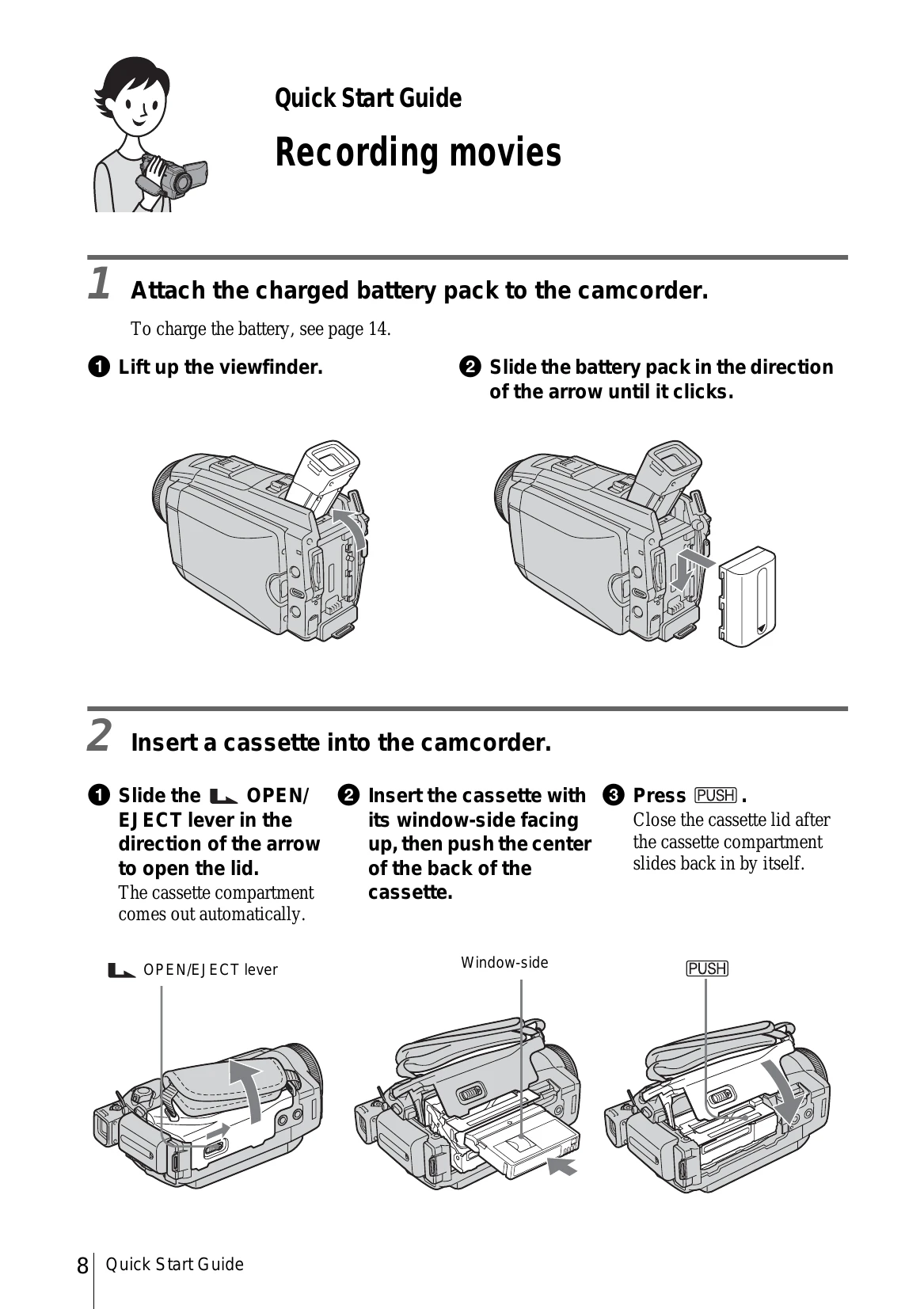
1. Attach charged battery pack.
2. Insert cassette.
3. Start recording: Remove lens cap, open LCD, slide power switch, press REC START/STOP.
4. View recorded picture: Slide power switch to PLAY/EDIT, touch Rewind, then Play.
1. Attach charged battery pack.
2. Insert "Memory Stick Duo".
3. Start recording: Remove lens cap, open LCD, slide power switch, press PHOTO lightly, then PHOTO fully.
4. View recorded picture: Slide power switch to PLAY/EDIT, touch PB, then use + or - to navigate.
Press EASY to switch to Easy Handycam operation for simpler recording/playback.