Manual for DCR-PC115/PC120BT

Manual for DCR-PC115/PC120BT

Brand: SONY

Category: Camcorder

Document Type: Manual

Language: EN

Uploaded: Aug. 10, 2025, 12:17 a.m.
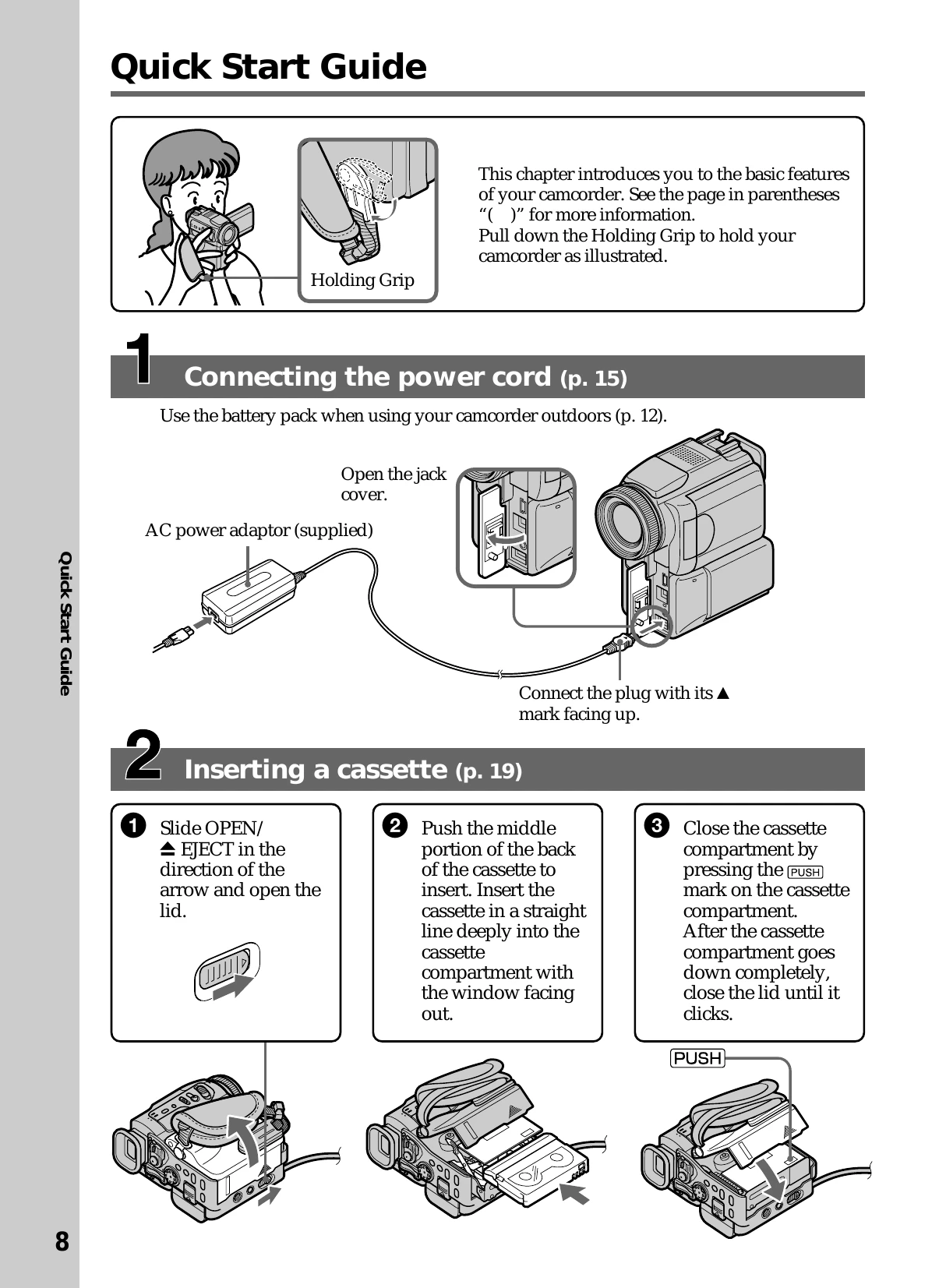
Quick Start Guide

Connecting the power cord

  • Connect the AC power adaptor to the camcorder's DC IN jack.
  • Connect the power cord to the AC power adaptor and then to the wall outlet.

Inserting a cassette

  • Slide OPEN/EJECT to open the cassette compartment.
  • Insert the mini DV cassette into the compartment.
  • Close the cassette compartment and lid until they click.

Recording a picture

  • Remove the lens cap.
  • Set the POWER switch to CAMERA.
  • Press OPEN to open the LCD panel.
  • Press START/STOP to begin recording. Press again to stop.

Monitoring the playback picture

  • Set the POWER switch to VCR.
  • PressREW to rewind the tape.
  • Press PLAY to start playback.
Privacy Policy