Brand: SONY
Category: Camcorder
Document Type: Manual
Language: EN
Brand: SONY
Category: Camcorder
Document Type: Manual
Language: EN
Uploaded: Aug. 10, 2025, 12:15 a.m.
Manual Publish Date: 1999
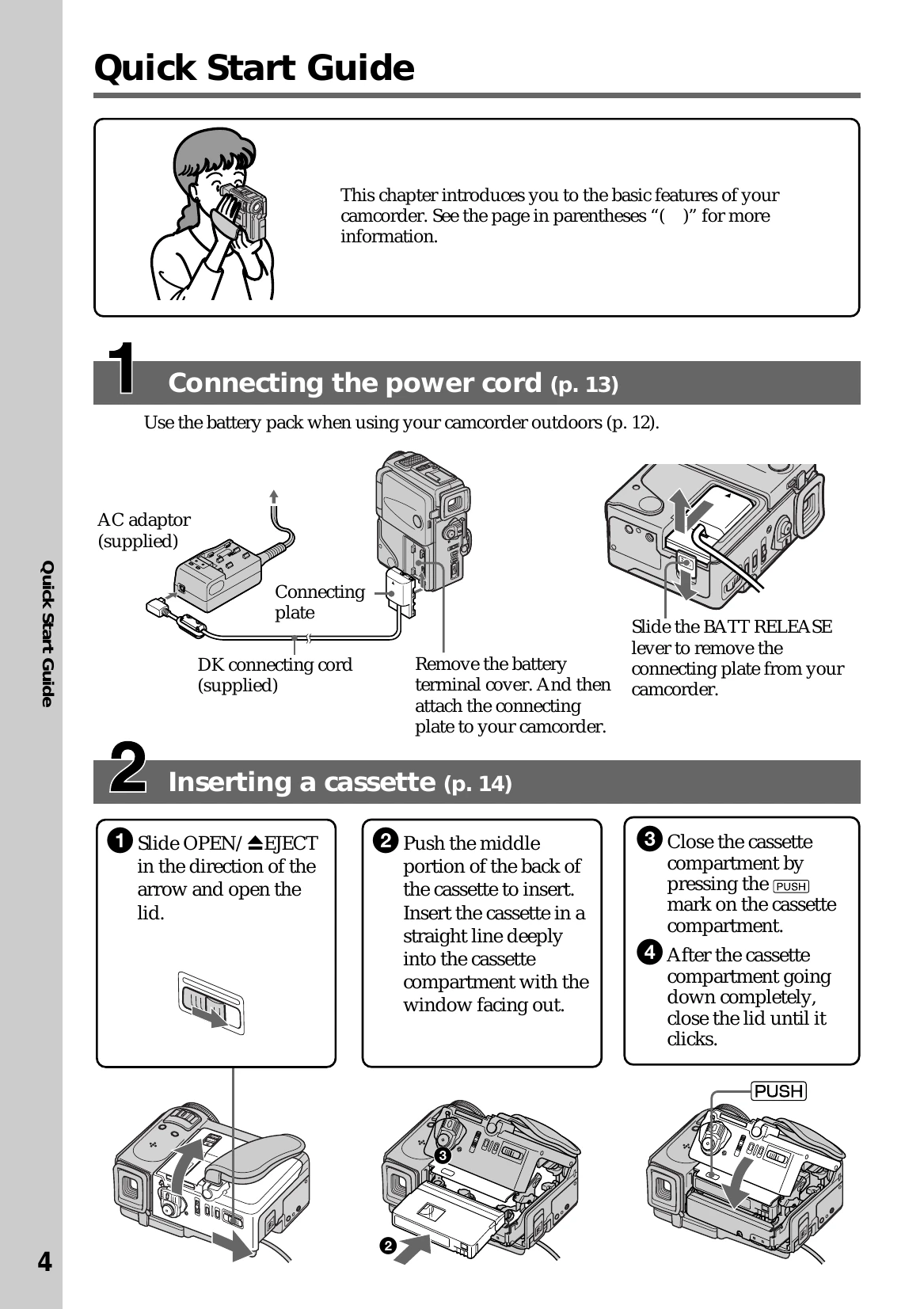
Connecting the power cord: Use the battery pack or AC adapter to power the camcorder. Charge the battery pack using the supplied AC adaptor and connecting cord. Connect the AC adaptor to a wall outlet.
Inserting a cassette: Slide OPEN/EJECT to open the lid. Push the cassette into the compartment. Close the cassette compartment and lid.
Recording a picture: Remove the lens cap. Adjust the viewfinder. Set the POWER switch to CAMERA. Press START/STOP to begin recording.
Operate functions by touching the LCD screen. Press FN to display operation buttons, then select the desired function. Use EXIT to return and OK to confirm.