Brand: SONY
Category: Camcorder
Document Type: Manual
Language: EN
Brand: SONY
Category: Camcorder
Document Type: Manual
Language: EN
Uploaded: Aug. 10, 2025, 12:18 a.m.
Manual Publish Date: 2011-01-01
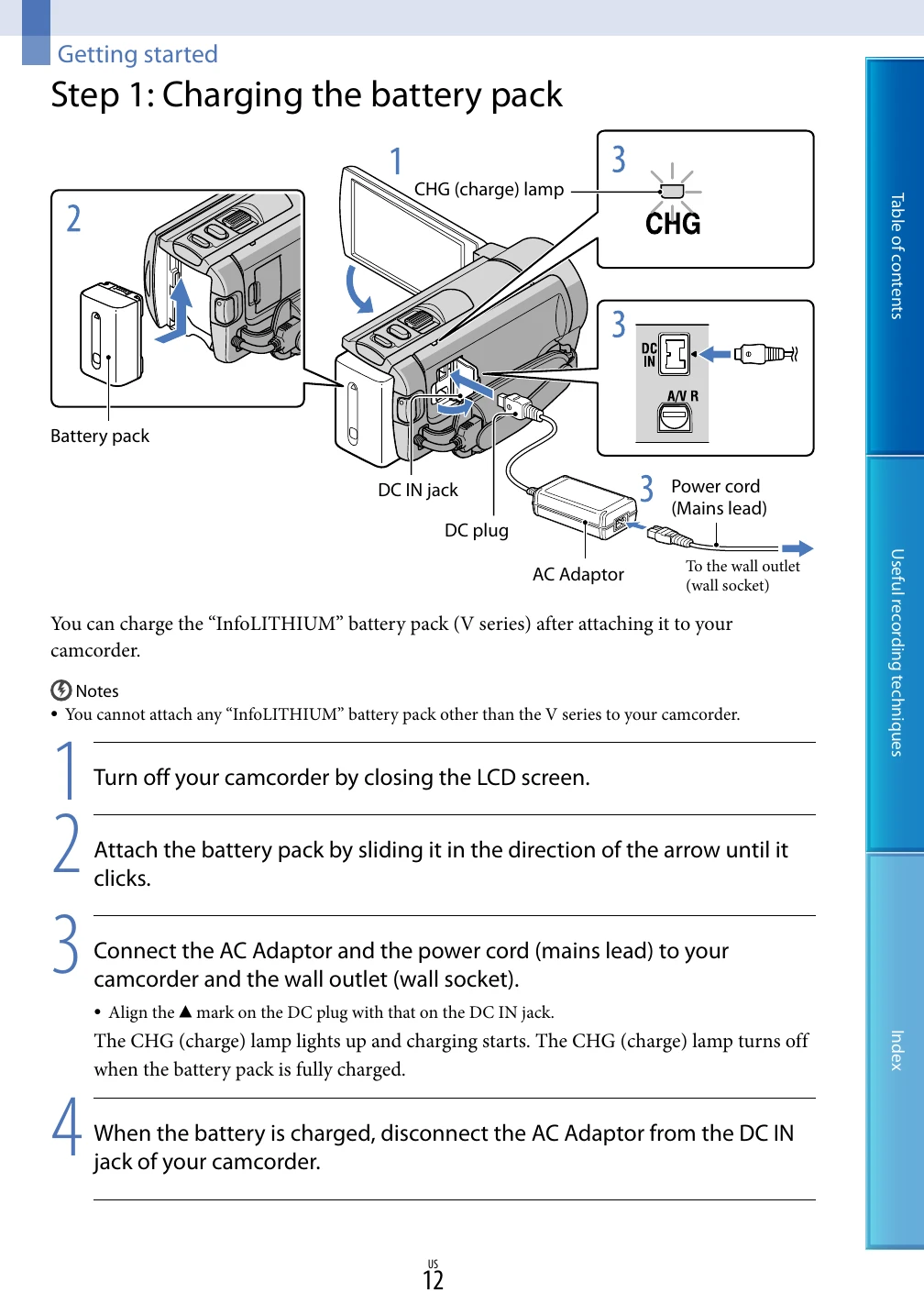
Getting Started: Charge the battery pack using the AC adapter or USB cable. Turn on the camcorder by opening the LCD screen. Set the local time and date by selecting your geographical area. Prepare the recording media by selecting either the memory card or internal memory.
Recording Movies and Photos: Press START/STOP to begin recording movies. Switch to photo mode by pressing MODE and then use the PHOTO button or START/STOP button to capture photos. Use the zoom lever for telephoto or wide-angle shots. The camcorder can automatically adjust settings for better results using Intelligent Auto.
Playback: Use the VIEW IMAGES button to access recorded content. Navigate through recorded movies and photos using the touch panel or buttons. Images can be played back on the camcorder or connected to a TV.
Saving and Managing: Save your recorded movies and photos to a computer or external media like a DVD writer. You can also use the "PMB Portable" software for easy transfer. Delete unwanted files to free up space.