Manual for DCR-TRV19/TRV22/TRV33

Manual for DCR-TRV19/TRV22/TRV33

Brand: SONY

Category: Camcorder

Document Type: Manual

Language: EN

Uploaded: Aug. 10, 2025, 12:24 a.m.
Recording Moving Pictures and Still Images

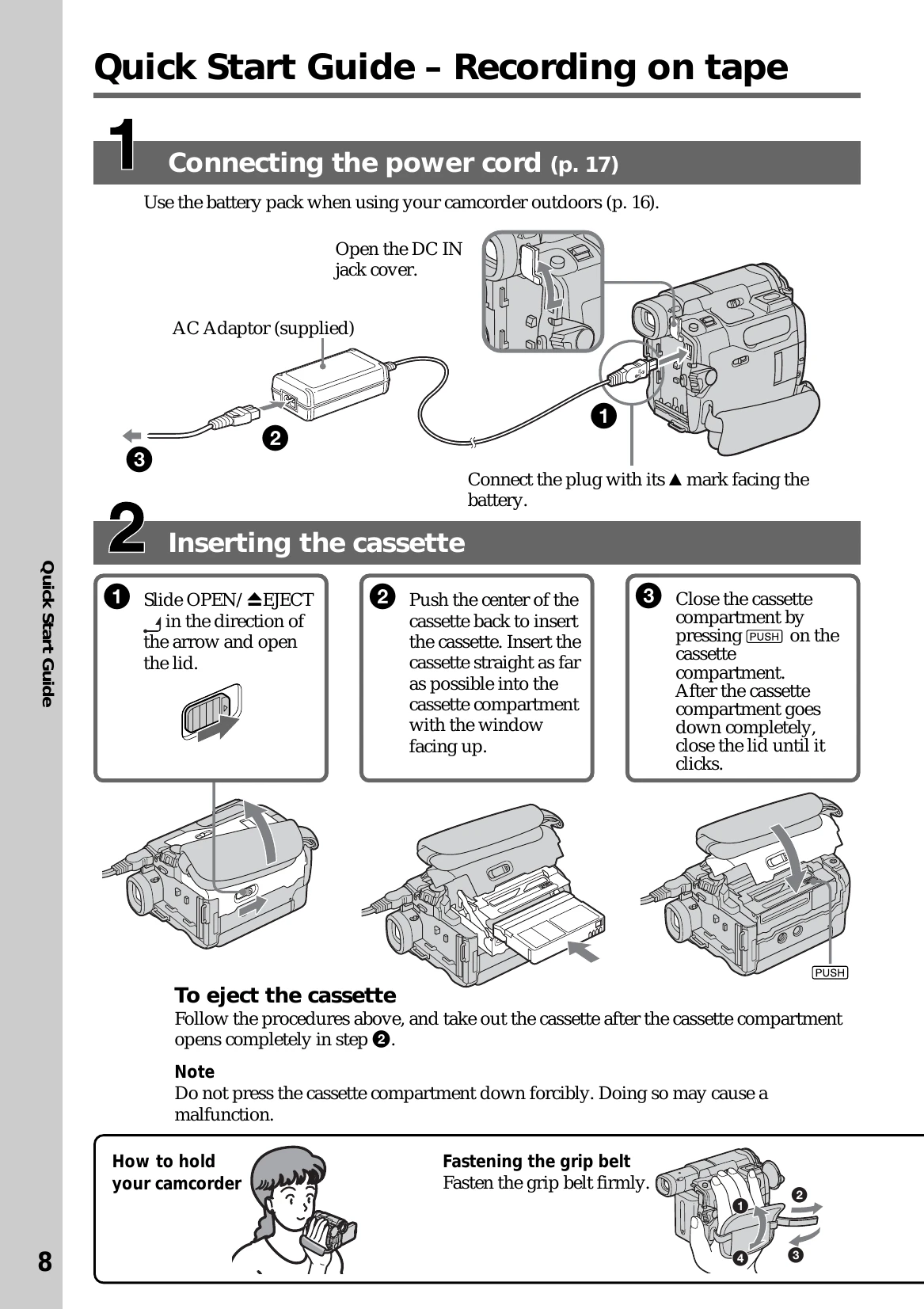
  • Insert a mini DV cassette or "Memory Stick" (DCR-TRV22/TRV33 only).
  • Connect the power cord and turn on the camcorder.
  • Set the POWER switch to CAMERA for tape recording or MEMORY for "Memory Stick" recording.
  • Press OPEN to open the LCD panel or use the viewfinder.
  • Press START/STOP to begin recording.

Playing Back Recordings

  • Set the POWER switch to VCR for tape playback or MEMORY for "Memory Stick" playback.
  • Use the touch panel or buttons to rewind, play, or stop playback.
  • View recordings on the LCD screen or viewfinder.

Connecting to a Computer

  • Use the USB cable to connect the camcorder to a computer for transferring images.
Privacy Policy