Recording moving pictures or still images, and playing them back
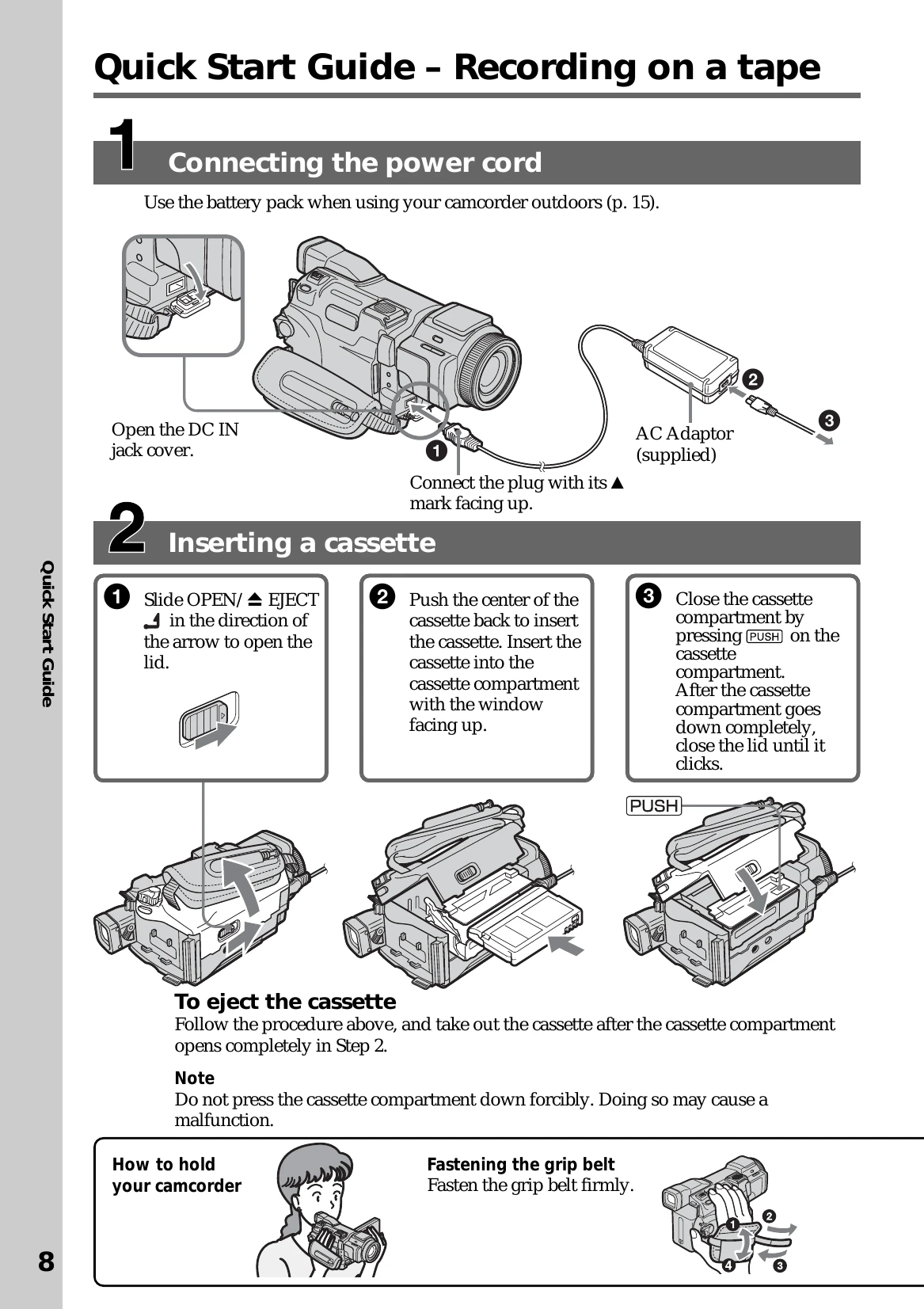
Recording moving pictures on a tape (p. 25)
Playing back a tape (p. 39)
Recording still images on a "Memory Stick” (p. 46, 109)
Recording moving pictures on a “Memory Stick” (p. 122)
Viewing still images recorded on the "Memory Stick" (p.130)
Viewing moving pictures recorded on the "Memory Stick" (p. 132)
Capturing images on the computer
Viewing moving pictures recorded on the tape using the USB cable (p. 156)
Viewing images recorded on the "Memory Stick" using the USB cable (p. 163, 168)
Capturing images on the computer from your camcorder using the USB cable (p. 158)
Converting an analog signal to digital to capture images onto the computer (p. 169)
Accessing the Internet via a USB device (optional) that supports your camcorder (DCR-TRV70 only)
Accessing the Internet, sending/receiving your e-mail. For details, refer to the Network Function/Application Operating Instructions supplied with your camcorder. (DCR-TRV70 only) (p. 171)
Other uses
Functions for adjusting exposure during recording
Functions for giving images more impact
Functions for giving a natural appearance to your recordings