Manual for FDR-AX100/FDR-AX100E/HDR-CX900/HDR-CX900E

Manual for FDR-AX100/FDR-AX100E/HDR-CX900/HDR-CX900E

Brand: SONY

Category: Camcorder

Document Type: Manual

Language: EN
Uploaded: Aug. 10, 2025, 12:17 a.m.

Manual Publish Date: 2014-01-01

Getting Started:

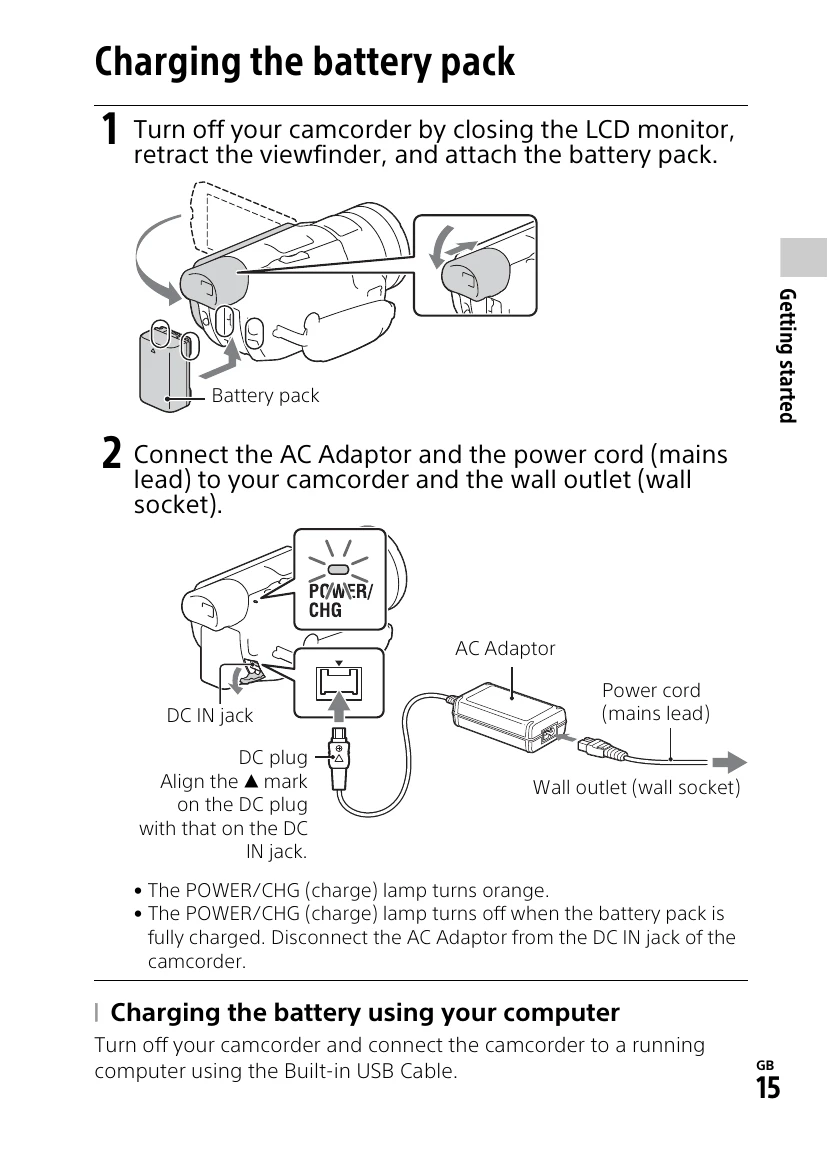
  • Charging the Battery Pack: Connect the AC adaptor and power cord to the camcorder and a wall outlet. The POWER/CHG lamp turns orange during charging and off when fully charged.
  • Turning the Power On: Open the LCD monitor or pull out the viewfinder to turn on the camcorder. Follow on-screen instructions to set language, date, and time.
  • Inserting a Memory Card: Open the cover and insert the memory card until it clicks. Ensure correct orientation.

Recording Movies:

  • Open the LCD monitor and press START/STOP to begin recording. Press START/STOP again to stop.
  • Dual Video REC: Record MP4 movies simultaneously with XAVC S or AVCHD formats. Access via MENU > [Image Quality/Size] > [Dual Video REC].
  • Focusing: Use the FOCUS MAGNIFIER to zoom in on the center of the LCD for sharp focus.

Saving Images:

  • Use PlayMemories Home software or connect to an external media device.
  • Transfer MP4 images to a smartphone via Wi-Fi.

Privacy Policy