Brand: SONY
Category: Camcorder
Document Type: Manual
Language: EN
Brand: SONY
Category: Camcorder
Document Type: Manual
Language: EN
Uploaded: Aug. 10, 2025, 12:23 a.m.
Supplied Items: Includes camcorder, AC Adaptor, power cord, Micro USB cable, HDMI cable, Operating Guide, and battery pack.
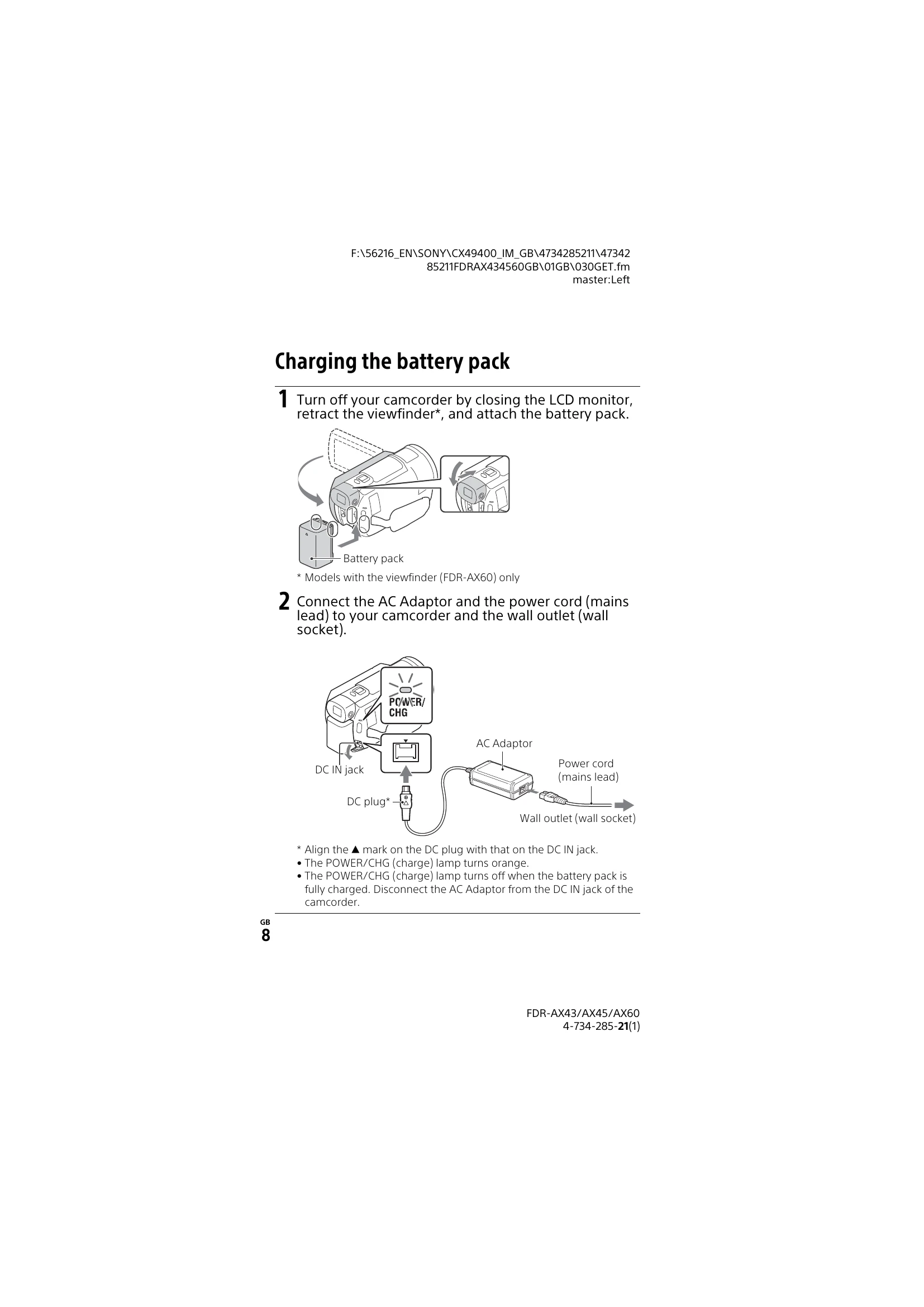
Charging: Charge the battery pack using the AC adaptor or a computer via USB. Charging times vary.
Powering On: Open the LCD monitor to turn on the camcorder. Follow on-screen prompts for initial setup (language, date/time, etc.).
Memory Card: Insert a memory card (SD/SDHC/SDXC or Memory Stick) into the card slot until it clicks. Ensure the card is compatible with the recording format.
Movie Recording: Open the LCD and press START/STOP to begin recording. Press START/STOP again to stop.
Dual Video REC: Record MP4 movies simultaneously with XAVC S or AVCHD formats.
Shooting Photos: Switch to Photo mode and press the PHOTO button.
Viewing Images: Press the View Images button to enter playback mode. Navigate through events and select images to view.
Playback Operations: Use on-screen controls for volume, play/pause, fast-forward, etc.