Manual for HDR-CX240/CX240E/PJ240/PJ240E/PJ270/PJ270E/PJ275

Manual for HDR-CX240/CX240E/PJ240/PJ240E/PJ270/PJ270E/PJ275

Brand: SONY

Category: Camcorder

Document Type: Manual

Language: EN

Uploaded: Aug. 10, 2025, 12:19 a.m.
Getting Started:
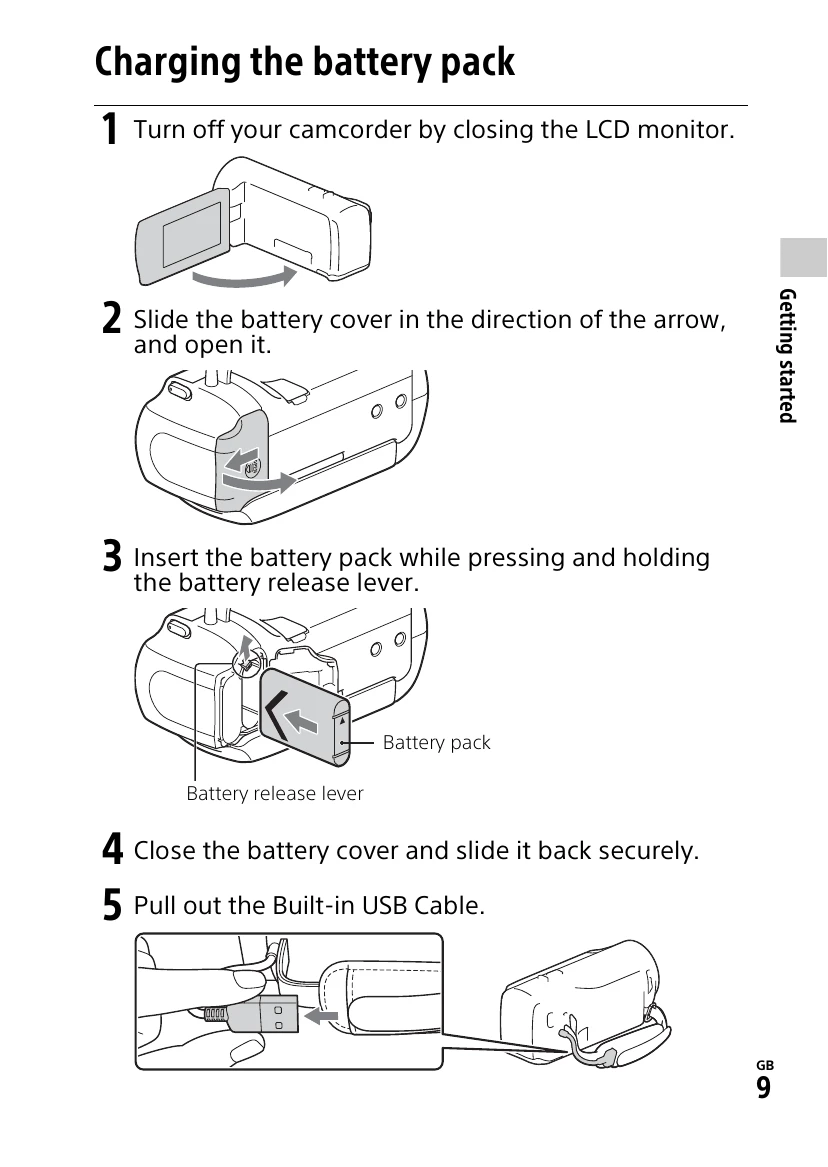
  • Charge the battery pack using the AC adapter or a computer.
  • Turn on the camcorder by opening the LCD monitor.
  • Set the language, date, and time.
  • Insert a memory card if needed.
Recording:
  • Open the lens cover.
  • Open the LCD monitor and press START/STOP to begin recording.
  • Press START/STOP again to stop recording.
  • Use the PHOTO button to capture still images during video recording.
Playback:
  • Open the LCD monitor and press the (View Images) button to enter playback mode.
  • Navigate through events using the < or > buttons.
  • Select an image to view it.
Viewing Images at a Larger Size:
  • Connect the camcorder to a TV via HDMI cable.
  • For models with a projector, press the PROJECTOR button and follow on-screen instructions.
Saving Images:
  • Use PlayMemories Home software to transfer images to your computer.
  • Transfer images to a smartphone via Wi-Fi (NFC or connection without NFC).
  • Save movies and photos to your computer via Wi-Fi.
Privacy Policy