Brand: SONY
Category: Camcorder
Document Type: Manual
Language: EN
Brand: SONY
Category: Camcorder
Document Type: Manual
Language: EN
Uploaded: Aug. 10, 2025, 12:24 a.m.
None
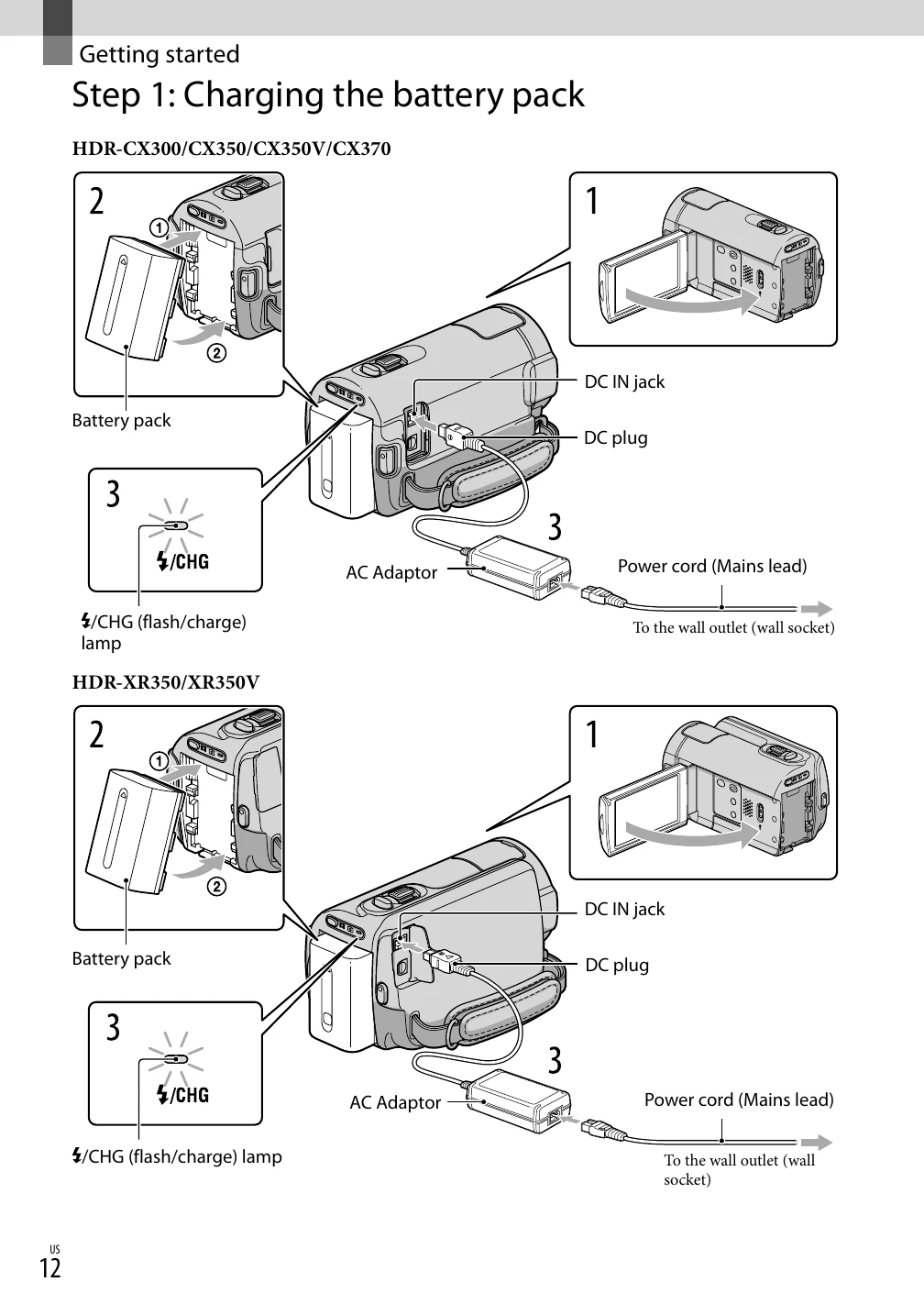
Getting Started: Prepare the power source and memory card. Charge the battery pack by connecting the AC adapter to the camcorder and a wall outlet. Close the LCD screen to turn the camcorder off. Open the LCD screen or press POWER to turn it on. Select the geographical area and set the date/time. Prepare the recording media by selecting internal memory, hard disk, or memory card for movies and photos.
Recording: Fasten the grip belt. Turn on the camcorder. Press MODE to select Movie or Photo mode. For movies, press START/STOP to begin recording and again to stop. For photos, press MODE to activate Photo mode and then press the shutter button.
Playback: Playback movies and photos on the camcorder or connect to a TV using the AV cable or HDMI. Use the camcorder controls or the remote commander for navigation.
| Indicator | Meaning |
|---|---|
| (Warning) | Warning (92) |