Manual for HDR-CX330/CX330E/PJ330E/PJ340/PJ340E/PJ350E
Brand:
SONY
Category: Camcorder
Document Type: Manual
Language: EN
Uploaded: Aug. 10, 2025, 12:16 a.m.
Getting Started:
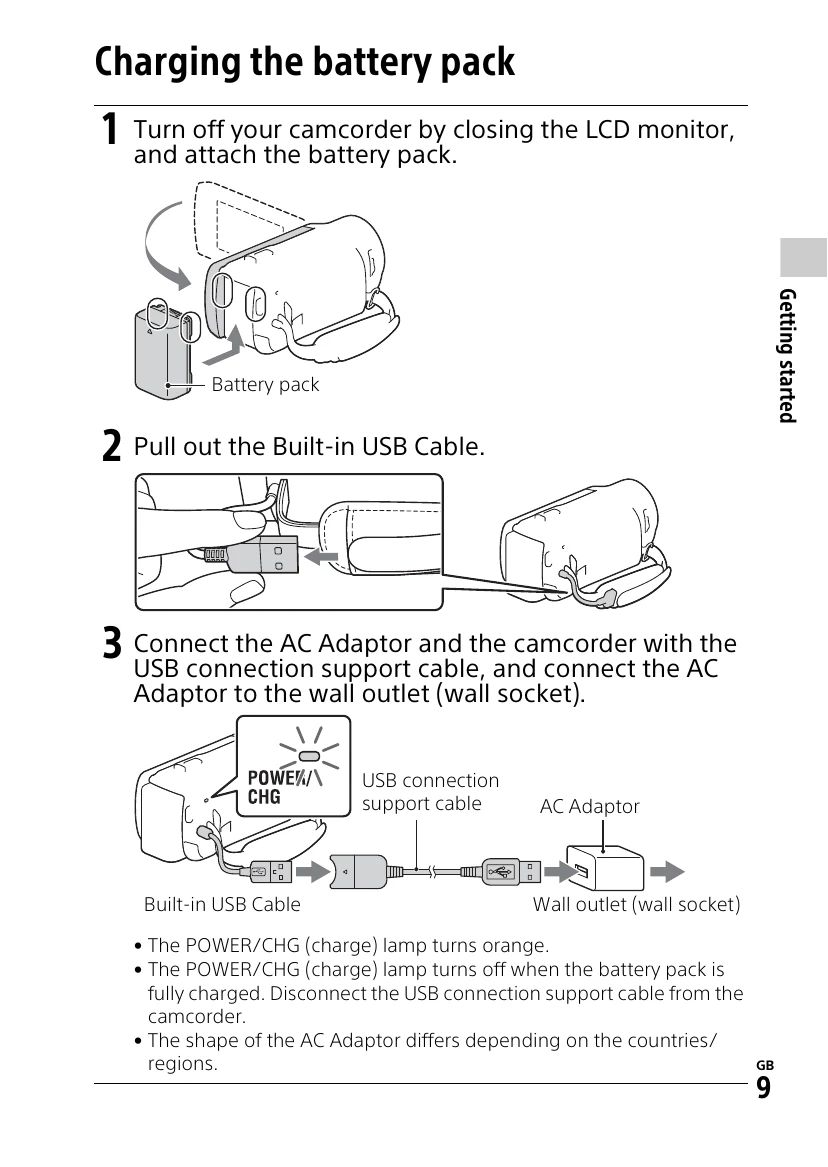
Charging the battery pack: Attach the battery pack, pull out the built-in USB cable, and connect to the AC adapter and wall outlet. The POWER/CHG lamp turns orange during charging and turns off when fully charged.
Turning the power on: Open the LCD monitor and turn the power on. Select language, region, date, and time. Close the LCD monitor to turn off the power.
Inserting a memory card: Open the cover and insert the memory card until it clicks. Ensure it is inserted in the correct direction.
Recording Movies:
Open the lens cover.
Open the LCD monitor and press START/STOP to begin recording. Press START/STOP again to stop.
Shooting Photos:
Open the lens cover.
Open the LCD monitor and select MODE to Photo.
Press the PHOTO button lightly to focus, then press fully to take the picture.