Manual for HDR-CX405/CX440/PJ410/PJ440

Manual for HDR-CX405/CX440/PJ410/PJ440

Brand: SONY

Category: Camcorder

Document Type: Manual

Language: EN
Uploaded: Aug. 10, 2025, 12:25 a.m.

Manual Publish Date: 2015

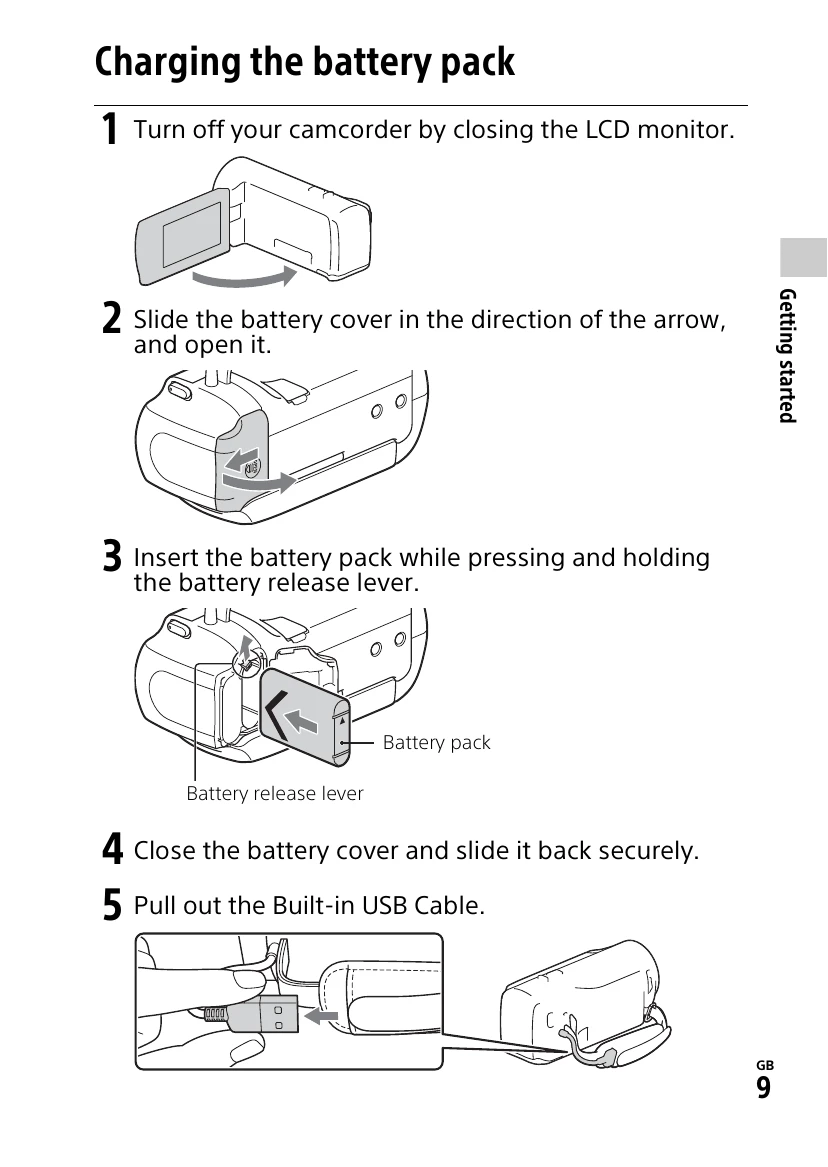
  • Getting Started: Learn to charge the battery pack, turn on the camcorder, and insert a memory card.
  • Recording/Playback: Record movies and photos, and then play them back or view them on a larger screen.
  • Saving Images: Import and manage your movies and photos using PlayMemories Home, transfer them to your smartphone via Wi-Fi, or save them to your computer.
  • Customizing: Adjust camera settings and personalize your camcorder's functions.

Troubleshooting and error codes

Problem Solution
If you run into any problems using your camcorder:
  • Check your camcorder referring to Help Guide (page 7).
  • Disconnect the power source, attach the power source again after about 1 minute, and turn the camcorder on.
  • Initialize your camcorder. All settings, including the clock setting, are reset.
  • Contact your Sony dealer or local authorized Sony service facility.
Privacy Policy