Manual for HDR-CX550/CX550V/XR550/XR550V

Manual for HDR-CX550/CX550V/XR550/XR550V

Brand: SONY

Category: Camcorder

Document Type: Manual

Language: EN
Uploaded: Aug. 10, 2025, 12:24 a.m.

Getting Started:

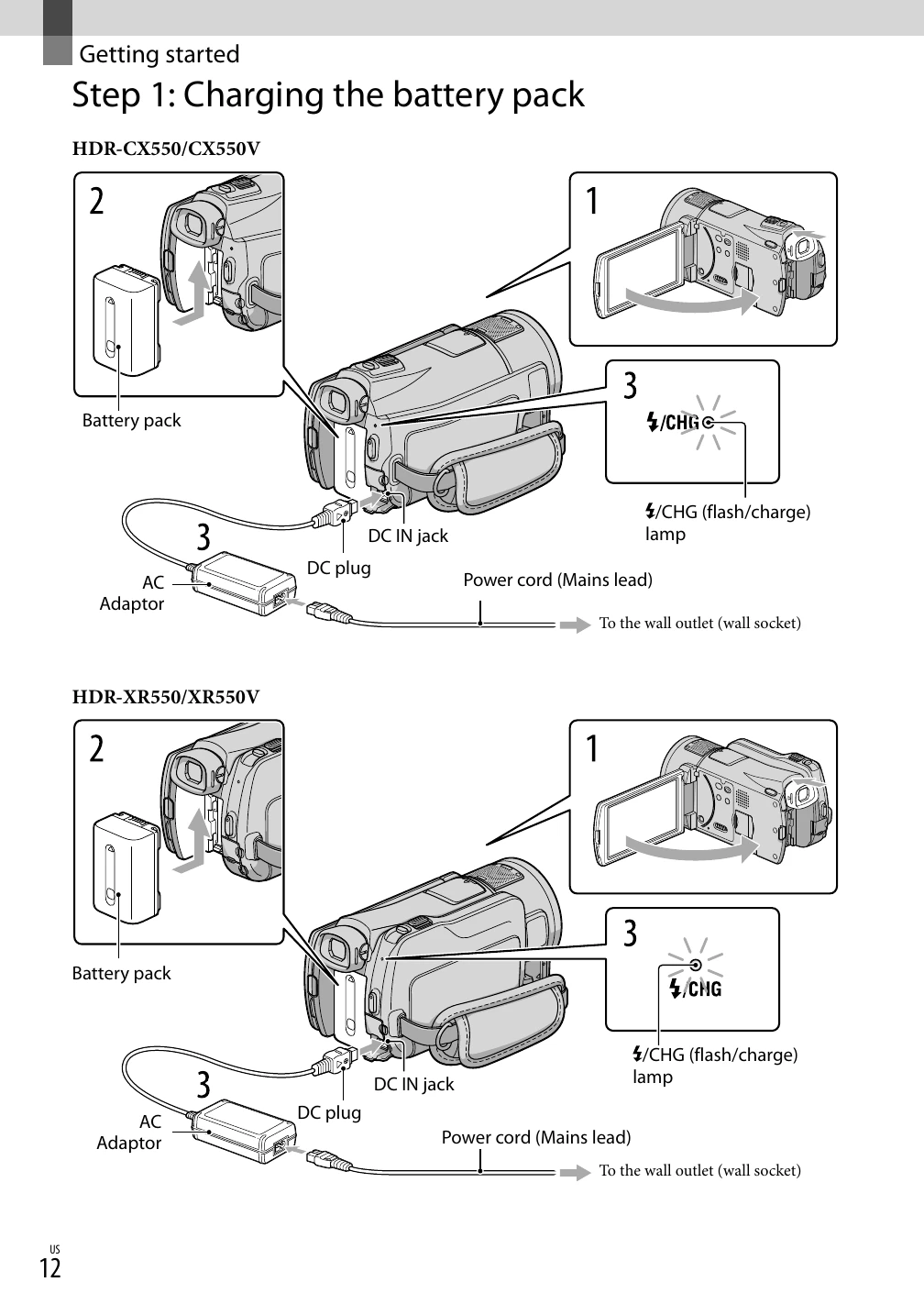
  1. Charge the battery pack using the AC adapter.
  2. Turn on the camcorder by opening the LCD screen and pressing POWER. Set the date and time.
  3. Prepare the recording media by selecting either internal memory or a memory card.
  4. Insert a memory card if using one.

Recording Movies and Photos:

  1. Fasten the grip belt.
  2. Open the LCD screen.
  3. Press MODE to select either movie or photo recording.
  4. Press START/STOP to begin recording or capture a photo.

Playback:

  1. Open the LCD screen.
  2. Use the VIEW IMAGES button to access recorded content.
  3. Navigate and play back movies and photos on the camcorder or connect to a TV.

Saving Images:

  1. Connect the camcorder to a computer or use external media (like a DVD writer) to save your recordings.

Customizing:

  1. Explore menus to customize settings like shooting options, playback preferences, and general settings.

Troubleshooting and error codes

Indicator Meaning
MENU MENU button (66)
5.1ch 2ch AUDIO MODE (79)
Self-timer icon Self-timer recording (80)
Gps icon GPS tracking status (53)
Flash icon Flash (81)/ REDEYE REDUC (81)
Mic icon MICREF LEVEL low (78)
4:3 WIDE SELECT (80)
Video camera icon BLT-IN ZOOM MIC (78)
Battery icon Remaining battery
Folder icon Recording folder
Arrow up left Return button (66)
[STBY]/[REC] Recording status (22)
Picture icon Photo size (80)
Play button Slide show set (40)
Night mode icon NightShot (30)
Warning icon Warning (98)
Power button icon Playback mode (34)
Drop icon Drop sensor off (90)
Drop icon Drop sensor activated (90)
Indicator light red FADER (71)
Hdmi logo HD/STD SET (27)
Night mode icon LOW LUX (77)
Play button Manual focus (74)
Scene icon SCENE SELECTION (71)
Color palette icon White balance (72)
Camera stabilizer icon SteadyShot off (77)
Spot metering icon SPOT MTR/FCS (73)/ SPOT METER (73)/ EXPOSURE (73)
Aperture icon AE SHIFT (74)
WB icon WB SHIFT (75)
Lens icon TELE MACRO (74)
Color wheel icon X.V.COLOR (79)
Shutter speed icon SHUTTER SPEED (31)
Privacy Policy