Supplied Items: Unpack and identify all included accessories (Camcorder, AC Adaptor, USB cable, HDMI cable, battery pack, operating guide).
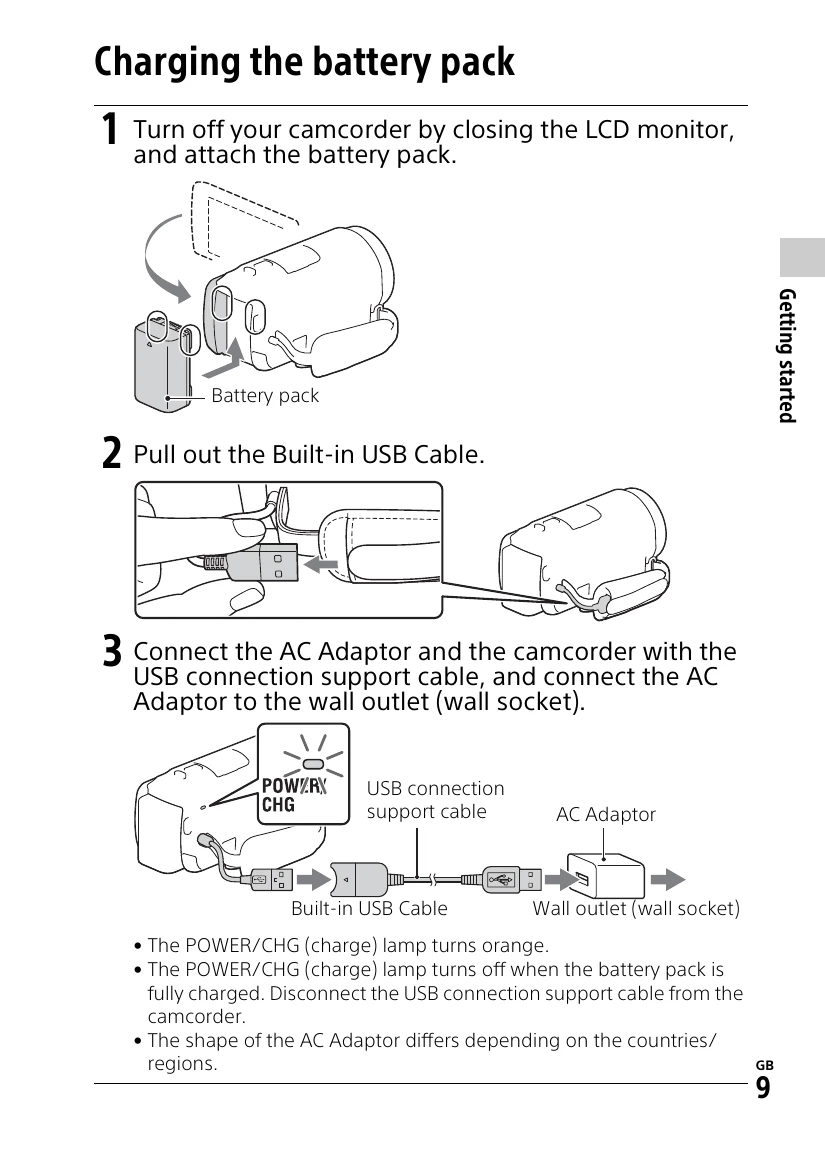
Charging the Battery Pack: Connect the battery pack to the camcorder, then use the AC adaptor and USB connection support cable to charge. The POWER/CHG lamp indicates charging status.
Turning the Power On: Open the LCD monitor and power on the camcorder. Follow on-screen prompts to set language, date, and time.
Inserting a Memory Card: Open the cover and insert the memory card until it clicks. Ensure it's inserted in the correct direction.
Recording Movies:
Open the LCD monitor and press START/STOP to begin recording. Press START/STOP again to stop.
Shooting Photos:
Open the LCD monitor, select MODE to (Photo), then press PHOTO to focus and capture.