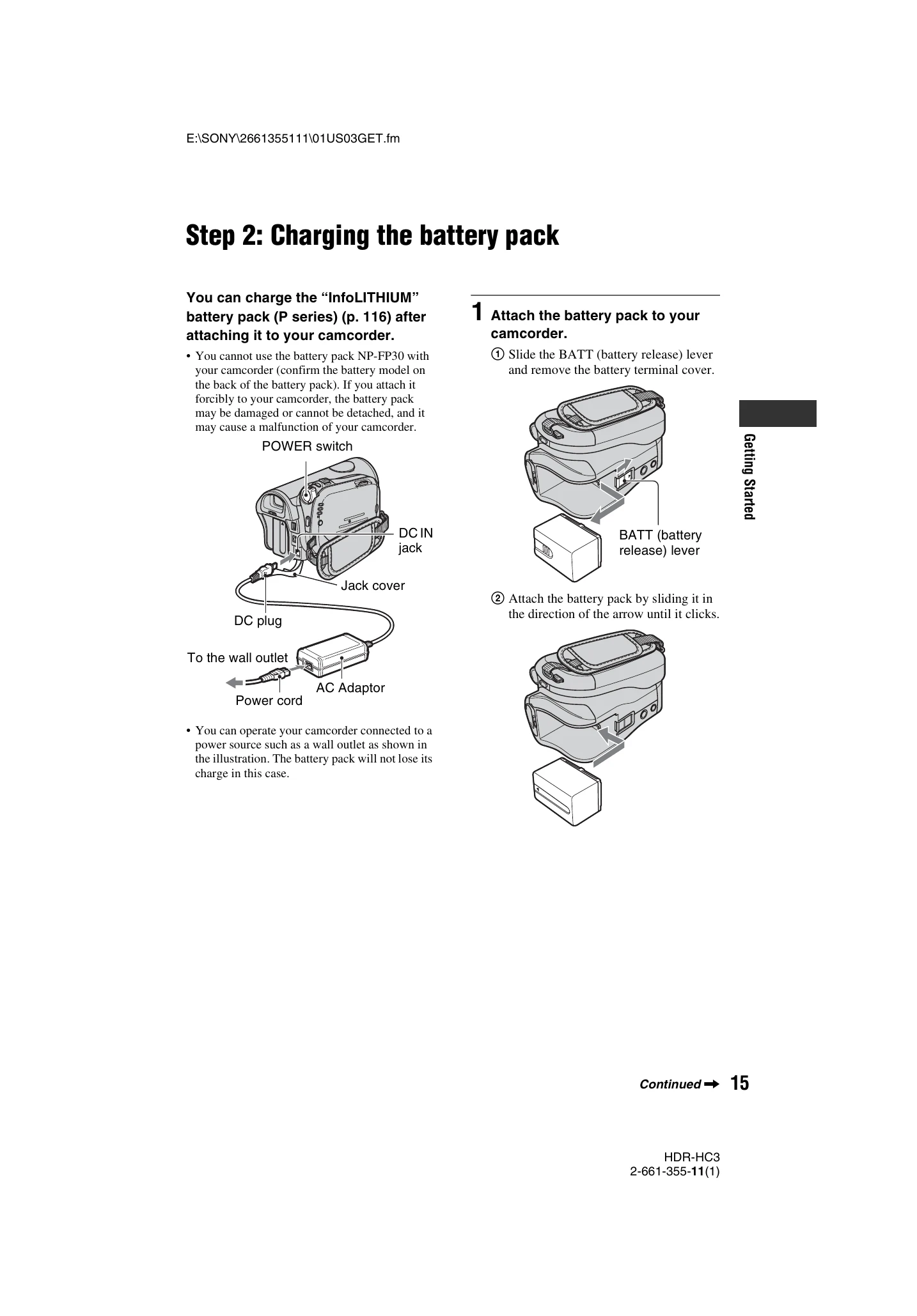
Charging the battery: Attach the battery pack to the camcorder, slide the POWER switch to OFF (CHG), connect the AC Adaptor to the camcorder and then to the wall outlet. The CHG lamp indicates charging status.
Turning the power on: Slide the POWER switch to the desired mode (CAMERA-TAPE, CAMERA-MEMORY, PLAY/EDIT). The lens cover opens automatically.
Holding the camcorder: Hold the camcorder firmly with a good grip and fasten the grip belt.
Adjusting LCD and Viewfinder: Open the LCD panel and rotate it for optimal viewing. Use the viewfinder for battery saving or when the LCD is poor. Adjust viewfinder brightness as needed.
Using the Touch Panel: Support the LCD panel with your hand and touch the on-screen buttons for playback or settings adjustment.
Changing Language: Select the desired language in the [LANGUAGE] setting within the [TIME/LANGU.] menu.
Checking Screen Indicators: Touch [MENU] and then [DISP GUIDE] to view the meaning of indicators on the screen.
To turn off power: Slide the POWER switch to OFF (CHG). The camcorder may automatically turn off after a set period to save battery.