Brand: SONY
Category: Camcorder
Document Type: Manual
Language: EN
Brand: SONY
Category: Camcorder
Document Type: Manual
Language: EN
Uploaded: Aug. 10, 2025, 12:22 a.m.
None
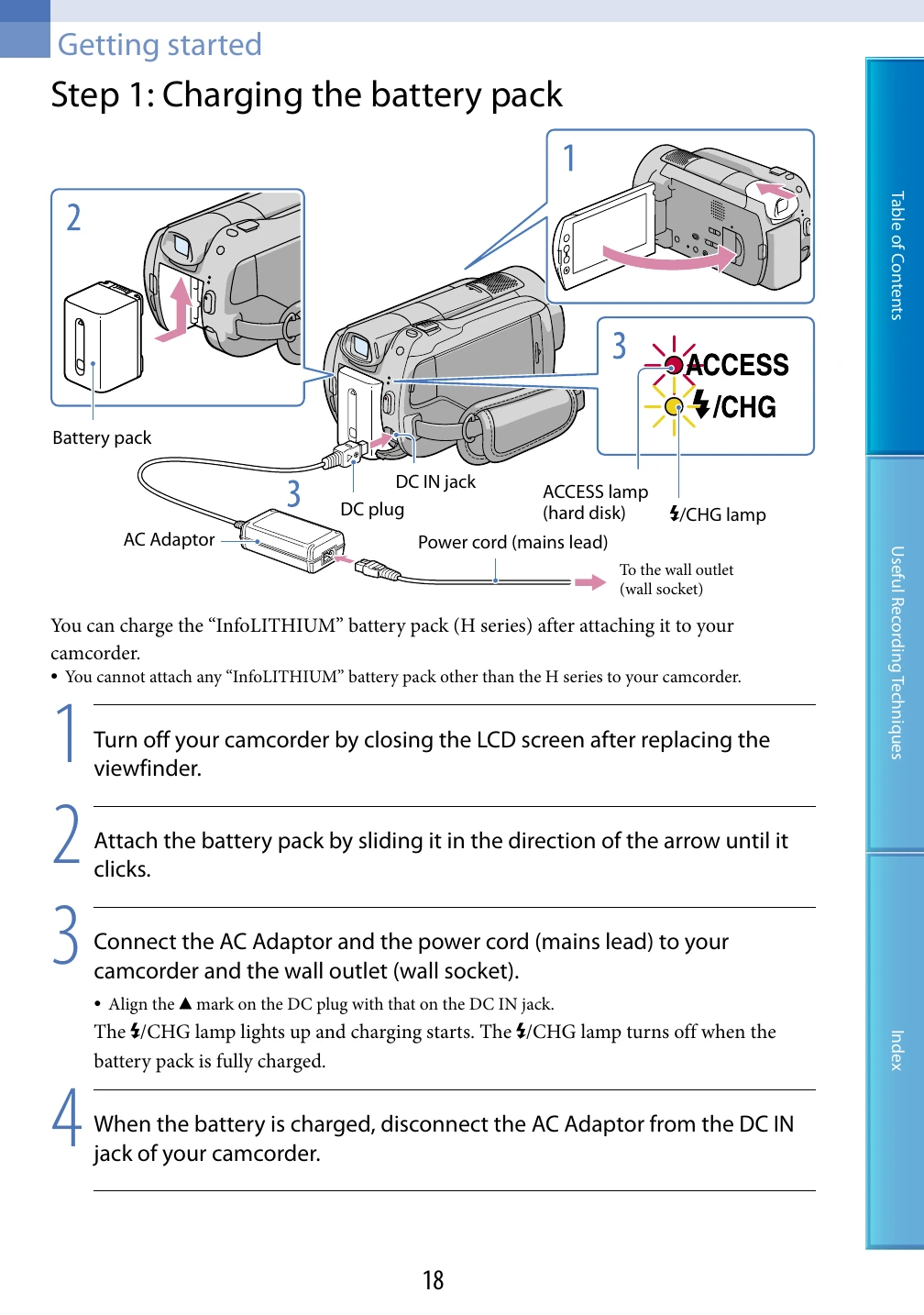
1. Charge the battery pack: Connect the AC Adaptor and power cord to the camcorder and a wall outlet. The 4/CHG lamp indicates charging status.
2. Power On and Set Date/Time: Open the LCD screen to turn on the camcorder. Select your geographical area and then set the date and time. You can also set DST (Daylight Saving Time).
Basic Operation:
Using Menus: The camcorder has two main menus: HOME MENU for general settings and OPTION MENU for context-specific settings. Use the buttons indicated to navigate and select options.
Recording Movies/Photos: Use the POWER button to turn on the camcorder. The (Movie) mode records movies, and the (Photo) mode records photos.
Playback: Use the VIEW IMAGES button to access recorded content.
Screen Indicators: Various icons on the LCD screen provide information about recording status, battery, media, and settings.
Care and Handling: Includes instructions on cleaning the lens and LCD screen, handling moisture condensation, and battery care.