Manual for HVR-Z5E/Z5P

Manual for HVR-Z5E/Z5P

Brand: SONY

Category: Camcorder

Document Type: Manual

Language: EN

Uploaded: Aug. 10, 2025, 12:21 a.m.
Getting Started

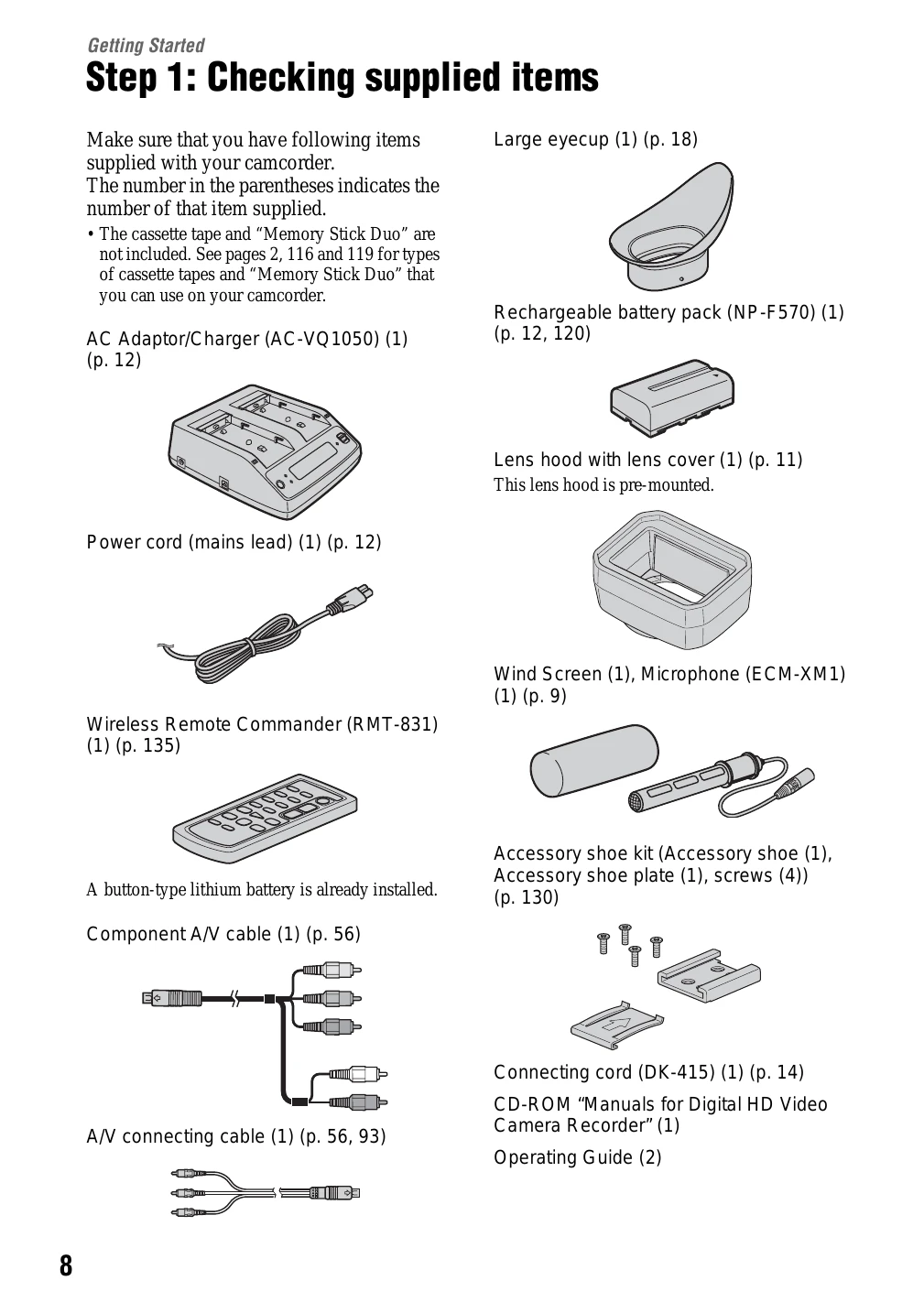
Step 1: Checking supplied items

Make sure you have the following items supplied with your camcorder.
  • AC Adaptor/Charger
  • Power cord
  • Rechargeable battery pack
  • Large eyecup
  • Lens hood with lens cover (pre-mounted)
  • Wind Screen, Microphone
  • Accessory shoe kit
  • Component A/V cable
  • A/V connecting cable
  • Wireless Remote Commander
  • Connecting cord
  • CD-ROM Manuals for Digital HD Video Camera Recorder
  • Operating Guide

Step 2: Attaching the supplied microphone and the lens hood with lens cover

  • Attach the wind screen to the supplied microphone.
  • Place the microphone in the microphone holder, close the cover, and shut the clamp.
  • Connect the plug of the microphone to the INPUT1 jack.
  • Put the microphone cable into the cable holder.
  • Select channels using the CH1 and CH2 switches.
  • Set the INPUT1 switch to an appropriate position for the microphone.

Step 3: Charging the battery pack

  • Set the mode change switch to CHARGE.
  • Connect the power cord to the AC Adaptor/Charger and the wall outlet.
  • Place the battery pack in the slot of the AC Adaptor/Charger.
  • After charging, all segments of the battery mark will appear in the display window.
  • Remove the battery pack when charging is complete.

Step 4: Turning the power on and holding your camcorder properly

  • Slide the POWER switch to CAMERA or VCR while pressing the green button.
  • Hold the camcorder properly and ensure a good grip.
  • Fasten the grip belt.
  • To turn off the power, slide the POWER switch to OFF while pressing the green button.

Step 5: Adjusting the LCD panel and viewfinder

  • Open and rotate the LCD panel to the best angle.
  • Adjust the viewfinder lens until the picture becomes clear.
  • To turn off the LCD backlight, press and hold the DISPLAY/BATT INFO button.
  • Use the large eyecup if the picture in the viewfinder is hard to see.

Step 6: Setting the date and time

  • Press the MENU button.
  • Select (OTHERS) and then [CLOCK SET].
  • Set the year, month, day, hour, and minute.
  • You can change the on-screen displays to show messages in a specified language by selecting [LANGUAGE].

Step 7: Inserting a tape or a “Memory Stick Duo”

  • Cassette tape: Slide and hold the OPEN/EJECT lever to open the lid, insert the cassette, and push.
  • “Memory Stick Duo”: Open the “Memory Stick Duo” slot cover, insert the “Memory Stick Duo” until it clicks.
Privacy Policy