Brand: SONY
Category: Camcorder
Document Type: Manual
Language: EN
Brand: SONY
Category: Camcorder
Document Type: Manual
Language: EN
Uploaded: Aug. 10, 2025, 12:17 a.m.
Sony provides a warranty for this product, refer to warranty documents for details.
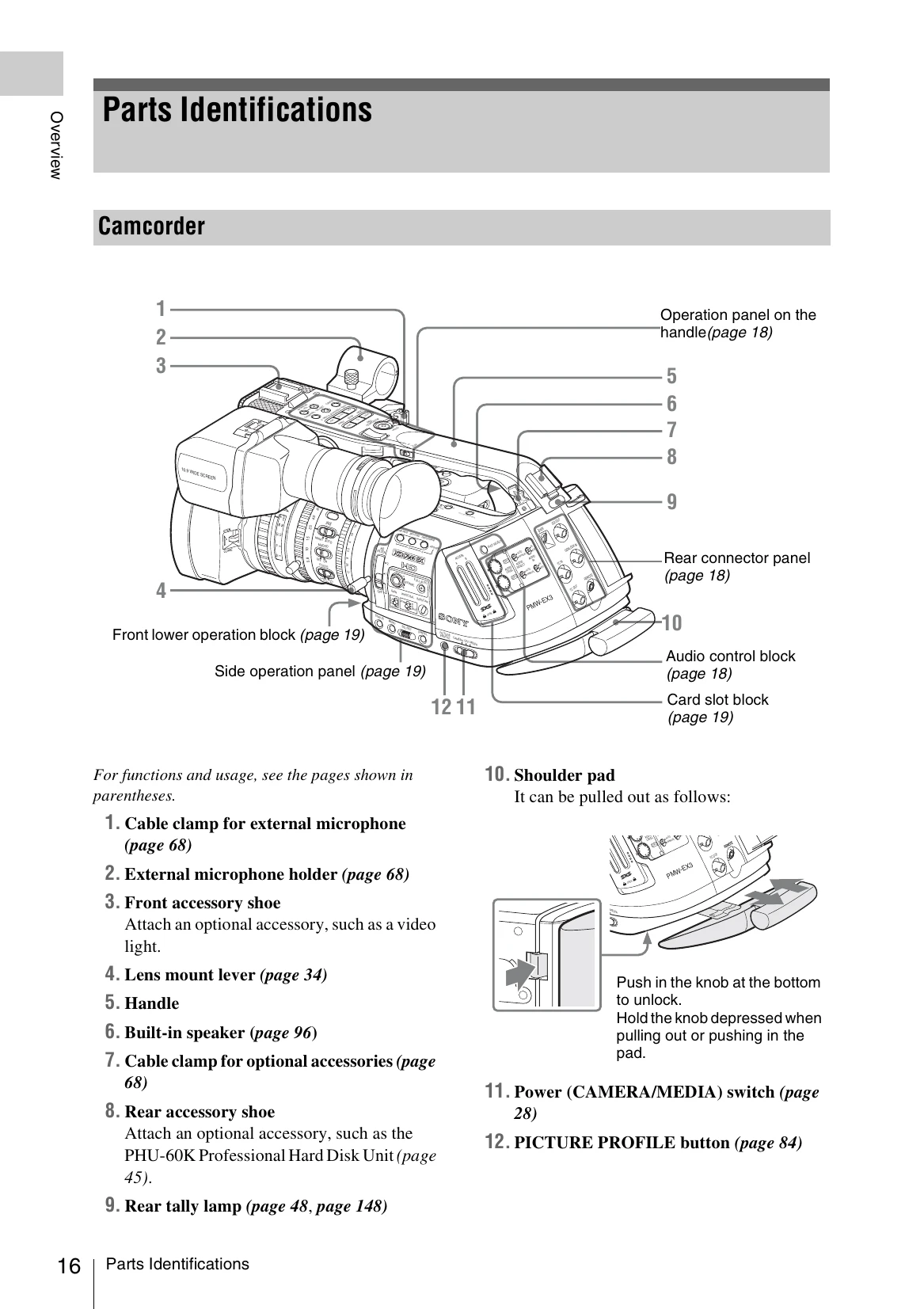
Powering On/Off: Use the POWER switch (page 28) located on the camera body. Ensure the battery pack is inserted or the AC adapter is connected.
Recording: Press the REC START/STOP button on the handle or camera body (page 48). The REC/TALLY lamp will illuminate.
Playback: Press the THUMBNAIL button to access recorded clips. Use the playback controls like PLAY/PAUSE and F FWD/PREV buttons to navigate and play clips (page 94).
Basic Settings: Adjust settings like White Balance (page 51), Gain (page 55), and Shutter Speed (page 56) using the dedicated buttons and menus on the camera.
Lens Control: Use the rings on the lens for zoom, focus, and iris adjustment. The grip also features a zoom switch (page 21).