Manual for PMW-TD300

Manual for PMW-TD300

Brand: SONY

Category: Camcorder

Document Type: Manual

Language: EN
Uploaded: Aug. 10, 2025, 12:18 a.m.

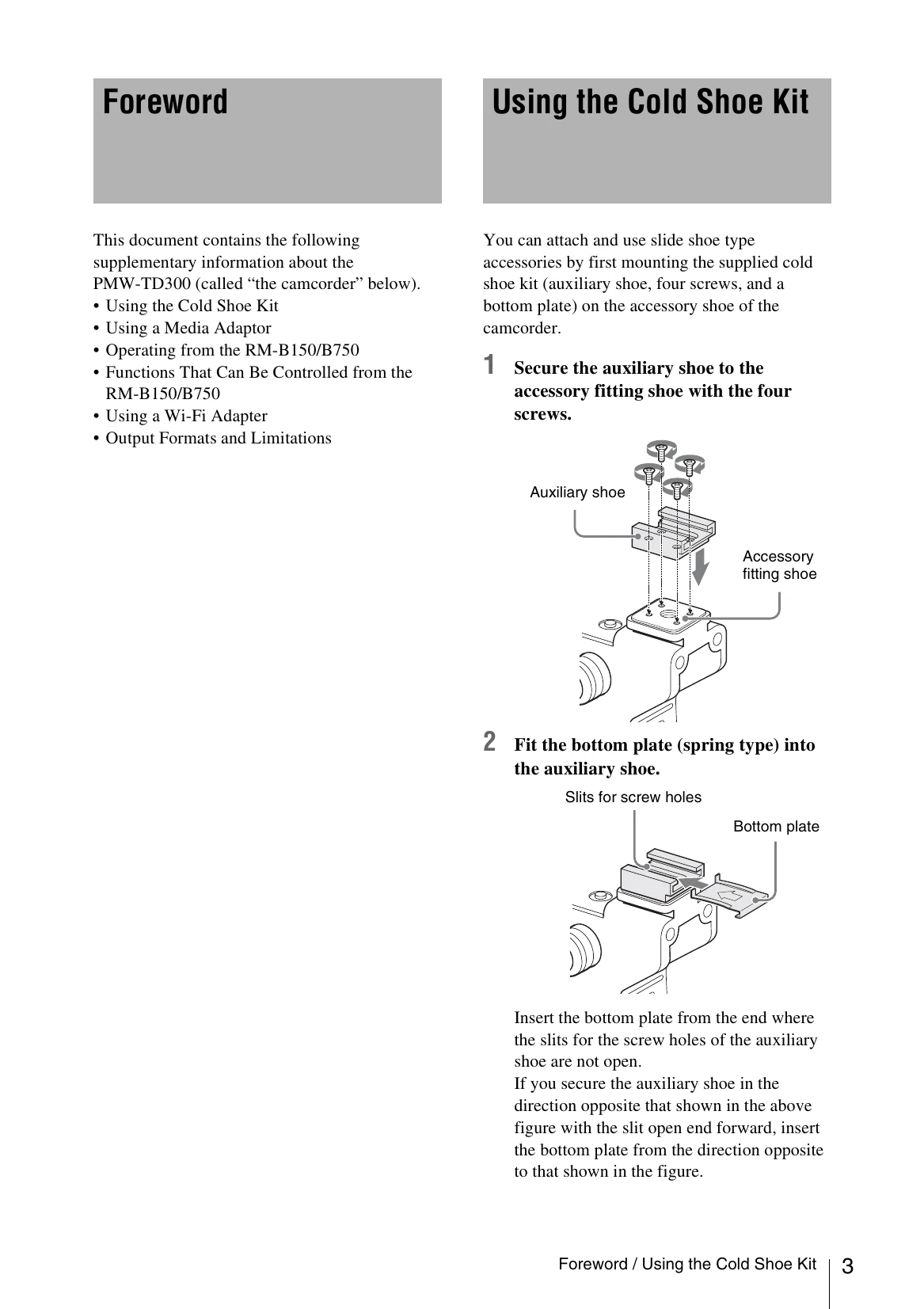
Using the Cold Shoe Kit

  1. Secure the auxiliary shoe to the accessory fitting shoe with the four screws.
  2. Fit the bottom plate (spring type) into the auxiliary shoe.

Using a Media Adaptor

Formatting

  1. Select OPERATION > Format Media in the setup menu.
  2. Select the slot to format.
  3. Turn the MENU knob to select [Execute], and press the knob.
  4. Turn the MENU knob to select "Execute", and then press the knob.

Connection between the camcorder and a computer

To use a "Memory Stick" or MEAD-SD01 in which data have been recorded with an XDCAM EX-series product, establish USB connection between the computer and this camcorder and insert it into the slot of the camcorder, or use a specified USB card reader.

Privacy Policy