Brand: SONY
Category: TV
Document Type: Manual
Language: EN
Brand: SONY
Category: TV
Document Type: Manual
Language: EN
Uploaded: Nov. 21, 2025, 7:37 p.m.
Using Your New TV
Getting Started
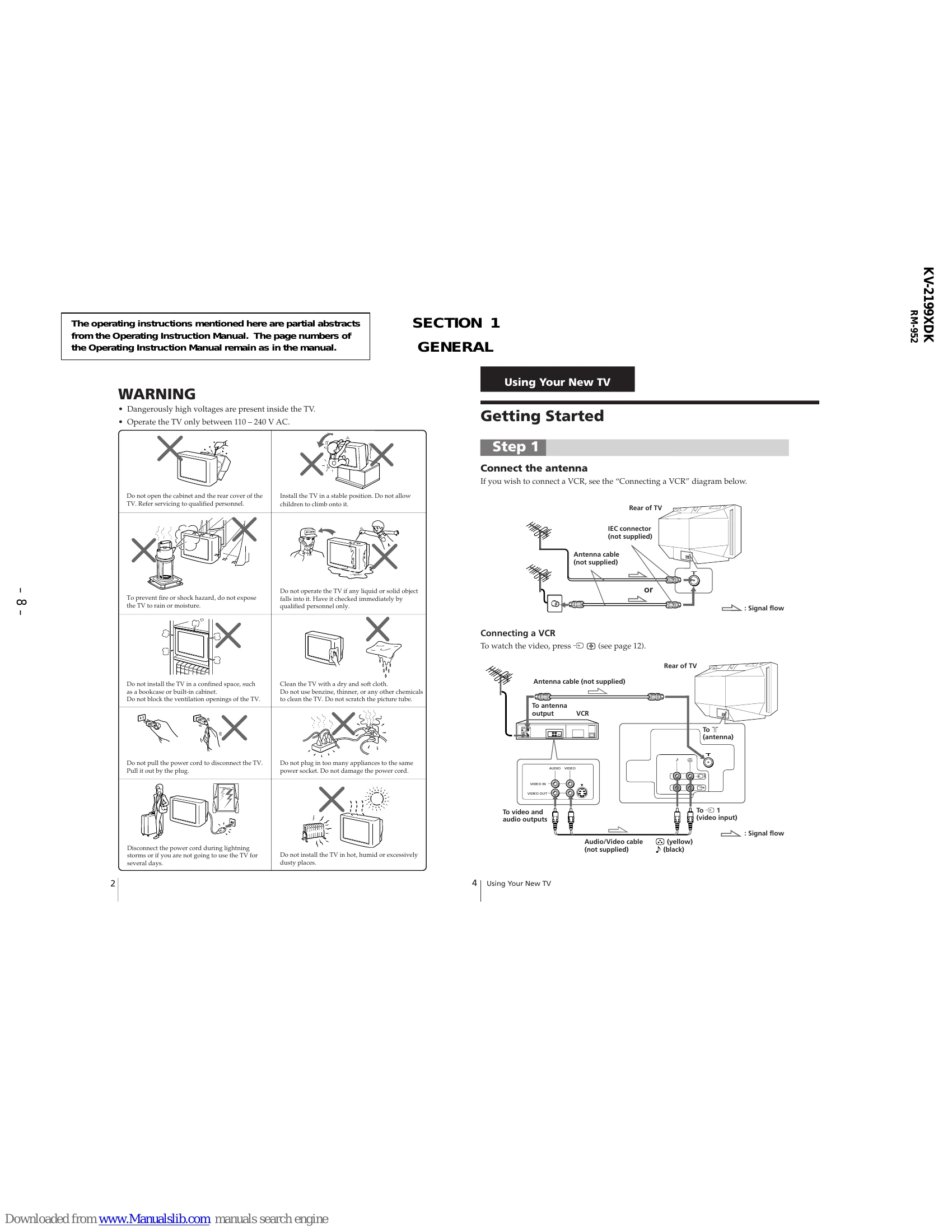
Step 1: Connect the antenna
Connect the antenna to the TV's IEC connector. If connecting a VCR, follow the provided diagram for connecting the VCR to the TV and antenna.
Step 2: Insert the batteries into the remote
Insert the batteries into the remote control. Do not mix old and new batteries.
Step 3: Preset the channels automatically
Press the power button to turn on the TV. Then, press 'AUTO PROGR.' to automatically scan and store TV channels. The TV system will indicate 'B/G' or 'D/K'. Tips are provided for stopping or adjusting the channel presetting.
Now You Are Ready...
Refer to page 11 for instructions on watching your TV.
| Symptom | Solutions | Possible cause |
| Snowy picture |
|
|
| Distorted picture |
|
The TV system setting is inappropriate. |
| No picture |
|
|
| Good picture / No sound |
|
|
| Double images or "ghosts" |
|
|
| No color |
|
|
| Abnormal color patches |
|
The magnetic disturbance from external speakers or other equipment, or the direction of the earth's magnetic field may affect the TV. |