Manual for HDC4800

Manual for HDC4800

Brand: SONY

Category: Video Camera

Document Type: Manual

Language: EN
Uploaded: Aug. 10, 2025, 12:19 a.m.

Warranty Information

Sony will not be liable for damages of any kind, including but not limited to, compensation for loss of profits.

Basic Operation

Mounting the Camera to a Tripod

  1. Attach the tripod attachment to the tripod and secure it with the screw.
  2. Place the camera on the tripod attachment, and slide forward it along the groove of the tripod attachment until it clicks.
  3. Make sure that the camera is securely attached by moving it back and forth.

Adjusting the Shoulder Pad Position

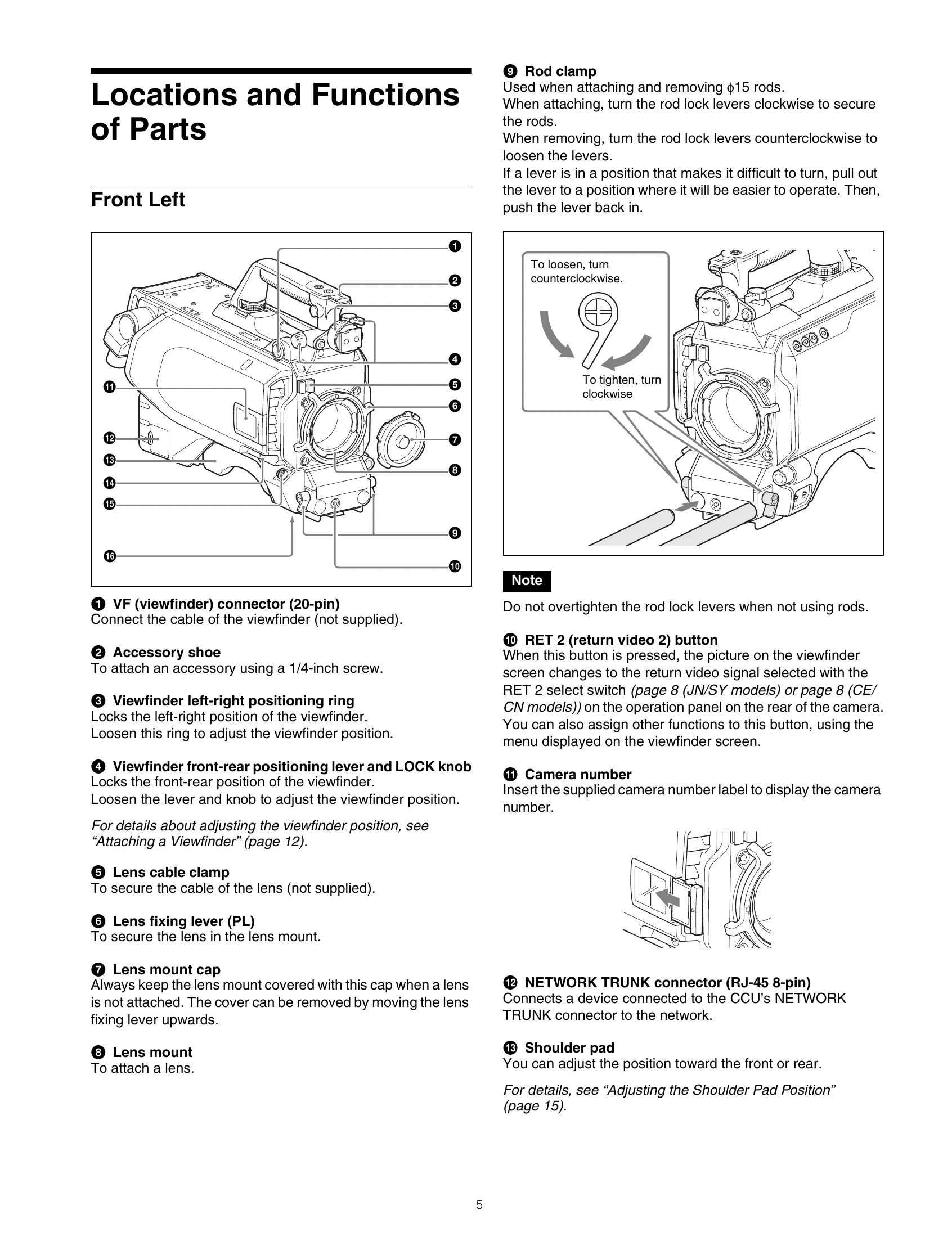
  1. Raise the lever in the center of the shoulder pad to unlock the shoulder pad.
  2. Slide the shoulder pad backward or forward until it is in the most convenient position.
  3. Move the lever down to lock the shoulder pad in the selected position.

Attaching a Lens

Attaching a PL lens

  1. Turn the lens fixing lever (PL) counterclockwise, and remove the lens mount cap from the lens mount.
  2. Align the notch on the lens with the positioning pin on the upper part of the lens mount, and insert the PL lens into the mount.
  3. While supporting the PL lens, turn the lens fixing lever (PL) clockwise to secure the lens.
Privacy Policy