Manual for HDR-AS200V

Manual for HDR-AS200V

Brand: SONY

Category: Video Camera

Document Type: Manual

Language: EN
Uploaded: Aug. 10, 2025, 12:15 a.m.

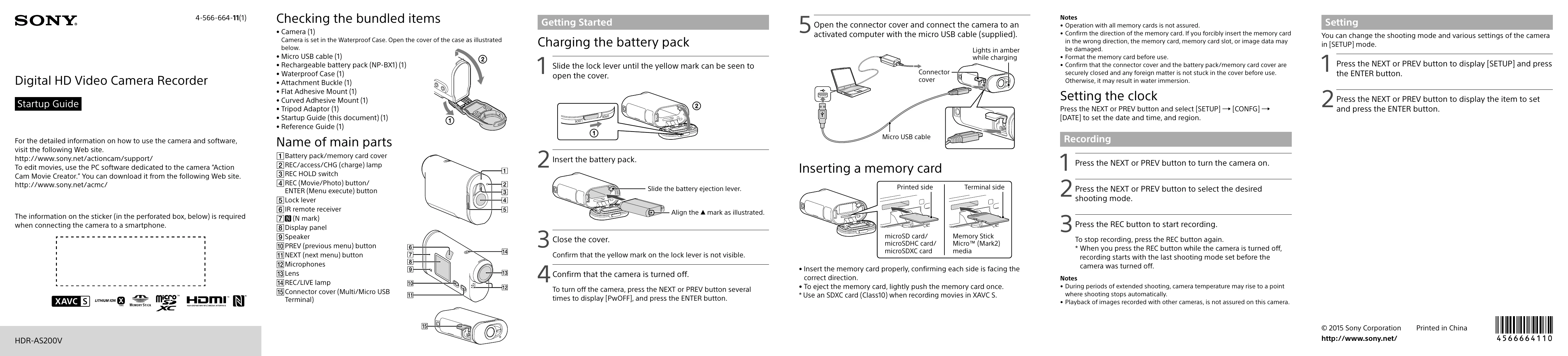
Checking the bundled items

  • Camera (1)
  • Micro USB cable (1)
  • Rechargeable battery pack (NP-BX1) (1)
  • Waterproof Case (1)
  • Attachment Buckle (1)
  • Flat Adhesive Mount (1)
  • Curved Adhesive Mount (1)
  • Tripod Adaptor (1)
  • Startup Guide (this document) (1)
  • Reference Guide (1)

Charging the battery pack

  1. Slide the lock lever until the yellow mark can be seen to open the cover.
  2. Slide the battery ejection lever.
  3. Confirm that the yellow mark on the lock lever is not visible.
  4. Confirm that the camera is turned off. To turn off the camera, press the NEXT or PREV button several times to display [PwOFF], and press the ENTER button.

Inserting a memory card

  1. Insert the battery pack.
  2. Insert the memory card properly, confirming each side is facing the correct direction.
  3. To eject the memory card, lightly push the memory card once. Use an SDXC card (Class10) when recording movies in XAVC S.

Setting the clock

Press the NEXT or PREV button and select [SETUP] → [CONFG] → [DATE] to set the date and time, and region.

Recording

  1. Press the NEXT or PREV button to turn the camera on.
  2. Press the NEXT or PREV button to select the desired shooting mode.
  3. Press the REC button to start recording. To stop recording, press the REC button again.

Setting

You can change the shooting mode and various settings of the camera in [SETUP] mode.

  1. Press the NEXT or PREV button to display [SETUP] and press the ENTER button.
  2. Press the NEXT or PREV button to display the item to set and press the ENTER button.
Privacy Policy