Manual for HDR-CX450/CX455/CX485/CX625/CX675/PJ 675

Manual for HDR-CX450/CX455/CX485/CX625/CX675/PJ 675

Brand: SONY

Category: Video Camera

Document Type: Manual

Language: EN

Uploaded: Aug. 10, 2025, 12:17 a.m.
How to Use

Before use

  • Model Information

Parts and controls

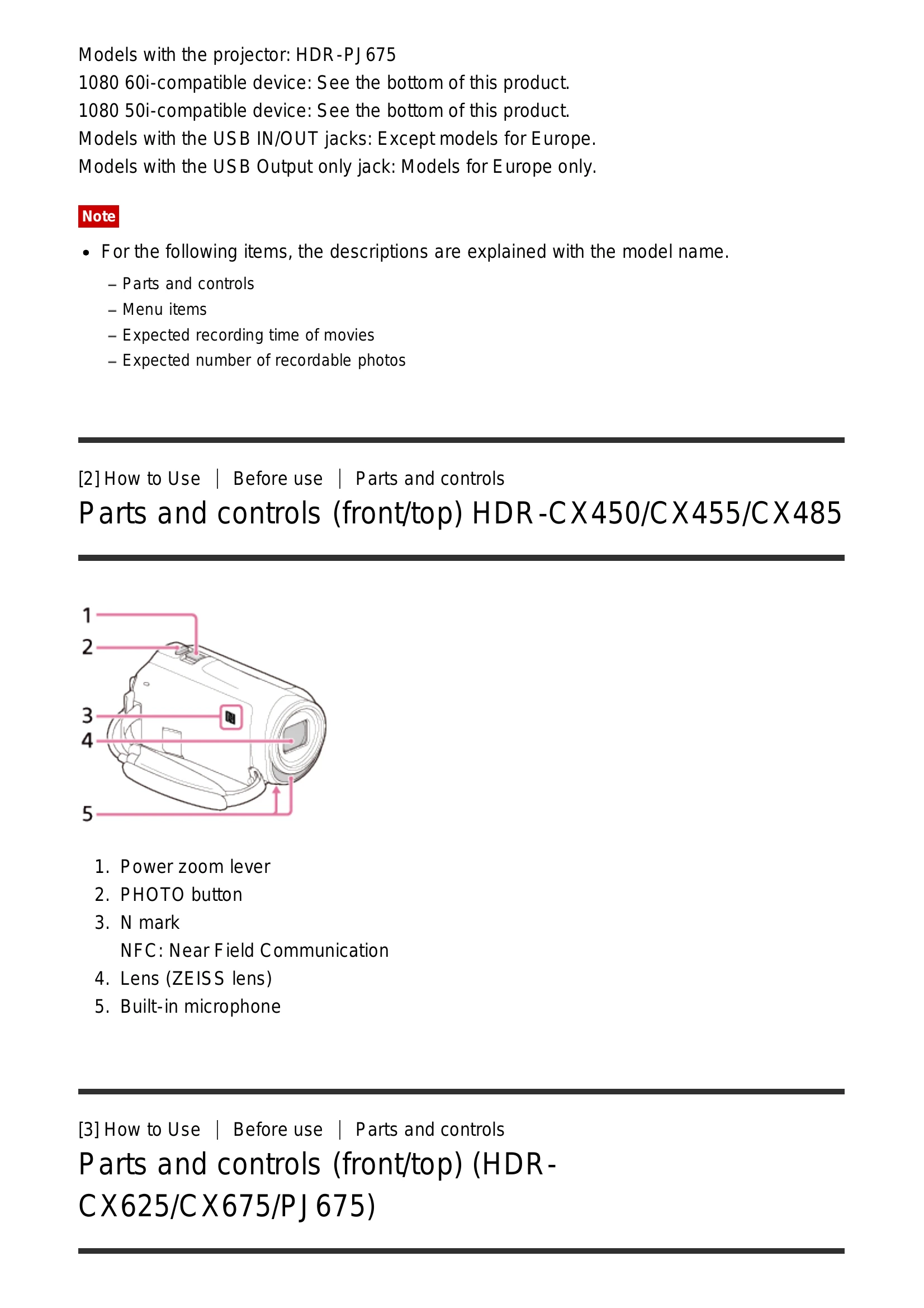
  • Parts and controls (front/top)
  • Parts and controls (LCD monitor)
  • Parts and controls (side)
  • Parts and controls (back/bottom)
  • Screen indicators

Getting started

  • Checking the supplied items

Power source preparations

  • Attaching the battery pack
  • Charging the battery pack
  • Turning the power on
  • Using this product supplying power from a wall outlet

Initial setup

  • Initial setting

Preparing a memory card

  • Inserting a memory card
  • Types of memory card you can use

Recording

  • Recording movies/photos

Useful functions for recording

  • Zooming
  • Capturing photos during movie recording
  • Recording in mirror mode
  • Intelligent Auto
  • Decreasing voice volume (My Voice Canceling)
  • Recording selected subject clearly (Lock-on AF)
  • Using Time-lapse Capture

Playback

  • Playing images using Event View
  • Creating a highlight movie
  • Playing MP4 movies

Editing images from the playback screen

  • Notes on editing
  • Deleting selected images
  • Deleting by date
  • Dividing a movie
  • Capturing a photo from a movie
  • Viewing trajectory of moving object

Using the built-in projector

  • Notes on using the projector
  • Using the built-in projector
  • Using the projector for computer/other devices

Playing images on a high definition TV

  • Connecting to a high definition TV
  • Enjoying 5.1ch surround sound
  • Using BRAVIA Sync

Playing images on a non-high-definition TV

  • Connecting to a non-high-definition TV

Saving images

  • Using the PlayMemories Home software
  • Saving images on an external media device

Creating a disc with a recorder

  • Creating a disc with a recorder

Using the Wi-Fi function

  • What you can do with the Wi-Fi function

Installing PlayMemories Mobile

  • About the PlayMemories Mobile software

Connecting a smartphone

  • Connecting to NFC-enabled smartphone/tablet
  • Connecting using QR Code
  • Connecting to Android smartphone/tablet
  • Connecting to iPhone/iPad

Controlling via a smartphone

  • Using smartphone/tablet as wireless remote commander
  • Using NFC function (NFC one-touch remote)

Transferring images to a smartphone

  • Transferring movies/photos to smartphone/tablet
  • Transferring using NFC function (NFC one-touch sharing)

Transferring images to a computer

  • Send to Computer

Transferring images to a TV

  • Playing images on a TV (View on TV)

Live Streaming

  • About Live Streaming
  • Preparing Live Streaming
  • Performing Live Streaming
  • Restrictions for Live Streaming

Controlling other cameras through this product

  • Shooting with this product and other cameras with Multi Camera Control
  • Connecting to one camera with Multi Camera Control
  • Connecting to more than one camera with Multi Camera Control
  • Editing images recorded with several cameras

Menu operations

  • Using menu items
  • Setting up menu items
  • How to use the keyboard

Shooting Mode

  • Movie
  • Photo
  • Time-lapse Capture

Camera/Mic

  • White Balance
  • Spot Meter/Fcs
  • Spot Meter
  • Spot Focus
  • Exposure
  • Focus
  • IRIS
  • Shutter Speed
  • AE Shift
  • White Balance Shift
  • Low Lux
  • Scene Selection
  • Picture Effect

Others under Camera/Mic

  • Cinematone
  • Fader
  • Self-Timer
  • SteadyShot (Movie)
  • SteadyShot (Photo)
  • Digital Zoom
  • Conversion Lens
  • Auto Back Light
  • Face Detection
  • Smile Shutter
  • Smile Sensitivity
  • Flash (Only when connecting an external flash)
  • Flash Level (Only when connecting an external flash)
  • Red Eye Reduction (Only when connecting an external flash)
  • My Voice Canceling
  • Blt-in Zoom Mic
  • Auto Wind NR
  • Audio Mode
  • Audio Rec Level
  • My Button
  • Grid Line
  • Display Setting
  • Audio Level Display

Image Quality/Size

  • REC Mode
  • Frame Rate
  • Dual Video REC
  • File Format
  • Image Size

Wireless

  • Ctrl with Smartphone
  • Multi Camera Control
  • Live Streaming
  • Send to Smartphone
  • Send to Computer
  • View on TV
  • Airplane Mode
  • Multi Camera Ctrl Set
  • Vid REC during strm.
  • WPS Push
  • Access point settings
  • Edit Device Name
  • Disp MAC Address
  • SSID/PW Reset
  • Network Info Reset

Playback Function

  • Event View

Edit/Copy

  • Delete
  • Protect
  • Copy
  • Direct Copy

Setup

  • Media Select
  • Media Info
  • Format
  • Empty
  • Repair Img. DB F.
  • File Number
  • Data Code
  • Volume
  • Motion Interval ADJ
  • Download Music
  • Empty Music
  • TV Type
  • HDMI Resolution
  • CTRL FOR HDMI
  • USB Connect
  • USB Connect Setting
  • USB Power Supply
  • USB LUN Setting
  • Beep
  • Monitor Brightness
  • Power ON w/monitor
  • Language Setting
  • Calibration
  • Battery Info
  • Power Save
  • Initialize
  • Demo Mode
  • Version
  • Date & Time Setting
  • Area Setting

Charging time/recording time of movies/number of recordable photos

  • Check the charging time
  • Charging time

Expected recording and playback times for individual batteries

  • Expected recording time with each battery pack
  • Expected playback time with each battery pack

Expected movie recording time and number of recordable photos for the internal memory

  • Notes on recording movies
  • Expected recording time of movies (models with internal memory)
  • Expected number of recordable photos (models with internal memory)

Expected movie recording time and number of recordable photos for memory cards

  • Notes on recording movies
  • Expected recording time of movies
  • Expected number of recordable photos

Bit-rate for each recording mode

  • Bit-rate and recording pixels

Pixels recorded at each image size of photos

  • Recording pixels and aspect ratio

Additional information

  • Precautions
  • About the AVCHD format
  • About the memory card
  • About the InfoLITHIUM battery pack

Handling of this product

  • On use and care
  • On connecting to a computer or accessory etc.
  • Notes on optional accessories

Maintenance

  • On handling the LCD monitor
  • To clean the casing and the projector lens surface
  • About care and storage of the lens

Using this product abroad

  • Using this product abroad

Trademarks

  • On trademarks

License

  • Notes on the License

Zoom magnifications

  • Zoom magnifications

Using this product after a long time

  • Using this product after a long time

Troubleshooting

  • If you have problems

Overall operations

  • The power does not turn on
  • This product does not operate even when the power is set to on
  • The menu settings have been changed automatically
  • This product gets warm
  • A rattling noise is heard when this product is shaken
  • Intelligent Auto is canceled

Batteries/power sources

  • The power abruptly turns off
  • The POWER/CHG lamp does not light while the battery pack is being charged
  • The POWER/CHG lamp flashes while the battery pack is being charged
  • The remaining battery power is not displayed correctly
  • The battery pack is quickly discharged

Monitor

  • Menu items are grayed out
  • The buttons do not appear on the LCD monitor
  • The buttons on the touch panel do not work correctly or do not work at all
  • The buttons on the LCD monitor quickly disappear
  • There are dots in the shape of a grid on the monitor
  • The backlight of the LCD monitor turns off if you do not attempt to operate this product for a while
  • The image in the LCD monitor is not clear

Memory card

  • Operations using the memory card cannot be performed
  • Images stored on the memory card cannot be deleted
  • The data file name is not indicated correctly or flashes

Recording

  • Pressing START/STOP or PHOTO does not record images
  • Photos cannot be recorded
  • The access lamp remains lit or flashing even if recording has stopped
  • The imaging field looks different
  • The actual recording time for movies is less than the expected recording time of the recording media
  • This product stops recording
  • There is a slight time lag between the moment when START/STOP is pressed and the actual movie recording starts or stops
  • The auto focus does not function
  • SteadyShot does not function
  • Images cannot be recorded or played back correctly
  • The subjects passing across this product very fast appear crooked
  • Horizontal stripes appear on the images
  • [Monitor Brightness] cannot be set
  • Sound is not recorded correctly
  • Photos are recorded automatically

Playback

  • Images cannot be played back
  • Photos cannot be played back
  • The movie freezes
  • An icon appears on a thumbnail
  • No sound or only a quiet sound is heard during playback
  • Left and right sound is heard unbalanced when playing back movies on computers or other devices

Wi-Fi

  • The wireless access point you want to connect to does not appear
  • [WPS Push] does not work
  • [Ctrl with Smartphone], [Send to Smartphone], [Send to Computer] or [View on TV] terminates prematurely
  • Cannot transfer movies to your smartphone
  • The shooting screen does not display smoothly. The connection is cut off
  • The shooting screen during Multi Camera Control does not display smoothly. The connection is cut off
  • The NFC connection does not work

Editing movies/photos on this product

  • A movie cannot be divided
  • The demonstration movies cannot be deleted

Playback on a TV

  • Neither image nor sound is played on the connected TV
  • The top, bottom, right, and left edges of images are trimmed slightly on a connected TV
  • The image appears distorted on the 4:3 TV
  • Black bands appear at the top and bottom of the LCD monitor of the 4:3 TV

Copying/Connecting to other devices

  • Images are not copied correctly

Connecting to a computer

  • PlayMemories Home cannot be installed
  • PlayMemories Home does not work correctly
  • This product is not recognized by the computer

Self-diagnosis display/Warning indicators

  • Self-diagnosis display

Error messages during Live Streaming

  • Error messages during Live Streaming

Warning messages

  • Warning Indicators
Privacy Policy