Installation Guide for MHS-FS3/FS3K

Installation Guide for MHS-FS3/FS3K

Brand: SONY

Category: Video Camera

Document Type: Installation Guide

Language: EN
Uploaded: Aug. 10, 2025, 12:20 a.m.

How to Share

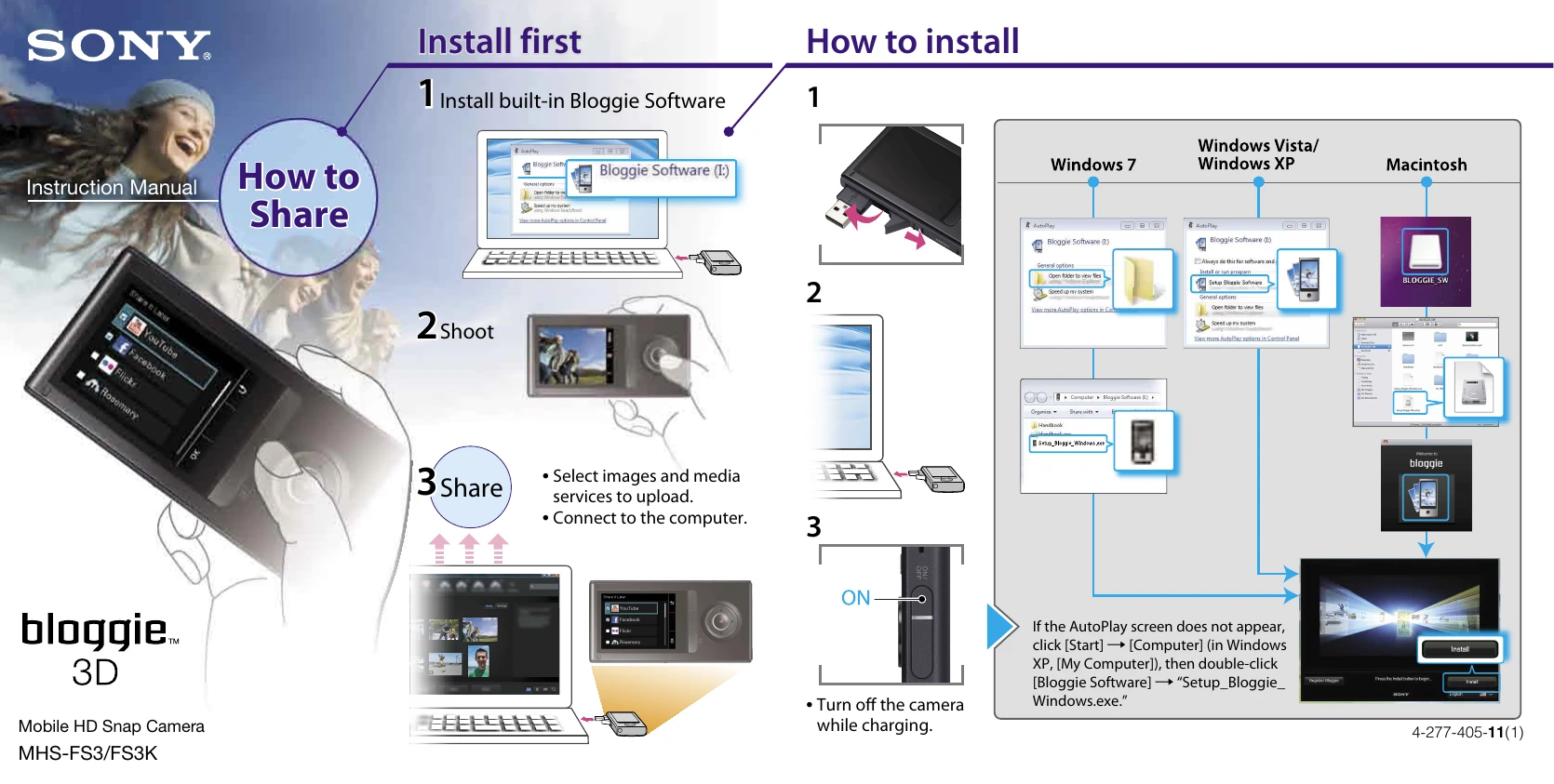
  1. Install first: Install the built-in Bloggie Software by inserting the camera into the computer and running the setup program.
  2. Shoot: Capture your images or videos.
  3. Share: Connect the camera to the computer. Select images and media services to upload. Connect to the computer.

Basic operations

  • Shoot/play back 3D images by holding the camera horizontally.
  • Use the Menu to select playback mode, then choose images to share.
  • Connect to a computer to import and share photos/videos using Bloggie Software.

On-screen icons

  • T/W Zooming
  • Go to index view mode
  • Go to shooting mode
  • Self-Timer
  • Volume
  • 3D/2D Go to 3D/2D mode
  • Light
  • Go to playback mode

Note: Turn off the camera while charging.

Privacy Policy