Manual for MVC-C1

Manual for MVC-C1

Brand: SONY

Category: Video Camera

Document Type: Manual

Language: EN
Uploaded: Aug. 10, 2025, 12:15 a.m.

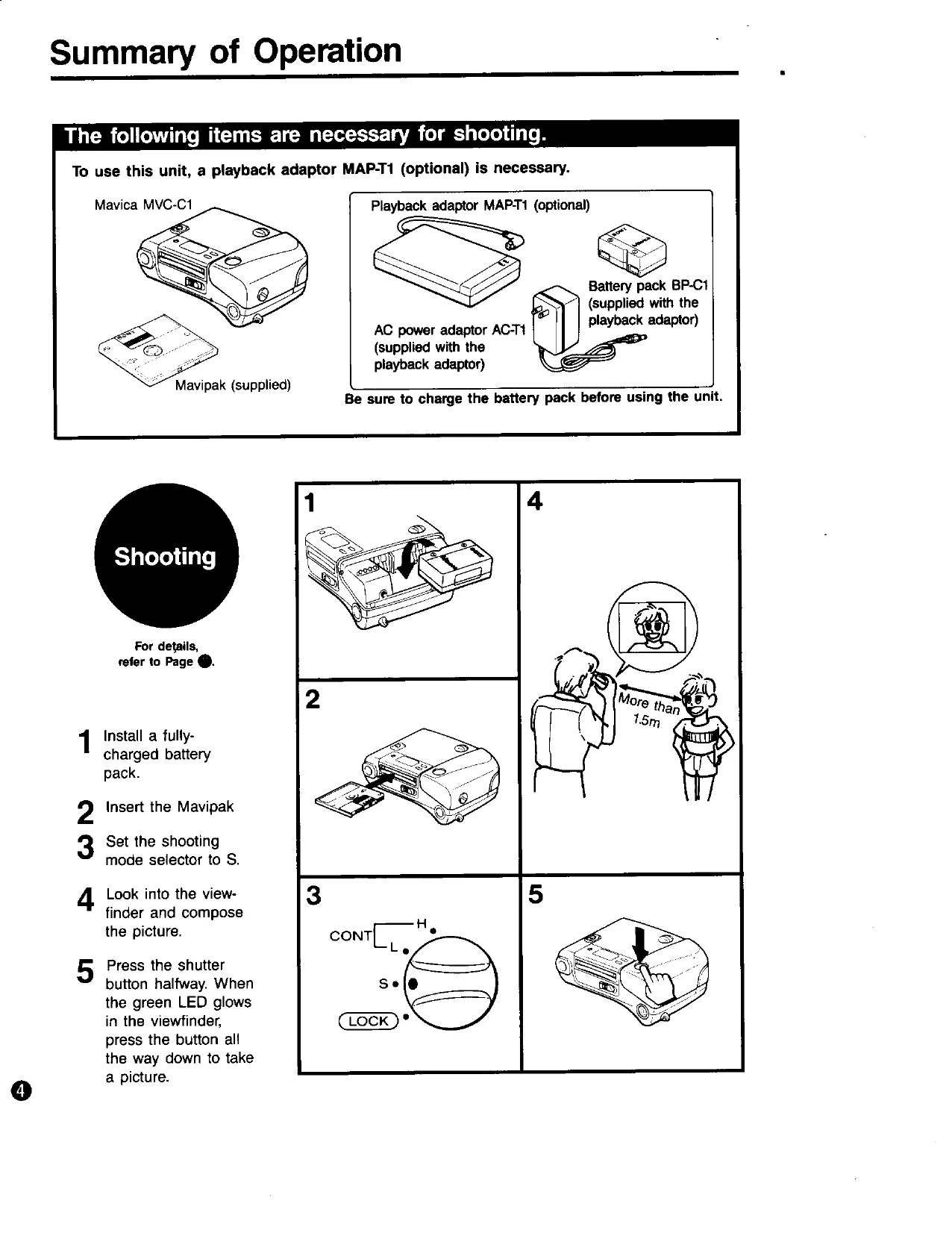
Shooting Pictures:

  1. Install a fully-charged battery pack.
  2. Insert the Mavipak.
  3. Set the shooting mode selector to 'S'.
  4. Look into the viewfinder and compose the picture.
  5. Press the shutter button halfway. When the green LED glows, press the button all the way down to take a picture.

Self-timer Shooting:

  1. Place the camera on a flat surface with the spacer under it for stability.
  2. Press the self-timer button and the shutter button until the self-timer lamp blinks.
  3. The camera will take the picture about 10 seconds after the shutter button is pressed.

To Record onto a Recorded Track:

Use the BLANK SRCH button to find unrecorded tracks and shoot.

Important Notes:

  • Always charge the battery pack before use.
  • Ensure the Mavipak is inserted correctly.
  • Do not expose the unit to rain or moisture.
  • Avoid strong electric fields and locations near heat sources.
Privacy Policy